
Tui Quota Usage
OpenCode quota usage sidebar tracker for OpenCode V2 CLI/TUI
0
154
154 in 7 days
33.5
Multi-signal model
1 day ago
2026-10-04
Install and configure
opencode.jsonWrites to this project's opencode.json — applies to this repository only.
opencode.json
{
  "$schema": "https://opencode.ai/config.json",
  "plugin": ["opencode-tui-quota-usage@0.2.1"]
}
Writes to ~/.config/opencode/opencode.json — applies to every project.
~/.config/opencode/opencode.json
{
  "$schema": "https://opencode.ai/config.json",
  "plugin": ["opencode-tui-quota-usage@0.2.1"]
}
If you want to modify the plugin locally, install it into the project and reference the local path.
shell
pnpm add -D opencode-tui-quota-usageOpenCode loads npm dependencies through its embedded runtime on startup and caches them locally — no manual global install needed.


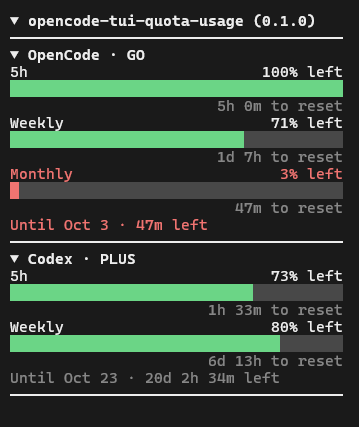
A read-only quota sidebar for the OpenCode V2 CLI/TUI. It shows remaining allowance for OpenCode Go / Go Plus and Codex in separate sections. This package is a CLI-only TUI plugin, not an OpenCode V1 plugin or a server plugin.
Install and load (V2)
Requires Node.js 26.4.0 or newer and an OpenCode V2 CLI with TUI plugin support.
OpenCode V2 loads CLI-only plugins through the global ~/.config/opencode/cli.json (or $XDG_CONFIG_HOME/opencode/cli.json if set). You can open it from the TUI with Ctrl+P > Open settings. Add the package name to its plugin list, preserving any existing settings and plugins:
{
    "plugins": ["opencode-tui-quota-usage"]
}
OpenCode automatically resolves and loads the package from npm. You can also pin a version with "opencode-tui-quota-usage@0.1.0". Launch opencode in the terminal after updating cli.json.
From local checkout (development)
Clone this repository and build from source:
git clone https://github.com/jn-s3s/opencode-tui-quota-usage.git
cd opencode-tui-quota-usage
npm ci
npm run build
The build bundles src/tui.tsx into dist/tui.js. package.json exports ./tui maps to ./dist/tui.js (and . points to the same file). Add the local package directory, not src/tui.tsx, to the cli.json plugin list:
{
    "plugins": ["D:/Projects/opencode-tui-quota-usage"]
}
Replace that path with your own absolute checkout path. On macOS/Linux, use an absolute path such as /home/you/projects/opencode-tui-quota-usage. Do not add both the local path and the package name. This CLI-only package has no separate server entrypoint; do not configure it as a server plugin in opencode.json(c).
See the official V2 CLI plugin configuration, V2 CLI plugin development guide, and V2 configuration guide. cli.json is the CLI plugin configuration described in the V2 guide; opencode.json(c) is a different configuration file.
Accounts and credentials
The providers are independent. You may configure either or both; signing in to one does not sign in to the other. Both start disabled even when credentials are available: enable each provider with its own TUI command before it fetches or displays quota. /quota-help provides setup/help guidance; the Windows Go credential prompts are specific to OpenCode, not Codex.
OpenCode Go / Go Plus (explicit opt-in)
Copy a Go API key from the official OpenCode V2 Go Console docs for the Go / Go Plus account whose quota you want displayed. On Windows, run /quota-opencode to opt in to OpenCode quota; when no key is available, its native themed dialog prompts for the API key only. The native key prompt is visible, not masked: avoid screen sharing, recording, or opening it where others can see your terminal. Long pasted values may scroll out of view; the plugin cannot change the native prompt's wrapping. Open the linked docs in a browser separately.
Use /quota-opencode-key for these native management options:
Add/Replace opencode api keysaves a key and preserves any stored optional org ID.Add/Replace workspace id / org idupdates the optional org ID while preserving the stored key; it requires a saved vault key and never silently copies an environment key. Leave the org ID blank to clear it.Removed saved keysremoves the saved credential after confirmation.
The saved credential lives in Windows Credential Manager, scoped to your OS user; the plugin does not store it in plugin settings/JSON or its own encrypted file. Once saved, no Go API key in the environment is needed on Windows. OPENCODE_QUOTA_GO_API_KEY remains a fallback if no credential is saved or the optional native vault integration is unavailable. A saved key overrides the environment key; removing it may reveal the environment fallback. Other running TUI instances reload the vault on refresh after a change. Restart the TUI after changing environment variables. On macOS/Linux, set OPENCODE_QUOTA_GO_API_KEY (and optionally OPENCODE_QUOTA_GO_ORG_ID) in your environment before starting the TUI; the Windows prompts/vault are not available there.
The plugin does not read OpenCode auth.json, automatically access OAuth credentials, use browser cookies, or fall back to a stored OpenCode login. With Go enabled but no usable saved or environment key, it sends no Go usage request. A corrupt saved vault entry fails closed: it must be replaced or removed with /quota-opencode-key before the environment fallback can be used. The key must be nonempty visible ASCII, without spaces, and at most 512 characters.
The plugin uses the key as a Bearer token for a read-only GET https://opencode.ai/zen/go/v1/usage. This hosted usage endpoint is visible in source but is not a documented public API; its availability and response format can change. An API key can authorize spending elsewhere: treat it as a sensitive credential, use only a key you intend to share with this local plugin process, and never put it in a repository, shell command literal, screenshot, or issue report. The plugin does not submit generation requests. Visible TUI entry exposes the key to anyone watching your terminal or a screen recording; neither the dialog nor Windows Credential Manager protects process memory or the clipboard. Windows Credential Manager is not plugin-only encryption; software running as your Windows user can access the vault, and a compromised process can expose the key. Environment keys can also be inherited by child processes.
Optional Go status. A valid org ID, supplied through the Windows org ID prompt or OPENCODE_QUOTA_GO_ORG_ID with an environment key, enables a best-effort plan/access lookup after successful quota retrieval at GET https://opencode.ai/console/api/go/status. The org ID is not needed for quota, and the plugin cannot automatically derive it. This endpoint is not a documented public API and its behavior is not source-verified here; availability, authentication requirements, and response fields may change. An observed response contains product and access.endsAt: the plugin shows a plan tier only if it can safely recognize product, and treats access.endsAt as an access end, not a billing renewal date or a quota reset. Do not infer a Go Plus tier from an unrecognized product. An API key and org ID must refer to the appropriate account, and having either or both does not guarantee this endpoint will authorize the request. No browser cookies or OAuth credentials are used. Without an org ID, status is disabled but key-only quota still works; a status failure does not invalidate quota.
To find your org ID privately, open your own OpenCode Console in a browser and inspect its Network requests in Developer Tools. Look for a Console request with the x-org-id request header. Do not paste the value into a chat, repository, issue, screenshot, or shell command; do not hardcode an org ID in a script. Treat it as account information, even though it is not itself a secret API key. Avoid typing credentials as literal shell commands so they do not enter shell history. Use the Go Console docs URL linked above in a browser.
Codex (separate CLI sign-in)
Sign in with the Codex CLI separately, then run /quota-codex to enable Codex quota. When Codex is enabled, at each refresh the plugin reads the existing Codex CLI auth.json at $CODEX_HOME/auth.json if CODEX_HOME is set to an absolute path, otherwise at ~/.codex/auth.json. It uses the tokens.access_token and tokens.account_id fields for read-only ChatGPT usage requests; it never refreshes tokens and does not use the Go key for Codex. If the login is missing or expired, sign in again through the Codex CLI. Do not paste Codex tokens into this plugin's configuration or any TUI prompt.
Sidebar and controls
The sidebar.content slot starts visible by default, but OpenCode and Codex are both disabled initially. A single hint row names every provider that is currently off, and a right-aligned /quota-help for help footer is always shown; a disabled provider neither fetches nor appears in the display at all, rather than being listed as a disabled section, so use the hint to turn it back on. Enabled providers appear as independently collapsible sections in this order: OpenCode (Go / Go Plus quota: 5h, Weekly, Monthly when present) and Codex (5h, Weekly). Values are percent left, not percent used, with a bar and a separate reset countdown when a valid reset time exists. Missing Codex windows show unavailable; the OpenCode section shows only valid windows returned by the Go usage endpoint. The OpenCode heading may show a recognized GO or GO PLUS plan badge if optional status succeeds; an access-end date from status is not a billing renewal date or a quota reset. The Codex heading may show the account's reported plan. If Codex returns a valid optional subscription active_until, an Until ... row appears independently of its quota meters. This is a subscription boundary, not a quota reset. A boundary carried over from an older refresh because its follow-up lookup failed shows a (stale) suffix once it is more than 5 minutes old.
- Run
/quota-opencodeto opt in to or toggle OpenCode Go / Go Plus quota and/quota-codexto toggle Codex quota. On Windows, enabling OpenCode with no available key prompts for the visible Go API key only;/quota-opencode-keymanages the saved key and optional org ID separately. Enabling a provider allows its own fetch/display; disabling it stops its requests and removes its quota display without affecting the other provider. Codex does not ask for a key here. - Run
/quota-helpfor provider setup/help guidance; it does not collect credentials. Use the Windows Go API key prompts/vault or the starting-process environment fallback for OpenCode, or sign in using the separate Codex CLI, then enable the provider you want. - Run
/quota-usageto hide/show the entire sidebar contribution (not a provider toggle). Visibility is persisted between TUI sessions; hiding cancels current requests and stops polling, showing starts a refresh only for enabled providers. If saving the visibility setting fails, the toggle is rolled back and an error toast appears. - Click the main heading row to collapse or expand every section at once, or click a provider heading to toggle just that section. The same actions are available from the command palette as Collapse or expand quota usage and Toggle OpenCode section / Toggle Codex section, though they ship with no default keybinding. Collapse state is stored in the same durable settings store as visibility, so it persists between TUI sessions and live-syncs across running instances.
- While visible, the plugin refreshes only enabled providers independently on show and every 2 minutes. A display clock updates countdowns every 30 seconds. A failed refresh preserves the previous successful snapshot and adds a status note; after 5 minutes without a successful fetch that snapshot is marked
(stale). A missing reset time displaysReset unavailable. The displayed percentage is rounded to one decimal; 45% left or less is warning and 10% left or less is critical.
Troubleshooting
If the sidebar is visible but has no quota meters on first launch, this is expected: both providers start disabled. Use /quota-help for setup guidance, /quota-opencode to enable OpenCode Go / Go Plus (and its Windows credential prompts), or /quota-codex to enable Codex. /quota-opencode-key manages the Windows Go credential. /quota-usage controls the whole sidebar, not either provider.
| Sidebar message or symptom | Meaning / next step |
|---|---|
| Go key missing or invalid | On Windows, use the Go credential prompts or /quota-opencode-key, or set OPENCODE_QUOTA_GO_API_KEY before starting the TUI. On macOS/Linux, set the environment key. OpenCode sign-in alone is insufficient. |
| Saved Go credential invalid | Replace or remove the corrupt Windows vault entry through /quota-opencode-key. An environment key does not bypass a corrupt saved entry. |
OpenCode Go / Go Plus API key rejected |
The Go usage endpoint returned 401 or an authentication redirect. Check the supplied key and account. |
No OpenCode Go subscription |
The Go endpoint returned 403 (no eligible Go / Go Plus subscription reported for this key). Check the account associated with the key. |
Sign in with Codex CLI |
Codex auth.json is missing, unreadable, invalid, or lacks the required access token/account ID. Check CODEX_HOME and sign in with the Codex CLI. |
Codex sign-in expired |
The Codex endpoint returned 401/403 or redirected. Refresh sign-in using the Codex CLI; the plugin cannot renew tokens. |
Rate limited · retry in Xm / Rate limited · retry later |
Codex returned HTTP 429. The plugin respects a bounded cooldown, sometimes retries once when Retry-After is short, and shows a live countdown when available. Wait before retrying. |
Unavailable, No data, or (stale) |
Request, payload, or endpoint problem, no fetched data yet, or an old snapshot. Check connectivity and allow another refresh; the undocumented Go endpoint can change. |
If only one enabled section fails, the other enabled section can still update. A successful Codex usage lookup can show meters even when the optional subscription lookup fails. Neither the sidebar nor tests need a live Go key to run locally. Without a valid optional org ID, Go status is disabled; Go quota does not require an org ID. A status lookup failure does not mean the key-only quota request failed.
Development
npm ci
npm run build          # dist/tui.js (generated; rebuild after source changes)
npm run typecheck
npm run lint
npm run format:check
npm test
npm run check          # lint + typecheck + format:check + tests
The Vitest suite under tests/ uses synthetic JSON, fake fetches, and stubbed TUI behavior; no live credentials or network access are needed. Do not put real keys or tokens in tests.
License: MIT.
Similar plugins

Providers Balances
opencode-providers-balances
OpenCode TUI plugin that shows provider account balances in the session sidebar. Providers are configured entirely in opencode.jsonc.

Usage Report
opencode-usage-report
opencode plugin: /usage command showing subscription quota windows for configured providers

Codex Usage
opencode-plugin-codex-usage
OpenCode TUI plugin that shows live Codex usage limits in the session sidebar.