
Tui Workflows
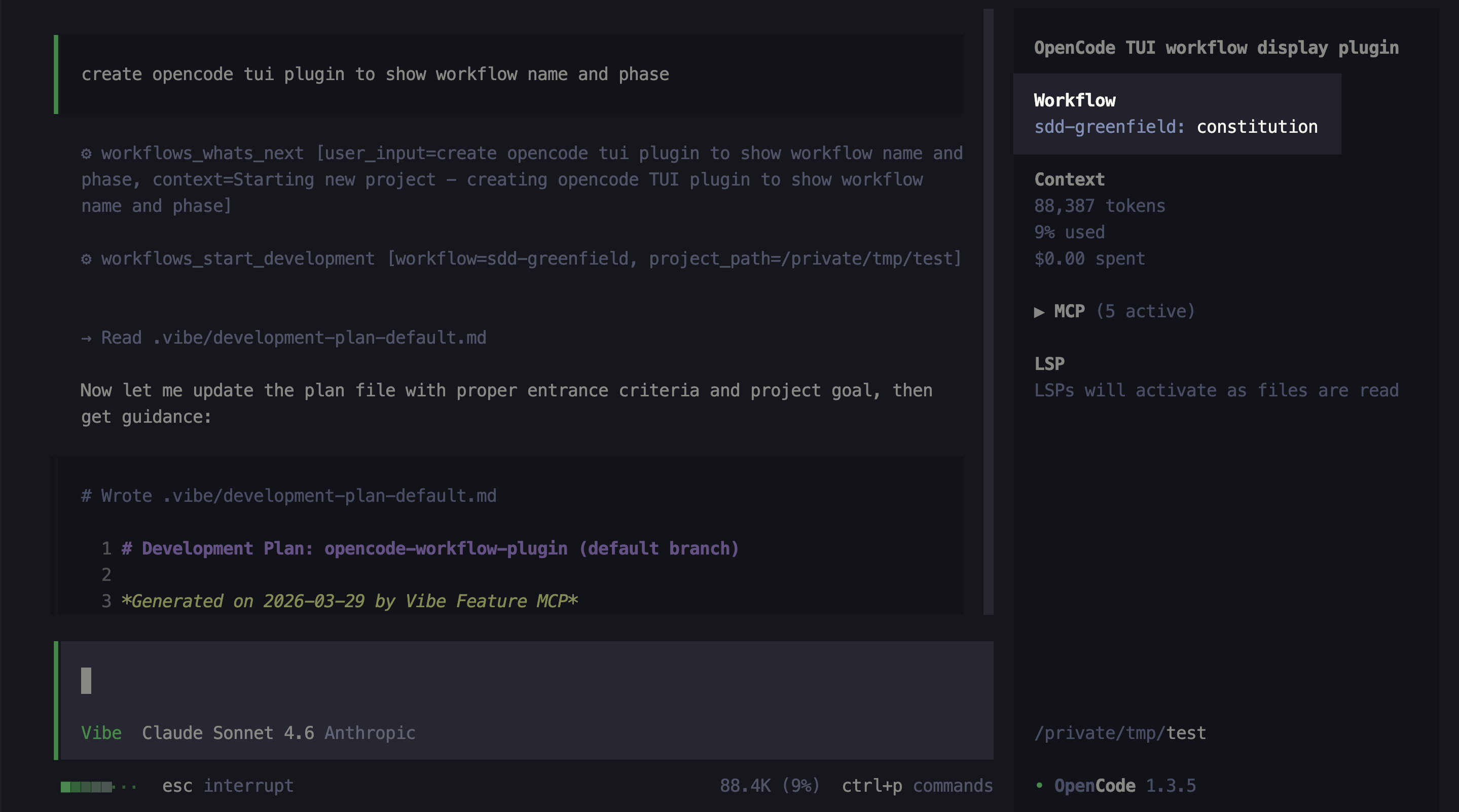
OpenCode TUI plugin that shows the current workflows MCP phase and workflow name in the sidebar
0
37
9 in 7 days
6.8
Multi-signal model
6 months ago
2026-03-29
Install and configure
opencode.jsonWrites to this project's opencode.json — applies to this repository only.
opencode.json
{
  "$schema": "https://opencode.ai/config.json",
  "plugin": ["opencode-tui-plugin-workflows@1.0.0"]
}
Writes to ~/.config/opencode/opencode.json — applies to every project.
~/.config/opencode/opencode.json
{
  "$schema": "https://opencode.ai/config.json",
  "plugin": ["opencode-tui-plugin-workflows@1.0.0"]
}
If you want to modify the plugin locally, install it into the project and reference the local path.
shell
pnpm add -D opencode-tui-plugin-workflowsOpenCode loads npm dependencies through its embedded runtime on startup and caches them locally — no manual global install needed.
An OpenCode TUI sidebar plugin that shows the active Responsible Vibe MCP workflow phase and workflow name while your agent is running.
What it does
When the workflows MCP is active, the sidebar displays the current phase and workflow name, updating automatically whenever the agent calls a workflows tool:
Requirements
- OpenCode >= 1.3.4
- Responsible Vibe MCP configured in your project
Installation
[!IMPORTANT] This is a TUI plugin — it must be added to
tui.json, notopencode.json.
Add the plugin to your .config/opencode/tui.json:
{
  "$schema": "https://opencode.ai/tui.json",
  "plugin": ["opencode-tui-plugin-workflows"]
}
OpenCode installs the package automatically via Bun on next startup. No separate
npm install required.
License
Similar plugins

Requesty
@christiangalsterer/opencode-requesty-plugin
opencode TUI plugin: shows Requesty.ai monthly budget, current spend, and per-model cost distribution in the session sidebar, in the session prompt and with a detail dialog via the /requesty command

Browser
opencode-browser
OpenCode plugin that integrates Browser MCP for browser automation

Qoder Bridge
opencode-qoder-bridge
Qoder provider plugin for OpenCode powered by the official Qoder Agent SDK, with streaming, tools, MCP, sessions, multimodal input, and quota tracking.