
Tokenwatch
Real-time token usage, cache analytics & performance dashboard plugin for OpenCode CLI
22
+1 in 30 days
630
89 in 7 days
49.7
Multi-signal model
15 days ago
2026-09-20
Install and configure
opencode.jsonWrites to this project's opencode.json — applies to this repository only.
opencode.json
{
  "$schema": "https://opencode.ai/config.json",
  "plugin": ["opencode-tokenwatch@0.6.1"]
}
Writes to ~/.config/opencode/opencode.json — applies to every project.
~/.config/opencode/opencode.json
{
  "$schema": "https://opencode.ai/config.json",
  "plugin": ["opencode-tokenwatch@0.6.1"]
}
If you want to modify the plugin locally, install it into the project and reference the local path.
shell
pnpm add -D opencode-tokenwatchOpenCode loads npm dependencies through its embedded runtime on startup and caches them locally — no manual global install needed.
English · 简体中文
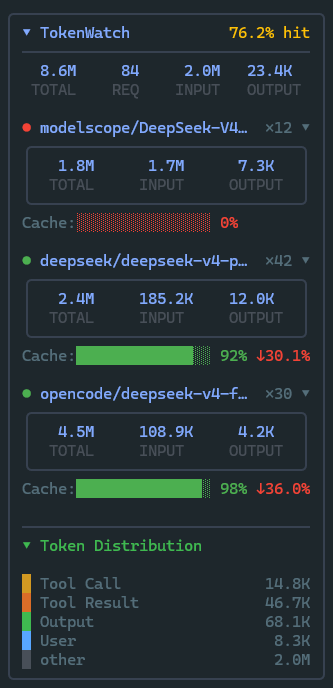
OpenCode CLI的终端监控插件,在侧边栏实时显示Token用量、缓存命中率与模型响应速度,并支持一键生成网页版可视化用量报表。
主要特性
- 侧边栏实时看板:会话中随时查看各模型的输入输出Token、预估花费、缓存命中率,以及当前会话的平均首字延迟与生成速率。
- 缓存命中率与趋势:按模型追踪缓存利用效率,用箭头标注近几次请求的命中率是在上升还是下降。
- Token构成归类:自动将Token按系统提示词、用户输入、工具调用和模型输出分别统计,清楚定位上下文占用大头。
- 交互式用量报告:在终端输入
/usage即可在浏览器中打开ECharts 交互仪表盘,查看历史用量趋势、模型横向对比与失败请求统计;也可一键导出为JSON或Markdown文件。 - 双版本无缝适配:同时兼容 OpenCode 1.x 与 OpenCode 2(beta),自动识别宿主环境,无需手动切换或调整配置。
安装与配置
1. 安装
在项目中运行:
npm install opencode-tokenwatch
2. 启用插件
在配置文件 opencode.json(或 opencode.jsonc)中添加插件项:
{
  "$schema": "https://opencode.ai/config.json",
  "plugin": ["opencode-tokenwatch"]
}
重新打开 OpenCode,侧边栏便会自动载入 TokenWatch 面板。
常用操作
在终端对话框中输入 /usage 即可唤出操作菜单:
- HTML 报告:选择统计日期范围,在默认浏览器中打开交互式图表。
- 导出数据:导出结构化 JSON 或 Markdown 报告,默认保存在
~/.opencode/reports/目录下。 - 设置:在弹出的交互菜单中开关各个显示区块或切换中英文显示。改动会自动保存,不需要手动修改配置文件。
系统要求
- OpenCode CLI:1.18+ 或 OpenCode 2(
@opencode-ai/cli@beta) - Node.js:≥ 18.0.0
相关项目
- opencode-throughput — 实时 LLM 性能监控,采集 TTFT/TPS/延迟和成本
- opencode-visual-cache — TUI 侧边栏缓存命中率可视化,Token 分布分析
- magic-context — 缓存感知的无限上下文 + 跨会话记忆系统
协议
MIT
Similar plugins

Token Board
opencode-token-board
Real-time token usage, cache analytics & performance dashboard plugin for OpenCode CLI

Sidebar Token Metrics
opencode-sidebar-token-metrics
OpenCode sidebar plugin showing generation speed (tok/s), cache hit rate, and average time-to-first-token (TTFT).

Usage Report
opencode-usage-report
opencode plugin: /usage command showing subscription quota windows for configured providers