
Secrets Env
OpenCode plugin that injects secrets from ~/.config/opencode/secrets.env into process.env at startup, hot-reloads them on change, and reconnects MCP servers so they pick up new values
0
400
400 in 7 days
36.0
Multi-signal model
5 hours ago
2026-10-05
Install and configure
opencode.jsonWrites to this project's opencode.json — applies to this repository only.
opencode.json
{
  "$schema": "https://opencode.ai/config.json",
  "plugin": ["opencode-secrets-env@0.6.0"]
}
Writes to ~/.config/opencode/opencode.json — applies to every project.
~/.config/opencode/opencode.json
{
  "$schema": "https://opencode.ai/config.json",
  "plugin": ["opencode-secrets-env@0.6.0"]
}
If you want to modify the plugin locally, install it into the project and reference the local path.
shell
pnpm add -D opencode-secrets-envOpenCode loads npm dependencies through its embedded runtime on startup and caches them locally — no manual global install needed.





An OpenCode plugin that loads secrets from
~/.config/opencode/secrets.env into process.env when OpenCode starts.
The injected variables can then be used by:
- MCP servers — via
{env:NAME}substitution inmcp.servers.*.environment/headers - Other plugins — any plugin loaded after this one reads them from
process.env - OpenCode itself — e.g. provider API keys discovered from the environment
Secrets stay out of opencode.json(c), so your configuration can be committed
to a dotfiles repo without leaking keys.
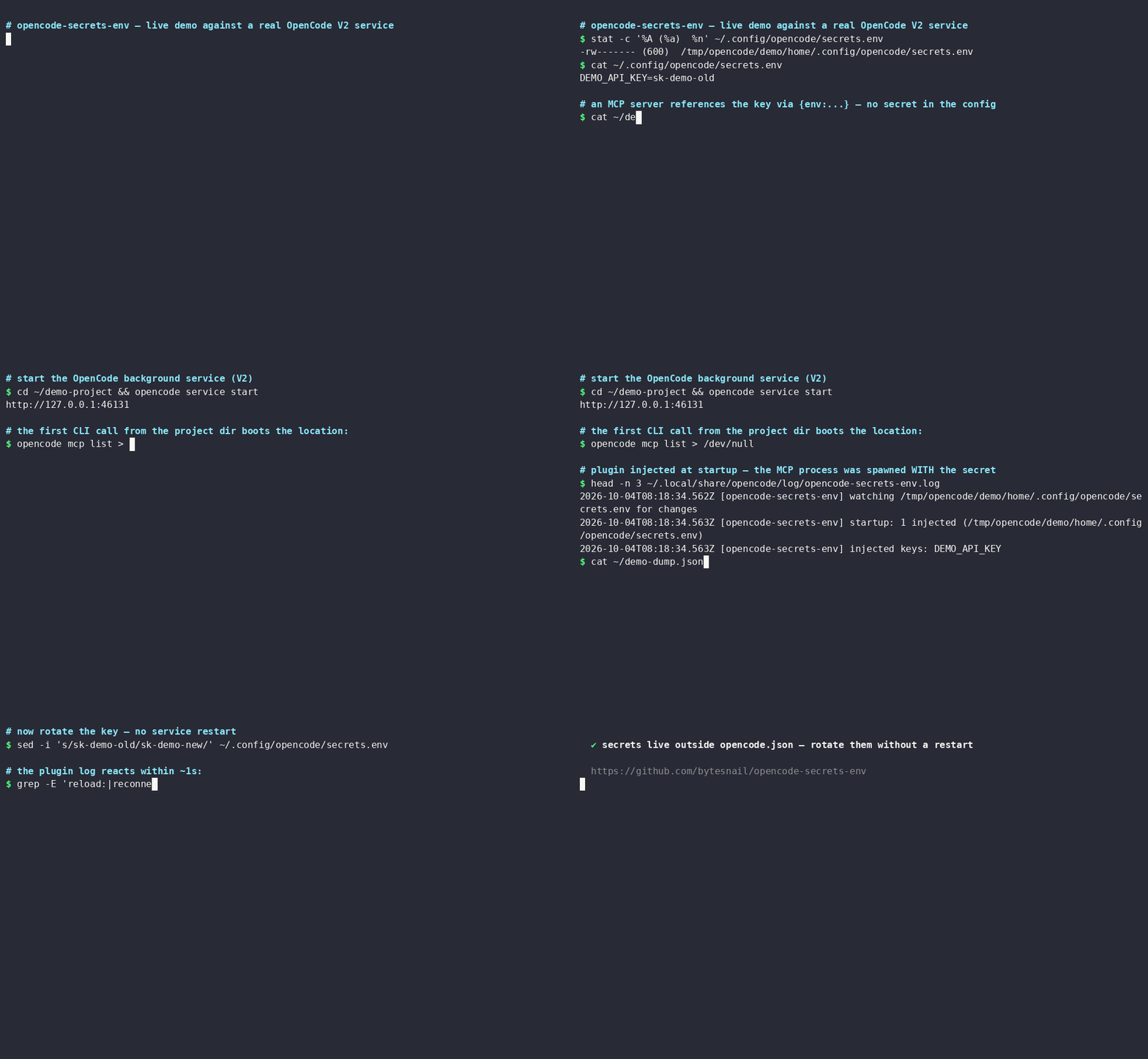
Install
Tested on Linux, macOS and Windows — CI runs unit tests and real-host end-to-end tests on all three, against both OpenCode V1 and V2 hosts.
OpenCode V2 (@opencode/cli 2.x):
opencode plugin add opencode-secrets-env
OpenCode V1 (opencode-ai 1.x, >= 1.14.34) has no plugin CLI command — add
the package to the plugin array in ~/.config/opencode/opencode.jsonc
(global) or a project's opencode.jsonc as shown below; V1 installs npm
plugins automatically at startup.
The plugin key (singular) with string or [name, options] tuple entries is
the one form both V1 and V2 hosts load. The plural plugins key — V2's
native form, also what opencode plugin add writes — takes string or
{ "package", "options" } object entries and does not work for this plugin
on V1:
{
  "$schema": "https://opencode.ai/config.json",
  "plugin": [
    // list it FIRST so later plugins already see the variables in their setup()
    "opencode-secrets-env"
  ]
}
Usage
Create the secrets file (dotenv format) and lock down its permissions (secrets.env.example is a starting point):
mkdir -p ~/.config/opencode
cat >> ~/.config/opencode/secrets.env <<'EOF'
GITHUB_TOKEN=ghp_xxx
CONTEXT7_API_KEY=ctx7_xxx
EOF
chmod 600 ~/.config/opencode/secrets.env
Reference the variables from your OpenCode configuration:
{
  "$schema": "https://opencode.ai/config.json",
  "plugin": ["opencode-secrets-env"],
  "mcp": {
    "servers": {
      "context7": {
        "type": "remote",
        "url": "https://mcp.context7.com/mcp",
        "oauth": false,
        "headers": { "CONTEXT7_API_KEY": "{env:CONTEXT7_API_KEY}" }
      },
      "github": {
        "type": "local",
        "command": ["npx", "-y", "@modelcontextprotocol/server-github"],
        "environment": { "GITHUB_TOKEN": "{env:GITHUB_TOKEN}" }
      }
    }
  }
}
(Nesting under mcp.servers.<name>, as shown, is V2's canonical schema; V2
still accepts the flat legacy mcp.<name> form. V1 hosts canonically define
servers directly at mcp.<name> and likewise accept the nested form shown.
This plugin scans both shapes.)
Restart OpenCode so the plugin (re)injects the variables — on V2 that is the background service:
opencode service restart # V2; on V1 restart the TUI / server process
The file location follows OpenCode's own global config directory resolution:
$OPENCODE_CONFIG_DIR/secrets.env when OPENCODE_CONFIG_DIR is set, then
$XDG_CONFIG_HOME/opencode/secrets.env when XDG_CONFIG_HOME is set,
otherwise ~/.config/opencode/secrets.env.
File format
Standard dotenv syntax:
# comments and blank lines are fine
export OPTIONAL_EXPORT_PREFIX=value
QUOTED="values with spaces"
SINGLE='also quoted'
INLINE=value # trailing comment
EMPTY=
Options
Pass options with the tuple form in opencode.json(c) — [name, options]
works on both V1 and V2 hosts:
{
  "plugin": [
    ["opencode-secrets-env", {
      "path": "~/secrets/work.env",
      "override": false,
      "required": ["GITHUB_TOKEN"],
      "debug": true
    }]
  ]
}
| Option | Type | Default | Description |
|---|---|---|---|
path |
string |
~/.config/opencode/secrets.env |
Custom secrets file. Supports ~ (also ~\ on Windows) and relative paths (resolved against the project directory). |
override |
boolean |
false |
Overwrite variables that already exist in the real environment. By default the real environment always wins. |
required |
string[] |
[] |
Variables that must exist after loading. A warning is logged for each missing one. |
watch |
boolean |
true |
Watch the secrets file and hot-reload process.env when it changes (see below). |
pollIntervalMs |
number |
5000 |
Interval of the mtime poll backing the file watcher (only with watch on). OS watch events are the fast path; the poll heals dropped events — FSEvents can drop them under load, which would otherwise miss the reload entirely. One stat per interval; 0 disables the net (not recommended). |
mcpReconnect |
boolean | "all" | string[] |
true |
After a hot reload, reconnect MCP servers so they pick up new values. true = only servers whose config references a changed variable (precise), "all" = every enabled server, ["name"] = only those servers, false = never. |
quiet |
boolean |
false |
Silence info/debug messages (warnings are always shown). |
debug |
boolean |
false |
Also log the names of applied/skipped keys. Values are never logged. |
Hot reload
When watch is enabled (the default), editing secrets.env takes effect
within about a second — no opencode service restart needed. The watcher is
event-driven, backed by a low-frequency mtime poll (default 5 s): if the OS
drops a watch event — FSEvents can, under load — the change still lands
within one poll interval instead of being missed until the next restart:
- Added keys are injected into the running service's
process.env. - Changed keys are updated in place — but only keys the plugin itself
injected. Variables that came from your real shell environment are never
touched (unless
overrideis set). - Deleted keys are withdrawn from
process.env(withoverride, the original shell value is restored).
The file does not have to exist at startup: the plugin watches the nearest
existing parent directory and starts applying entries as soon as the file
(and its directory) appears — handy when you install the plugin first and
create secrets.env afterwards.
MCP servers are long-lived processes that received their environment at
spawn, so after a hot reload the plugin reconnects the affected ones
(mcpReconnect). With the default true, "affected" is computed
precisely: the plugin scans your raw config sources for {env:...}
references and only reconnects enabled servers that reference one of the
changed variables — unrelated servers keep running untouched. Servers you
explicitly disabled are never touched. The scan mirrors the host's own
config chain: project opencode.json(c) / .opencode/ directories (unless
OPENCODE_CONFIG_PROJECT_DISABLE/OPENCODE_DISABLE_PROJECT_CONFIG is set),
the OPENCODE_CONFIG file, the global config directory
(OPENCODE_CONFIG_DIR honored), and inline OPENCODE_CONFIG_CONTENT. Caveats:
- A tool call in flight while its server reconnects may fail (the agent can simply retry).
- Stateful MCP servers (e.g. browser automation) lose their state across a
reconnect — they are not reconnected unless they reference a changed
variable, and you can exclude them further with
mcpReconnect: ["name"]. - Servers that read secrets from the inherited environment without an
explicit
{env:...}reference cannot be detected this way; they pick up new values on their next natural connect, or usemcpReconnect: "all"to restart every enabled server on each change. - References in remote organization config (fetched from
.well-known/opencode) cannot be re-resolved — the raw text never exists locally.
The plugin also registers a permanent transform that re-resolves every
{env:...} reference found in your raw config sources against the live
environment whenever OpenCode rebuilds its MCP configuration — including
{file:...} tokens mixed into the same string, which are re-resolved the
way the host resolves them. Besides hot reloads, this fixes a race where a
server's first connection could otherwise start with empty substituted
values.
A hot reload updates process.env in place, so in-process consumers — other
plugins and OpenCode's own environment-based provider key discovery — see new
values the next time they read them. Two audiences a hot reload cannot reach:
- Plugins that captured a variable into a local constant or an SDK client in
their
setup()keep the old value. There is no plugin API to re-run their setup, so the ordering rule (this plugin first in thepluginarray) only fixes startup timing. {env:...}references outside the MCP config (e.g.provider.*.options.apiKey). The host substitutes them when it loads the config, but the permanent transform above only covers MCP, so those positions refresh on the host's next config reload or service restart.
Logging
The OpenCode background service runs detached, so plugin console output is invisible. This plugin therefore also appends to its own log file:
~/.local/share/opencode/log/opencode-secrets-env.log
($XDG_DATA_HOME/opencode/log/... when XDG_DATA_HOME is set.)
Only counts and key names are ever logged — never secret values. The log
rotates at ~256 KB, keeping one previous generation
(opencode-secrets-env.log.old). When a variable does not seem to take
effect, this log is the first place to look; enable the debug option for
key-level detail.
Notes & security
- Ordering: put
opencode-secrets-envbefore other plugins in thepluginarray. Plugins run theirsetup()in order, and only later plugins will see the injected variables. - Reloading: with
watchon (default), edits tosecrets.envapply automatically within a second. Withwatch: false, restart OpenCode after editing (opencode service restarton V2). - Permissions: keep the file at
chmod 600. The plugin warns when it is readable by other users (the check is POSIX-only — on Windows, restrict access with NTFS ACLs instead). - No project-level auto-loading: only your global file (or an explicitly
configured
path) is read, so a cloned repository cannot smuggle variables into your environment. - Local MCP servers inherit the full environment of the OpenCode process, including every injected secret — that is the point of this plugin, but only run MCP servers you trust.
- OpenCode V1: the package also exports a V1 (
>= 1.14.34) entry point. V1 hosts have no MCP transform API, so env substitution into MCP configs and MCP reconnection are skipped; secret injection,options, hot reload and clean withdrawal on shutdown all work. V2 is the primary target.
Development
The package is published as TypeScript source (OpenCode loads plugins directly), so there is no build step. Setup, test commands and house rules live in CONTRIBUTING.md.
To load a local checkout while developing, reference the directory:
{
  "plugins": [
    { "package": "/path/to/opencode-secrets-env", "options": { "debug": true } }
  ]
}
Release history lives in CHANGELOG.md.
License
Similar plugins

Browser
opencode-browser
OpenCode plugin that integrates Browser MCP for browser automation
Browser Mcp
opencode-browser-mcp
OpenCode plugin that integrates Browser MCP for browser automation

Qoder Bridge
opencode-qoder-bridge
Qoder provider plugin for OpenCode powered by the official Qoder Agent SDK, with streaming, tools, MCP, sessions, multimodal input, and quota tracking.