
Read Aloud
OpenCode TUI plugin: read the last answer aloud with Speechify or ElevenLabs, highlighting each word as it is spoken.
2
+1 in 30 days
140
17 in 7 days
39.2
Multi-signal model
7 hours ago
2026-10-21
Install and configure
opencode.jsonWrites to this project's opencode.json — applies to this repository only.
opencode.json
{
  "$schema": "https://opencode.ai/config.json",
  "plugin": ["opencode-read-aloud@0.1.0"]
}
Writes to ~/.config/opencode/opencode.json — applies to every project.
~/.config/opencode/opencode.json
{
  "$schema": "https://opencode.ai/config.json",
  "plugin": ["opencode-read-aloud@0.1.0"]
}
If you want to modify the plugin locally, install it into the project and reference the local path.
shell
pnpm add -D opencode-read-aloudOpenCode loads npm dependencies through its embedded runtime on startup and caches them locally — no manual global install needed.
Reads OpenCode's last answer aloud and highlights each word as it is spoken. Press ctrl+s in a session to start. Press it again to pause or resume.
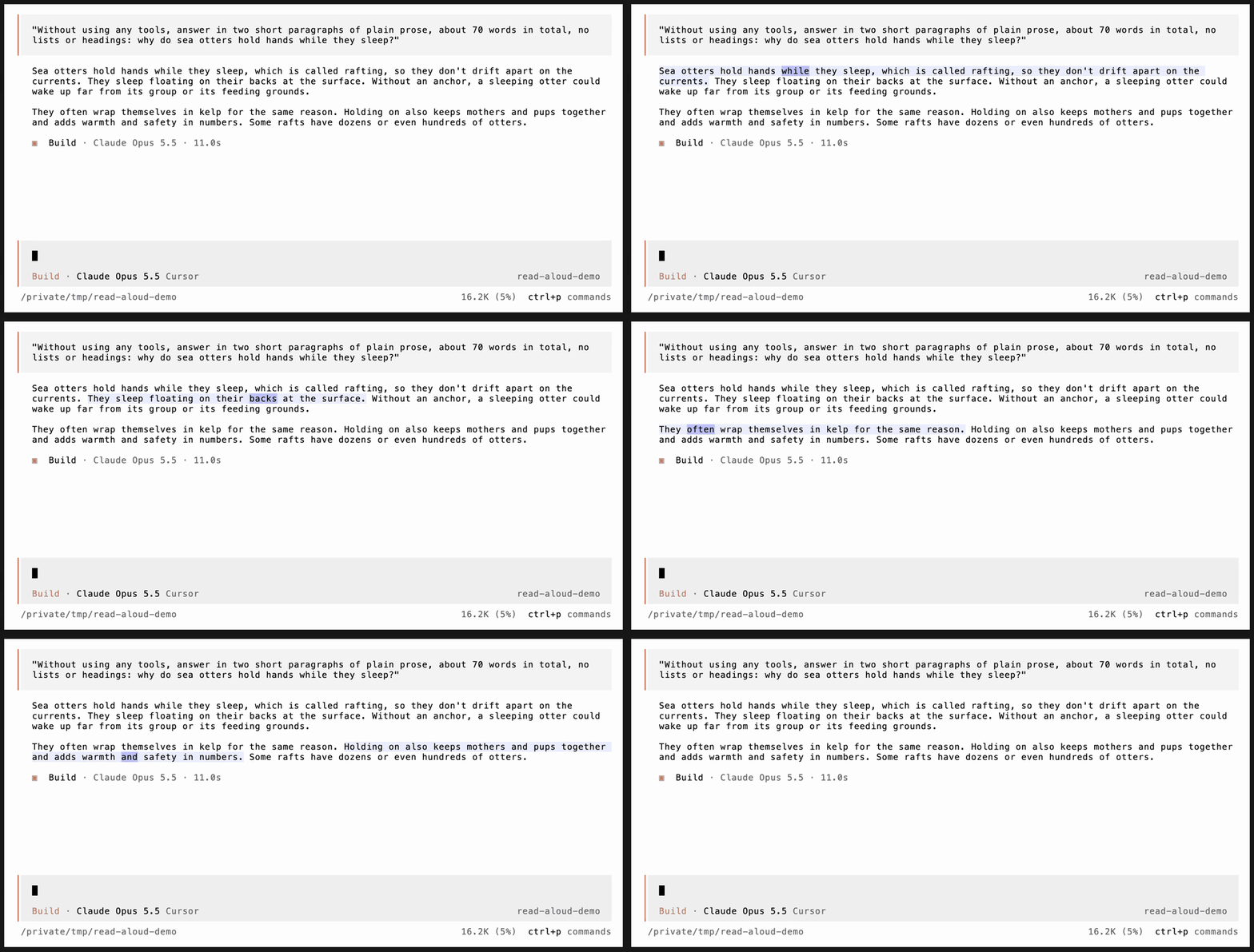
The same 20 seconds with sound: assets/demo.mp4.
- The sentence being read gets a faint tint and the current word a stronger one. The transcript scrolls to keep that paragraph on screen.
- Only the answer is read: the text after the last tool call of the latest assistant message. Code blocks, tables and rules are skipped, and so are long IDs like session IDs, commit hashes, UUIDs and timestamps. File paths are read as just their file name, without line numbers.
- Double-click or Option+click (alt+click) any word of an answer to start reading from that word. This works for older answers too. Double-click avoids a macOS quirk: Option+clicking into a background window hides the app you came from. Cmd+click cannot work, terminals never report Cmd.
- The controls on the prompt row are clickable: play/pause, slower
-, faster+, and stop. On terminals narrower than 80 columns only play/pause and the speed are shown. - Speed changes keep the pitch and are remembered between sessions. The default is 1.7x.
- On macOS the AirPods button and the keyboard's play/pause key pause and resume reading while it is active, instead of starting your music. This needs the Xcode command line tools (
xcode-select --install), which compile a small helper on first use. Once reading stops, the keys go back to your music app. - Speech is synthesized a few sentences ahead of playback, so stopping after the first sentence only pays for the first sentence or two.
- Audio is cached, so replaying an answer or jumping around in it costs nothing after the first read.
Requirements
- A Speechify or ElevenLabs API key. Both report when each word is spoken, which is what drives the highlighting. When both keys are set, Speechify is used.
ffmpegon yourPATH(brew install ffmpeg). It handles seeking and speed changes.
| Provider | Price per 1M characters | Free allowance | Per typical answer (~1,600 characters) |
|---|---|---|---|
| Speechify | $10 (Starter), down to $6 | 500k characters/month | about 1.6¢ |
| ElevenLabs | $50 pay-as-you-go (Flash) | 10k characters/month | about 8¢ |
Set a key with an environment variable or a key file:
export SPEECHIFY_API_KEY=sk_...
# or
echo sk_... > ~/.local/share/opencode/speechify.key

export ELEVENLABS_API_KEY=sk_...
# or
echo sk_... > ~/.local/share/opencode/elevenlabs.key
The voice and model can be changed with the speechify and elevenlabs options, or with these environment variables:
- Speechify:
SPEECHIFY_VOICE_ID(default Dominic,dominic_32) andSPEECHIFY_MODEL_ID(defaultsimba-3.2, English).GET https://api.speechify.ai/v1/voiceslists the others;geffen_32is a female voice made for the same model. - ElevenLabs:
ELEVENLABS_VOICE_ID(default George,JBFqnCBsd6RMkjVDRZzb) andELEVENLABS_MODEL_ID(defaulteleven_flash_v2_5).
Install
opencode plugin opencode-read-aloud -g
That installs the package into your global OpenCode config and adds it to tui.json. Drop -g for the current project only. Restart OpenCode afterwards; plugins load at startup.
Without npm
git clone https://github.com/moritzWa/opencode-read-aloud ~/.config/opencode/tui-plugins/read-aloud
Then add it to ~/.config/opencode/tui.json:
{
  "plugin": ["./tui-plugins/read-aloud/index.tsx"]
}
OpenCode loads the TypeScript source directly, so there is nothing to build.
Options
{
  "plugin": [
    [
      "opencode-read-aloud",
      {
        "keybinds": { "speech_toggle": "ctrl+s", "speech_faster": "alt+=", "speech_slower": "alt+-" },
        "speechify": { "voice": "hugh_32" }
      }
    ]
  ]
}
| Option | Default | Meaning |
|---|---|---|
keybinds |
see below | Keys for the commands. "none" or false unbinds one. |
placement |
"right" |
"right" puts the controls on the prompt row (session_prompt_right). "footer" uses a session_prompt_footer slot, for OpenCode builds that have one. |
highlight |
Theme-derived | Optional hex background colors for sentence and word, independent of the theme's action text. For a light blue/lavender reading highlight: { "sentence": "#e2e2ff", "word": "#adadff" }. Works in V1 and V2. |
speechify |
none | { "voice", "model" } for Speechify. Overrides SPEECHIFY_VOICE_ID and SPEECHIFY_MODEL_ID. |
elevenlabs |
none | { "voice", "model" } for ElevenLabs. Overrides ELEVENLABS_VOICE_ID and ELEVENLABS_MODEL_ID. |
| Keybind | Default | Command |
|---|---|---|
speech_toggle |
ctrl+s |
Read the latest answer, or pause and resume |
speech_stop |
none | Stop reading |
speech_restart |
none | Read the answer from the start |
speech_faster |
none | Read faster (+0.1x) |
speech_slower |
none | Read slower (-0.1x) |
All five commands are also in the command palette (ctrl+p) under "Speech".
How it works
- Finding the text. The plugin walks the rendered transcript for the markdown view whose content matches each answer part. It reads that view's prose blocks: paragraphs, headings and list items.
- Building the script. The prose is turned into a plain-text script, with a map from every script character back to its position in the markdown.
- Speech. The script is split after sentence ends into pieces that grow from about 200 characters to 2,000. Each piece goes to Speechify's or ElevenLabs' streaming
with-timestampsendpoint only when playback is within 8 seconds of the audio so far running out, or when a word in it is clicked. Playback starts on the first chunk. ElevenLabs times every character; Speechify times every word, and each character takes the start of its word. Each piece's timings are shifted by the length of the audio before it, which both providers' constant 128 kbps mp3 gives from its size. - Audio. Audio is piped through
ffmpeg(for the seek and theatempospeed change) into opentui's audio output. - Highlighting. Every 40 ms the playback position is mapped to a word. That word and its sentence are highlighted by extending the block's
onHighlight, using two styles registered on the block's syntax style and tinted from the theme's primary colour. - Cache. Audio and timings are cached in
~/.cache/opencode/speech/, one file per piece, keyed by a hash of the voice, the model and the piece's text. A whole-answer reading cached by an earlier version, from either provider, is reused before anything new is requested.
License
MIT
OpenCode V2
The existing opencode-read-aloud/tui entrypoint supports both V1 and V2.
V2's normal package discovery uses its native { id, setup(context) } contract;
V1 still uses the same { id, tui(api, options) } contract. The separate
opencode-read-aloud/v2 entrypoint is available for explicit file loading.
Use the same options (including provider, voice, keybinds and placement).
The V2 adapter requires session.composer.right and prompt.footer host slots,
real markdown descendants under message:<messageID>:part:<contentIndex>, and
the scrollbox session:<sessionID>:transcript. Part IDs are string content
indices, including non-text content. Duplicate answer text is resolved by
message identity rather than by text matching.
Both versions share the exact player, scripts, audio cache, lazy synthesis, word/sentence highlighting, Option-click/double-click seeking, older-answer pause/resume selection, speed controls, stall recovery and media-key support.
For double-click-to-read without copying text on selection, set
"terminal": { "copy": "manual" } in V2's cli.json. Drag selection and
explicit copy shortcuts still work. The plugin clears only the selection
consumed by a speech gesture; an ordinary drag does not start reading.
Compiled V2 clients require the host's shared-runtime fix
(migration integration 8806e2cdf3). It keeps Solid owners and OpenTUI runtime
identity shared across local wrappers and npm entrypoints. Physical dependency
versions need not match when the host supplies its canonical runtime.
On first use V2 seeds missing preferences such as speech_speed from the
copied V1 $XDG_STATE_HOME/opencode/kv.json (or ~/.local/state/opencode/kv.json).
Set legacyKV to an object or legacyKVPath to a seed file to migrate an
isolated candidate explicitly. Existing V2 preferences win. The adapter writes
only to V2 plugin storage; the seed file stays read-only.
Similar plugins

Smart Voice Notify
opencode-smart-voice-notify
Smart voice notification plugin for OpenCode with multiple TTS engines (ElevenLabs, Edge TTS, Windows SAPI), AI-generated dynamic messages, and intelligent reminder system

Background Tasks
opencode-background-tasks
A sidebar list of the background shells and subagents still running in an OpenCode v2 session
Shortcuts
opencode-shortcuts
A keyboard shortcut cheatsheet and rebinder for the OpenCode v1 and v2 TUI