
Groq Dictate
Groq dictation in the OpenCode v2 TUI: alt+v records, transcribes with whisper-large-v3-turbo, and pastes the text into the prompt.
0
0
20.0
Multi-signal model
15 hours ago
2026-10-20
Install and configure
opencode.jsonWrites to this project's opencode.json — applies to this repository only.
opencode.json
{
  "$schema": "https://opencode.ai/config.json",
  "plugin": ["opencode-groq-dictate@1.1.14"]
}
Writes to ~/.config/opencode/opencode.json — applies to every project.
~/.config/opencode/opencode.json
{
  "$schema": "https://opencode.ai/config.json",
  "plugin": ["opencode-groq-dictate@1.1.14"]
}
If you want to modify the plugin locally, install it into the project and reference the local path.
shell
pnpm add -D opencode-groq-dictateOpenCode loads npm dependencies through its embedded runtime on startup and caches them locally — no manual global install needed.





Dictation inside the opencode v2 TUI: press alt+v, speak, press alt+v again.
The take goes to Groq (whisper-large-v3-turbo by default) and the transcript is
pasted into the prompt, ready to edit. esc throws a take away without uploading it.
The sidebar carries the state, the model, the language, the spend and the request count, so you can see what the plugin is doing and what it costs while you dictate.
Why a plugin and not a global shortcut
The usual setup is a shell script bound to a desktop shortcut: it records in one
process, then pastes with xdotool ctrl+v into whatever window has focus. That works
until the focus is somewhere else, and it leaves the transcript in no-man's land.
Here recording, upload and paste all happen inside the TUI. The text is put on the
clipboard and handed to prompt.paste, so it always lands in the composer, at the
cursor, as if it had been pasted by hand.
Requirements
- opencode v2 — the generation whose TUI plugins are loaded from
~/.config/opencode/plugins/and built on@opencode/plugin/tui(ui.slot,ui.dialog,keymap.layer). The v1 plugin API is a different generation and this plugin does not target it. parec(pulseaudio-utils) to record,xclipto place the transcript on the clipboard. Both are already installed on a normal PulseAudio/PipeWire desktop.- A Groq API key, free tier is enough. It is asked once, on the first
alt+v, and kept in the opencode plugin storage — never in this repository.
bun is only needed for the tests.
Install
opencode plugin add opencode-groq-dictate
Restart the TUI afterwards — plugins are read at startup and there is no hot reload. On the
first alt+v the plugin asks for the Groq API key (the free tier is enough) and keeps it in
the opencode plugin storage, never in this repository. If the key is rejected (401) it is
dropped and asked again.
To update: opencode plugin update, then restart.
For hacking on it, install from a clone instead — plugins are also discovered from
~/.config/opencode/plugins/<name>/ and need no opencode.json entry:
git clone https://github.com/LeonVeganMan/opencode-groq-dictate.git \
  ~/.config/opencode/plugins/opencode-groq-dictate
The clone is for development only. opencode plugin add installs the npm package
alongside it, and OpenCode would then load the same plugin twice: duplicated palette
entries, a doubled footer line, and the key bind registered twice. Pick one — move the
clone out of ~/.config/opencode/plugins/ before installing from npm.
Usage
| Key | Action |
|---|---|
alt+v |
start recording; while recording, stop and paste the text so you can review it |
ctrl+alt+v |
start recording; while recording, stop, paste and send it right away |
click on Groq Dictate or on the state row |
same as alt+v |
ctrl+click on the same two |
same as ctrl+alt+v |
esc |
cancel the take: no upload, no request, no cost |
/dictate |
same as alt+v, from the command palette |
settings next to the title |
open the settings panel |
A take stops on its own after 60 seconds. Everything else is in the palette under
Voice: Dictate (Groq) and submit, Dictation model, Dictation language,
Dictation quota, Dictation settings.
The settings panel (or Dictation settings in the palette) holds the four things worth
changing: the two shortcuts, the model and the language. Click a row, write the new
value, and it applies at once — the keymap layer reads the stored config, so a new
combination works without restarting OpenCode. A blank shortcut disables the key but
leaves the command in the palette. model and language open the same pickers as the
palette commands.
The shortcuts are ordinary commands, so you can also rebind or disable them in
cli.json without touching the plugin:
{
  "keybinds": {
    "opencode-groq-dictate.toggle": "alt+d",
    "opencode-groq-dictate.toggleSubmit": false
  }
}
The click handlers stay available even when both bindings are off.
Super+V cannot be used: VTE (Tilix, xfce4-terminal) only enables xterm
modifyOtherKeys, which never reports the Super modifier, so the binding could not
fire inside the terminal. alt+v and ctrl+alt+v are reported by both the legacy
and the modifyOtherKeys encodings.
Screenshots
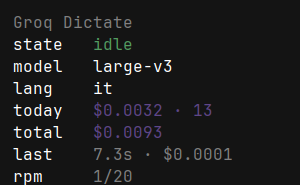
The sidebar panel, without a border, same shape and colours as opencode-go-meter. Nothing in it is decoration: every row is clickable and does something.
| Row | Shows | Click |
|---|---|---|
Groq Dictate (title) |
the panel name, muted | start / stop a take |
state |
idle, ● rec 12s, transcribing… |
start / stop a take |
model |
large-v3-turbo or large-v3 |
model dialog |
lang |
it, en, auto, … |
language dialog |
today |
$0.0032 · 13 takes |
quota dialog |
total |
$0.0093 since the log began |
quota dialog |
last |
7.3s · $0.0001 of the last take |
— |
rpm |
1/20 requests in the last minute |
quota dialog |
The state row is green when idle, red while recording, amber while the text is in
flight; rpm turns red at the limit, where a take would be refused.

While a take is running the prompt footer carries a red ● REC Ns; it turns amber
while the text is in flight.
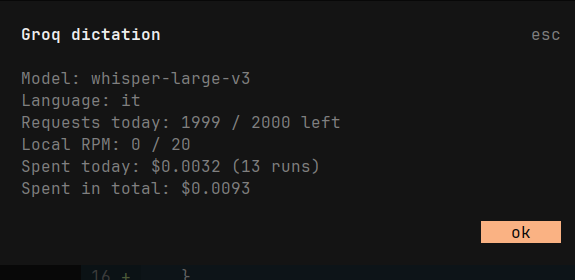
The quota dialog, also reachable by clicking today, total or rpm: model, language,
requests left today (from the Groq headers), local RPM, spend today with the number of
takes, spend in total.
Cost and quota
- Cost is estimated on the audio length at the model's rate — $0.04/hour for
whisper-large-v3-turbo, $0.111/hour forwhisper-large-v3— with Groq's 10-second minimum billed length per request. It is appended to~/.cache/groq-dictate-costs.log, the same file and the same four columns (date time seconds cost) the older shell script wrote, so a/dictate-costcommand keeps working unchanged. The model name trails as an optional fifth column, so each line stays attributable while readers of the first four columns ignore it. - The daily request figure comes from the
x-ratelimit-*headers of the real transcription. No request is spent just to read the quota. - The per-minute figure is tracked locally: timestamps of the last 60 seconds, cap 20, the free tier limit. At the cap the recording does not start.
- Language defaults to Italian. Set another ISO code, or
autofor detection, from the language dialog. Model can bewhisper-large-v3-turbo(default, faster) orwhisper-large-v3(same price, a little more accurate).
How it works
parec --rate=16000 --channels=1 --file-format=wavrecords to/tmpat the rate Whisper wants, so noffmpegstep is needed.- On stop the WAV goes to
https://api.groq.com/openai/v1/audio/transcriptionswithfetchandFormData(no dependencies), and the file is deleted as soon as the answer arrives. - The text goes to the clipboard with
xclip, thenprompt.pasteputs it in the composer. - The cost line is appended and the sidebar totals update.
The pure logic (src/voice.ts: audio length, cost, log format, rpm window, totals) is
separate from the TUI so it can be unit tested without a terminal.
Limitations
- TUI only: dictating into a browser or an editor is out of scope. A desktop shortcut running a small script is still the right tool there.
- The transcript is pasted, not submitted, unless you stop with
ctrl+alt+vor a ctrl+click: the plain stop always leaves you a chance to fix it. - No automatic stop at the end of a sentence yet. The microphone gain on a typical laptop is too high for a threshold to separate voice from room; see TODO.md for the measurements and the sketch.
- A silent or monitor source makes Whisper hallucinate ("Grazie a tutti!" is the
classic). The plugin checks
pactl get-default-sourceand refuses to record when the default is a.monitor; if the check passes and the text still looks invented, the capture level is the first thing to look at.
Development
bun test                          # unit tests on the pure logic
bun build tui.tsx --target=node --external '*'   # type/JSX sanity check
The plugin is one TUI entry point (tui.tsx) plus one pure module (src/voice.ts).
Editing it requires restarting the TUI: there is no hot reload.
License
MIT — see LICENSE.
Similar plugins

Dictate
opencode-dictate
Hands-free voice conversation mode for opencode: talk to the agent and answer questions/permissions by voice, with an animated status indicator.

Voice
@vaibhavgupta0786/opencode-voice
Local-only push-to-talk dictation for OpenCode v2 — press F9, speak, press F9.

Voice
@juliuskb/opencode-voice
Local-first voice dictation for OpenCode with push-to-talk Whisper transcription