
Clm
OpenCode plugin for Context Language Models: the model edits a file mirror of its own context, and the edited mirror becomes its next input.
0
602
602 in 7 days
37.1
Multi-signal model
1 day ago
2026-10-04
Install and configure
opencode.jsonWrites to this project's opencode.json — applies to this repository only.
opencode.json
{
  "$schema": "https://opencode.ai/config.json",
  "plugin": ["opencode-clm@0.4.0"]
}
Writes to ~/.config/opencode/opencode.json — applies to every project.
~/.config/opencode/opencode.json
{
  "$schema": "https://opencode.ai/config.json",
  "plugin": ["opencode-clm@0.4.0"]
}
If you want to modify the plugin locally, install it into the project and reference the local path.
shell
pnpm add -D opencode-clmOpenCode loads npm dependencies through its embedded runtime on startup and caches them locally — no manual global install needed.


  ____ _     __  __
 / ___| |   |  \/  |
| |   | |   | |\/| |
| |___| |___| |  | |
 \____|_____|_|  |_|

opencode-clm
the agent that manages its own context
opencode-clm is an OpenCode plugin that lets the agent manage its
own context: before each request the plugin writes the conversation to a file, the
language model edits that file with its ordinary tools, and the edited version becomes its
next input. OpenCode's stored session stays unchanged. It ports
pi-clm, the Pi extension for the paper
Context Language Models and its research
codebase.
Install
opencode plugin opencode-clm        # this project: .opencode/opencode.json and .opencode/tui.json
opencode plugin -g opencode-clm     # global: opencode.json(c) and tui.json in ~/.config/opencode
The package holds two plugins: the server plugin (index.ts: mirror, edits, budget,
/clm, /clm-compact) and the TUI plugin (tui.ts: the /clm panel). Install both:
without the TUI plugin there is no panel, and each /clm command costs a model turn.
opencode plugin writes the spec to both files. By hand, add it to both plugin lists;
options go on the opencode.json entry only, and the TUI plugin reads them from there:
// opencode.json
{ "plugin": [["opencode-clm", { "budget": "64k" }]] }
// tui.json
{ "plugin": ["opencode-clm"] }
Quick start
| command | what it does |
|---|---|
/clm |
open the panel: overview (context size per request + every accepted edit) 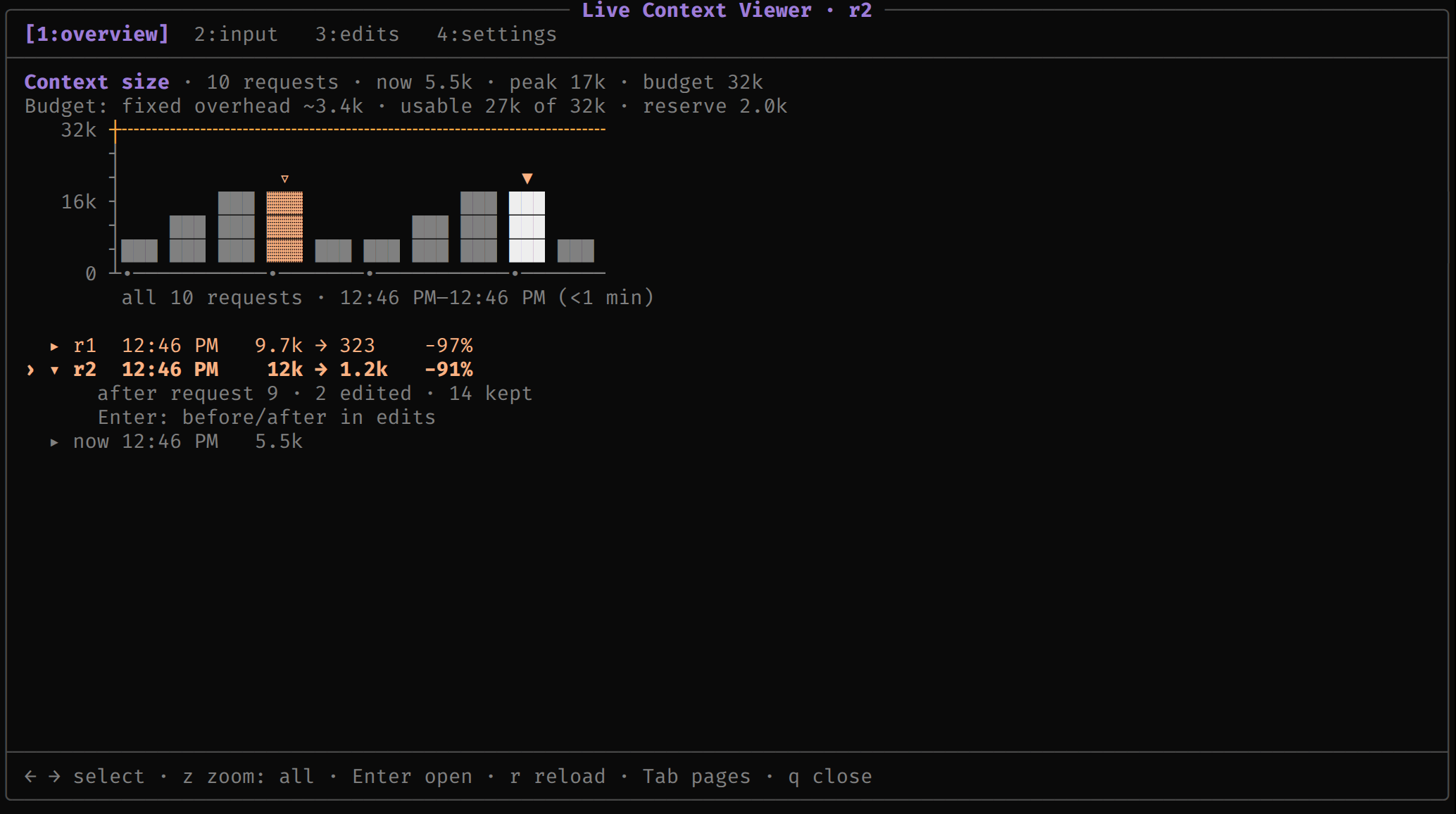 input (what the next request contains) · edits (per-revision side-by-side diff) 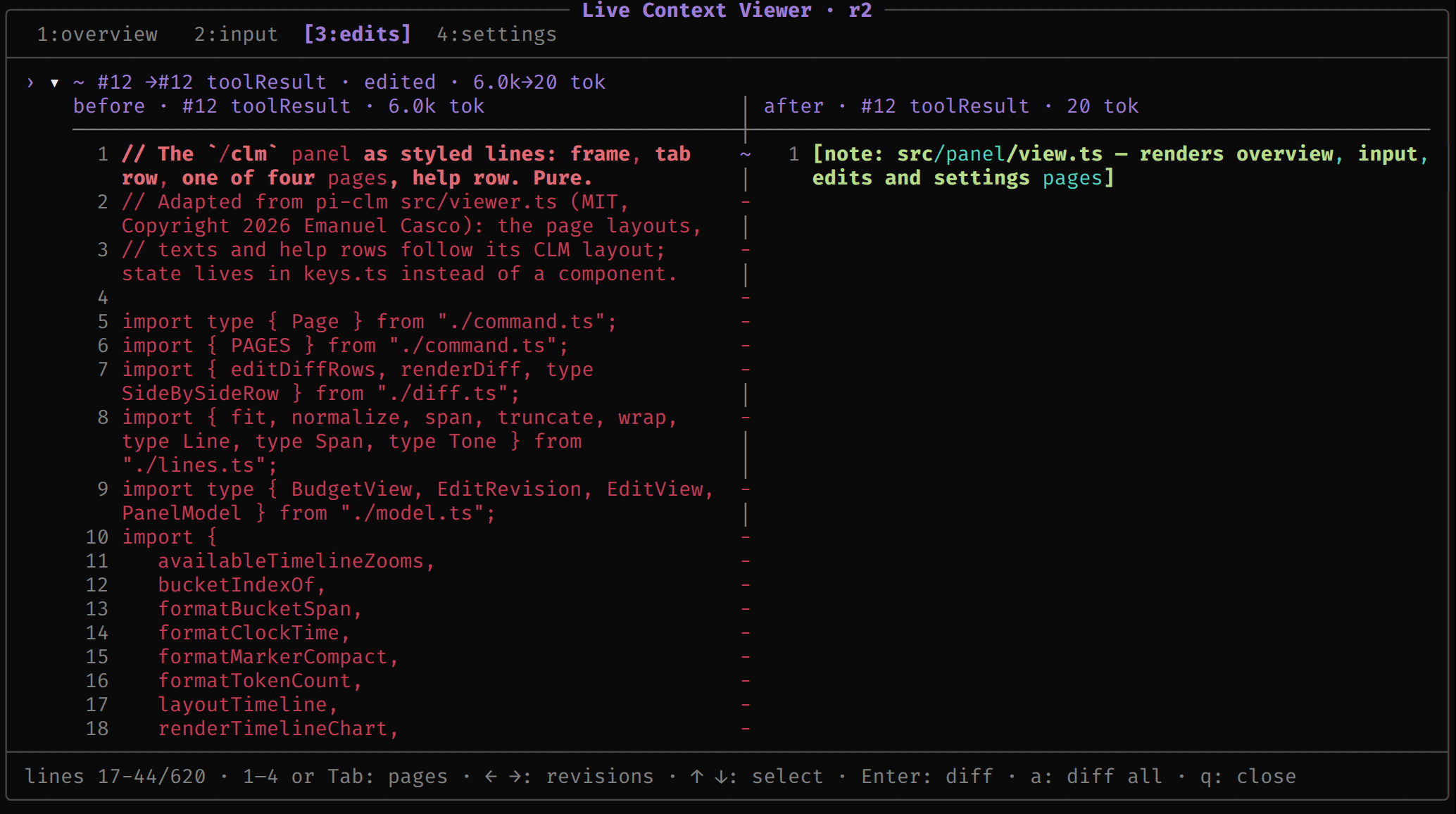 |
/clm overview / input / edits / settings |
open the panel on that page (timeline and edit also work); without the TUI plugin, print it as text |
/clm status |
a toast: on or off, revision, last request size, budget, fixed overhead, last outcome; mode notices-only when set |
/clm config |
open settings; /clm config <setting> <value> changes one, /clm config reset drops this session's changes 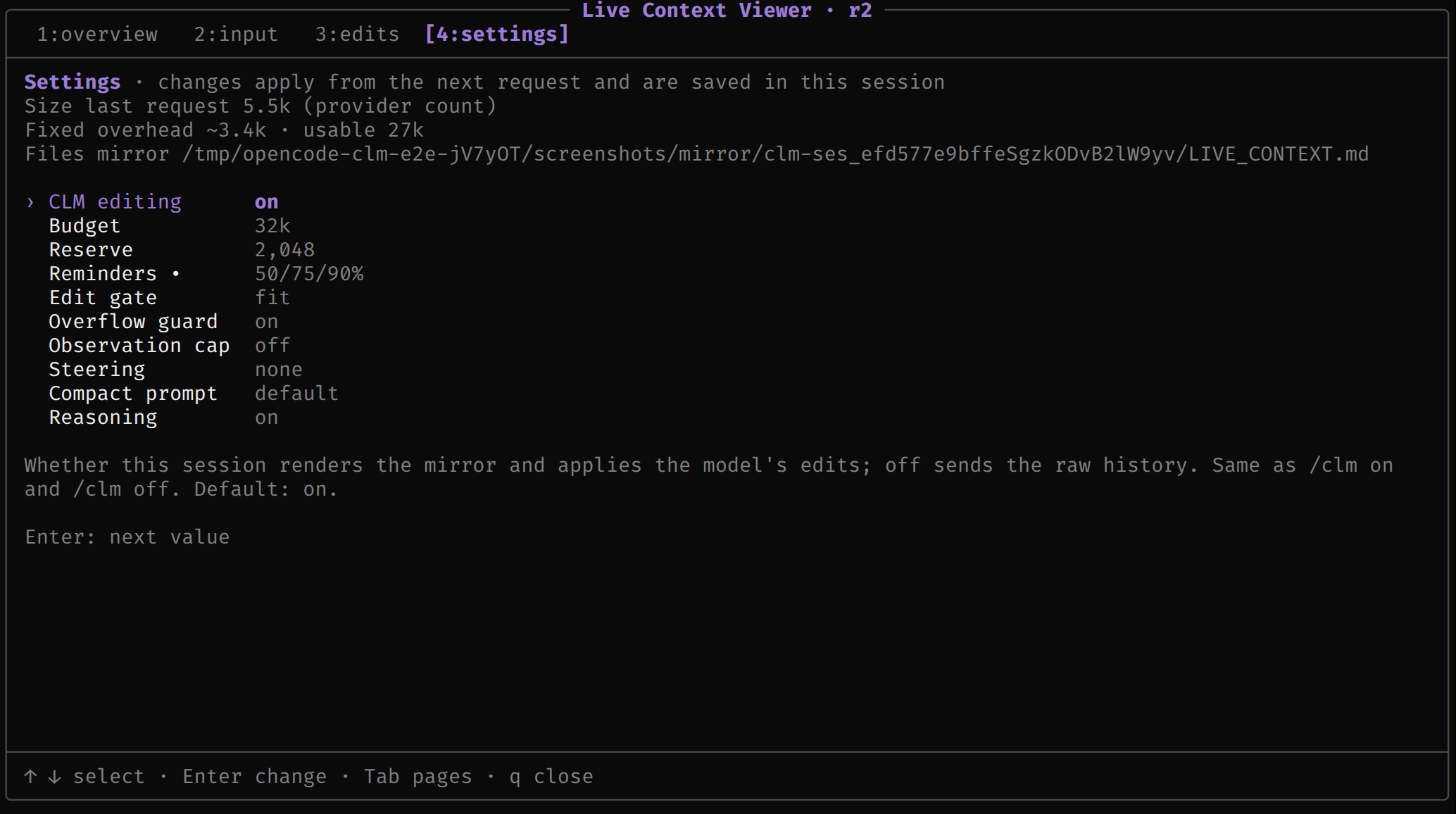 |
/clm-compact [instructions] |
ask the model to compact its own context now; anything you add (e.g. what to keep) is passed along. The result shows on the edits page |
/clm on / off / reset / path |
enable, use raw context, discard the accepted revision, show the mirror's path |
/clm budget [value] |
show or change the budget, the same as /clm config budget: a share of the model window (default 50%), tokens (64k), or window |
/clm config mode notices-only |
keep the budget notices, reminders and overflow guard but take away editing: no mirror, no protocol prompt, raw history. For comparing "telling the model its budget" with "letting it edit"; /clm config mode edit switches back |
With the TUI plugin, typed /clm … lines run in the TUI and cost no model turn, and Tab
completes their subcommands, setting names and values;
/clm reset is handed to the server plugin, also without a turn. The right of the
session prompt shows clm <size> / <budget> · r<revision> (~ before the size marks an
estimate the provider has not confirmed; clm off · r<revision> while CLM is off;
clm notices-only <size> / <budget> · r<revision> in notices-only mode).
In the panel: 1–4 or Tab switch pages, ← → step through the overview's markers or
the edits page's revisions, z zooms the chart, Enter opens the selection, r
reloads, q closes.
Benchmarks
These numbers come from one machine (AMD Strix Halo, gfx1151, Vulkan) running Qwen3.8-Flash-Next (UD-IQ4_XS) through lemonade, on a llama.cpp build with an unreleased patch that ports the paper's Suffix Cache Reuse (an SGLang patch) to llama.cpp's hybrid models. On a stock server, an edit re-prefills everything after the first changed token.
GSM8K, 50 test problems, edited prompt. Each problem is primed with an 8-shot prompt holding three stale worked examples, then asked again with that block replaced by a one-line note, mirroring a CLM edit. Temperature 0, thinking off.
| reuse after the edit | full prefill | |
|---|---|---|
| accuracy | 48/50 | 49/50 |
| median tokens prefilled | 23 | 1,362 |
| median prompt time | 0.51 s | 5.02 s |
| median request time | 3.1 s | 7.2 s |
A live OpenCode session with opencode-clm 0.2.0 (48k budget, auto-compaction off)
read and summarised every file under src/ and test/ of this repository and wrote its
notes: 49 requests, 16 accepted edits, 0 rejected. The server reused cache after 23 edits
and prefilled 11,240 tokens in total, where a prefix-only cache would have prefilled
214,585 (95% less); requests of 20–48k tokens prefilled 34–3,523 tokens each.
Nine agent tasks in OpenCode (find and fix, opencode-clm 0.3.0, 1 run each), CLM at a 32k budget vs CLM off: both solved 9/9; CLM took 55.5 s per task vs 91.3 s and prefilled 2,868 tokens vs 7,317 on average. CLM accepted only 1 edit in 9 runs because no task came near the budget, so most of the gain looks behavioural: told its budget, the model makes fewer tool calls. One CLM run read files outside its workspace and is not comparable.
Flash-Next was not trained for CLM, so it makes more edit mistakes than the paper's trained models. Hosted APIs are untested.
Docs
- How it works — the mirror, what runs without the model, the panel, model and server support, safety.
- Configuration — every setting (editing, budget, reserve, reminders, reminder-cooldown, gate, guard, compaction, cap, steering, mode, one-tool, trailer, compact-prompt, reasoning), plugin options and environment variables.
- Architecture — modules, session files, design notes, known limitations.
- Development — setup, checks, the integration suites, releasing.
Citation
If you use opencode-clm in your research, please cite Context Language Models:
@article{shao2026context,
  title   = {Context Language Models},
  author  = {Shao, Rulin and Shen, Shannon Zejiang and Yin, Junjie Oscar and Li, Yuetai and
             Wang, Minheng and Ivison, Hamish and Poovendran, Radha and Lambert, Nathan and
             Xiao, Teng and Lewis, Mike and Yih, Wen-tau and Zettlemoyer, Luke and Koh, Pang Wei},
  journal = {arXiv preprint arXiv:2609.37725},
  year    = {2026}
}
Credits
- pi-clm 1.0.0 (MIT, Copyright 2026 Emanuel
Casco): the design and most of the code derive from it, the
/clmpanel included, and most model-facing text is adapted from it. NOTICE lists the files. - facebookresearch/context-language-models
(CC BY-NC 4.0): this package copies no text from it; the
fit/shrinkedit gate and the default 25/50/75% reminder steps follow its harness design. This package is not licensed under CC BY-NC and is not endorsed by its authors. - Claude Code (Claude Opus) wrote the code and documentation; the maintainer has not hand-reviewed them.
License
MIT. See LICENSE, which includes the pi-clm notice, and NOTICE.
Similar plugins

Okf Context
opencode-okf-context
OpenCode plugin: progressive disclosure + auto-unload for OKF (Open Knowledge Format) knowledge bundles. Inspired by DCP's outbound-only context transformation.

Token Usage
@chenlongapps/opencode-token-usage
Session-tree token usage, live performance, context window and estimated cost for OpenCode 2

Rtk
opencode-rtk-plugin
OpenCode v2 plugin that rewrites shell commands through rtk to cut LLM token usage by 60-90%.