
14
116
近 7 天 5
40.7
生态多维模型
1 个月前
2026-07-15
快速安装与配置
opencode.json写入当前项目的 opencode.json,只对这个仓库生效。
opencode.json
{
  "$schema": "https://opencode.ai/config.json",
  "plugin": ["opencode-status-tab@0.4.0"]
}
写入 ~/.config/opencode/opencode.json,对所有项目生效。
~/.config/opencode/opencode.json
{
  "$schema": "https://opencode.ai/config.json",
  "plugin": ["opencode-status-tab@0.4.0"]
}
若你要在本地改造这个插件,先装到项目里再从本地路径引用。
shell
pnpm add -D opencode-status-tabopencode 启动时会通过内嵌运行时自动加载 npm 依赖并缓存至本地目录,无需手动在全局环境执行安装。
Know which of your OpenCode agents needs you — without switching tabs.
When you run several OpenCode sessions across Zellij tabs, they all look identical. You can't see which one is still grinding, which is silently waiting for you to approve something, and which finished five minutes ago.
The four states
| Icon | When | What it means for you |
|---|---|---|
| ⏳ | working | OpenCode is busy — ignore it for now |
| ❓ | needs you | blocked on a permission prompt or a question — go unblock it |
| 🔔 | done, unseen | it finished while you were away — go check the result |
| ✅ | done, seen | finished, and you've already looked |
Example
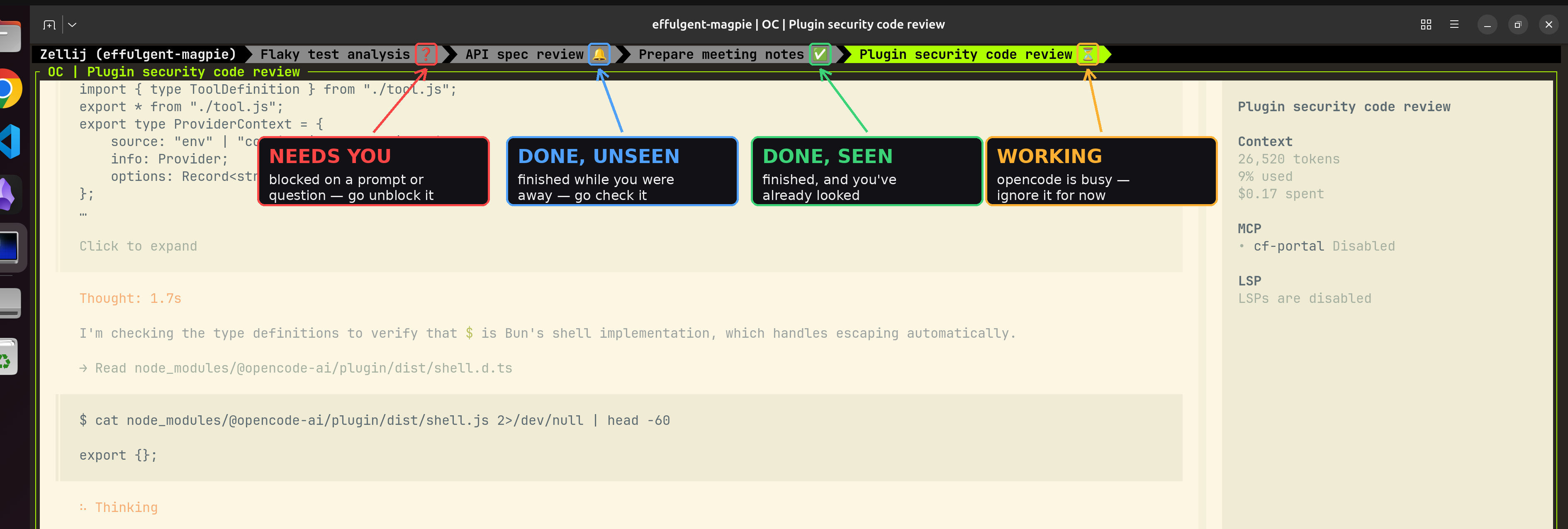
Naming
OpenCode gives each session an auto-generated title, and the plugin uses that as the Zellij tab name. To change it, run OpenCode's built-in /rename slash command.
Stopwatch
Show how long a session has been running. After a minute, the elapsed minutes appear next to the icon:

To disable the stopwatch set env variable OPENCODE_ZELLIJ_STOPWATCH=0.
Sound
When a non-focused zellij tab finishes (🔔) or needs you (❓) an audio notification is played.
To disable the sound set env variable OPENCODE_ZELLIJ_SOUND=0.
To override the default sound with your own set env variable OPENCODE_ZELLIJ_SOUND_CMD="pw-play ~/alert.wav".
Install
1. Install Zellij and OpenCode.
Requires Zellij ≥ 0.44.0
2. Enable the plugin.
Add the following to your opencode.json
{
  "plugin": ["opencode-zellij-indicator"]
}
Outside Zellij the plugin does nothing (it exits immediately), so it's safe to leave enabled everywhere at no cost.
3. Run OpenCode inside Zellij.
zellij      # opens the Zellij workspace
opencode    # run this inside Zellij
That single tab now shows OpenCode's status. To feel the point of the plugin,
open more tabs and run OpenCode in each — press Ctrl t then n for a new
tab (Ctrl t then the arrow keys to switch between them).