
opencode-sidebar-background-sessionsOpenCode TUI sidebar plugin that shows running background sub-agents.
2
105
近 7 天 26
32.0
生态多维模型
2 个月前
2026-05-28
快速安装与配置
opencode.json写入当前项目的 opencode.json,只对这个仓库生效。
opencode.json
{
  "$schema": "https://opencode.ai/config.json",
  "plugin": ["opencode-sidebar-background-sessions@0.5.0"]
}
写入 ~/.config/opencode/opencode.json,对所有项目生效。
~/.config/opencode/opencode.json
{
  "$schema": "https://opencode.ai/config.json",
  "plugin": ["opencode-sidebar-background-sessions@0.5.0"]
}
若你要在本地改造这个插件,先装到项目里再从本地路径引用。
shell
pnpm add -D opencode-sidebar-background-sessionsopencode 启动时会通过内嵌运行时自动加载 npm 依赖并缓存至本地目录,无需手动在全局环境执行安装。
OpenCode TUI sidebar plugin for background agents and quick session navigation.
It adds two sidebar sections:
Running Agents— shows currently active background sub-agent sessions and lets you jump into them.Sessions— a collapsible project-session accordion with paginated navigation between recent sessions.
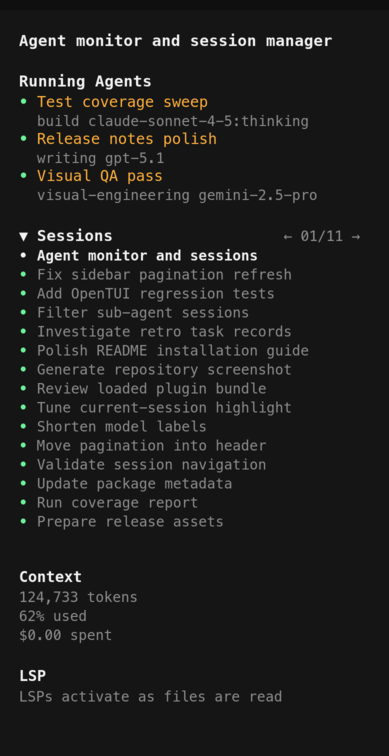
Features
- Tracks active background agents.
- Adds a project-only
Sessionsaccordion. - Supports click-to-open agent and session rows.
- Includes compact header pagination, for example
← 01/11 →. - Hides stale completed-agent records and sub-agent sessions from the navigator.
Sidebar behavior
When background agents are active, the plugin renders Running Agents above the session navigator. Clicking a running-agent row navigates to that sub-agent session.
The Sessions accordion is always rendered. It starts collapsed as:
▶ Sessions
When expanded, it renders session rows and pagination controls in the accordion header:
▼ Sessions                                           ← 01/11 →
• Current project session
• Another project session
The arrows are always visible when sessions are loaded. Active arrows are bright; inactive arrows are muted. Clicking pagination controls changes the visible page without collapsing the accordion.
Installation
For Humans
Copy and paste this prompt to your LLM agent (OpenCode, Claude Code, AmpCode, Cursor, etc.):
Install and configure the OpenCode TUI plugin `opencode-sidebar-background-sessions` by following the instructions here:
https://raw.githubusercontent.com/dnaroid/opencode-sidebar-background-sessions/master/docs/guide/installation.md
Or read the Installation Guide, but letting an agent edit the config is safer.
For LLM Agents
Fetch the installation guide and follow it:
curl -s https://raw.githubusercontent.com/dnaroid/opencode-sidebar-background-sessions/master/docs/guide/installation.md
Manual install
This is an OpenCode TUI plugin. It belongs in tui.json, not opencode.json.
Install the npm package into your OpenCode config directory and point TUI at the installed package:
cd ~/.config/opencode
bun add opencode-sidebar-background-sessions
- macOS / Linux:
~/.config/opencode/tui.json - Windows:
%APPDATA%\opencode\tui.json
{
  "$schema": "https://opencode.ai/tui.json",
  "plugin": ["./node_modules/opencode-sidebar-background-sessions"],
}
Restart OpenCode after installing. The sidebar will render the Sessions accordion even when there are no running background agents.
Do not use opencode plugin -g for this package if your OpenCode version writes plugin entries to opencode.json; that command is for server plugins, while this package is loaded by the TUI plugin runtime.
Updates
When installed from npm under ~/.config/opencode/node_modules, the plugin checks npm on startup and updates itself with:
bun add opencode-sidebar-background-sessions@latest
The running OpenCode process keeps the old bundle in memory, so after an automatic update the sidebar shows a restart notice. Restart OpenCode to load the new version.
To disable automatic updates, start OpenCode with:
OPENCODE_SIDEBAR_BACKGROUND_SESSIONS_AUTO_UPDATE=0 opencode
Local development install
From this package directory:
bun install
bun run build
Then point OpenCode at the package root — it will resolve the ./tui export from package.json automatically:
// ~/.config/opencode/tui.json  (macOS/Linux)
// %APPDATA%\opencode\tui.json  (Windows)
{
  "plugin": ["/absolute/path/to/opencode-sidebar-background-sessions"],
}
Development
bun install
bun run typecheck
bun run test
bun run test:coverage
bun run build
The test suite builds the plugin first and then drives the compiled TUI plugin through OpenTUI's testRender harness. It covers the regressions that shaped the current behavior: accordion collapse, header pagination, project-scoped session loading, sub-agent filtering, stale page refreshes, false Running Agents rows from old completed task records, running-agent navigation, and agent/model metadata formatting.
Notes
- This is a TUI plugin, so it is configured in
tui.json, notopencode.json. - The normal OpenCode Status dialog lists server plugins; TUI plugins may not appear there.
- The plugin intentionally does not mutate session titles. It reads the current TUI session state and renders only in the sidebar.
- If you update an installed copy under
~/.config/opencode/node_modules, restart the OpenCode TUI so the plugin bundle is reloaded.