
opencode-recallOpenCode plugin for reversible context pruning: prune tool I/O into on-disk blobs and restore on demand
9
18
近 7 天 7
24.6
生态多维模型
7 个月前
2026-01-21
快速安装与配置
opencode.json写入当前项目的 opencode.json,只对这个仓库生效。
opencode.json
{
  "$schema": "https://opencode.ai/config.json",
  "plugin": ["opencode-recall@0.1.0"]
}
写入 ~/.config/opencode/opencode.json,对所有项目生效。
~/.config/opencode/opencode.json
{
  "$schema": "https://opencode.ai/config.json",
  "plugin": ["opencode-recall@0.1.0"]
}
若你要在本地改造这个插件,先装到项目里再从本地路径引用。
shell
pnpm add -D opencode-recallopencode 启动时会通过内嵌运行时自动加载 npm 依赖并缓存至本地目录,无需手动在全局环境执行安装。


English | 中文
Tool I/O 越聊越多占满上下文?剪掉它,留指针,随时恢复。
⚡️ 核心痛点
OpenCode 已经有"单次工具输出超限就截断,并把完整输出临时写到 tool-output/"的兜底机制(通常还会附带如何用 grep / read offset/limit / 子代理继续处理的提示)。
但更常见、也更影响体验的问题是:输出没超限,却在长会话里不断累积 —— 你每一轮都在为同一批历史工具 I/O 反复付 token。
你是否遇到过:
- ❌ 单次日志/文件读取不大,但 10+ 轮后上下文被几十次工具输出拖到很臃肿(慢、贵、容易跑偏)
- ❌ 同一个命令反复跑、同一个文件反复读:旧输出早就"过期"了,却仍然占着上下文
- ❌
write/edit的大输入(content/patch)在后续read到最新文件后已经冗余,但还在上下文里付 token - ❌ 触发 compaction/summary 后,想回到"当时的原始证据"核对细节,却拿不到
Recall 的解决方案:把热上下文变成冷存储(可逆、可探索)
| Before Recall | After Recall |
|---|---|
| 🐢 上下文越聊越胖(重复/过期的工具 I/O 堆积) | ⚡ 用 [RCL:...] 指针替代;原文落盘到 .opencode/rcl/blobs/ |
| 🔍 想找关键信息只能翻历史/重跑工具 | 🔎 rcl_explore 子会话读取/搜索,只带回结论 |
| 💸 每一轮都为历史输出重复付 token | 💰 自动去重/剪枝(不额外调用 LLM),需要时再 rcl_restore/探索 |
┌─────────────────────────────────┬─────────────────────────────────────┐
│  Before Recall                  │  After Recall                        │
├─────────────────────────────────┼─────────────────────────────────────┤
│  [build log ~6KB]               │  [RCL:o:.opencode/rcl/blobs/... ]    │
│  [git diff ~3KB]                │  (restore_chars≈6K)                  │
│  [read src/app.ts ~2KB]         │                                      │
│  ...                            │  ↓ 需要时再恢复/探索                  │
│                                 │  rcl_explore(path="[RCL:o:...]",     │
│                                 │             question="找出关键报错") │
│                                 │  rcl_restore(path="[RCL:o:...],     │
│                                 │             force=true)              │
│  上下文: 逐轮膨胀 💥             │  上下文: 保持精简 ✅                   │
└─────────────────────────────────┴─────────────────────────────────────┘
📊 实测效果
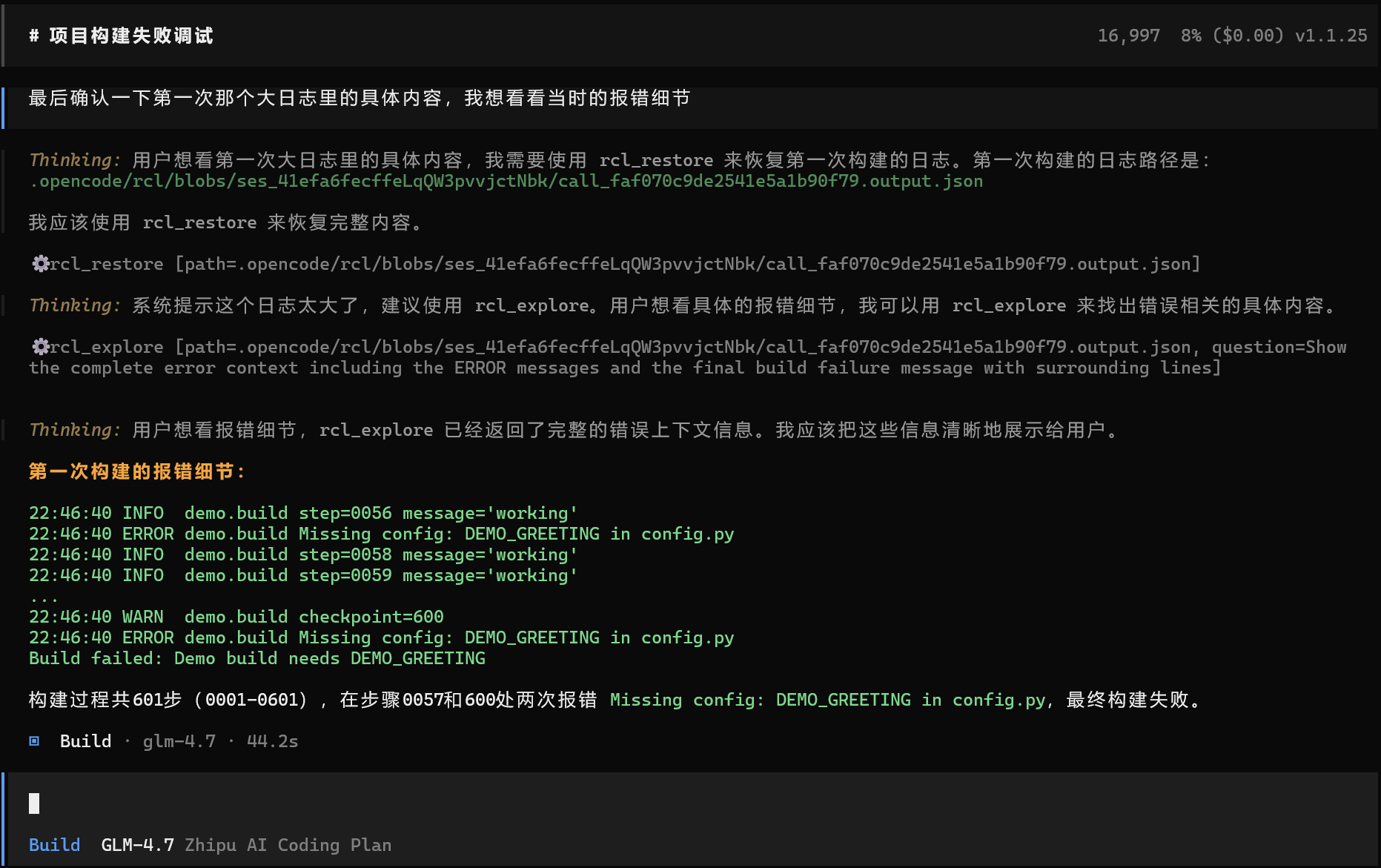
以 Demo 场景 为例:运行构建命令两次(触发去重剪枝)→ 用 rcl_explore 从被剪枝的日志中提取报错 → 修复问题并验证 → 生成并保存项目说明(触发 supersedeWrites 剪枝)→ 用 rcl_restore 恢复原始日志核对细节。
启用 Recall 后,上下文占用 ≈ 8%
不启用 Recall,上下文占用 ≈ 21%
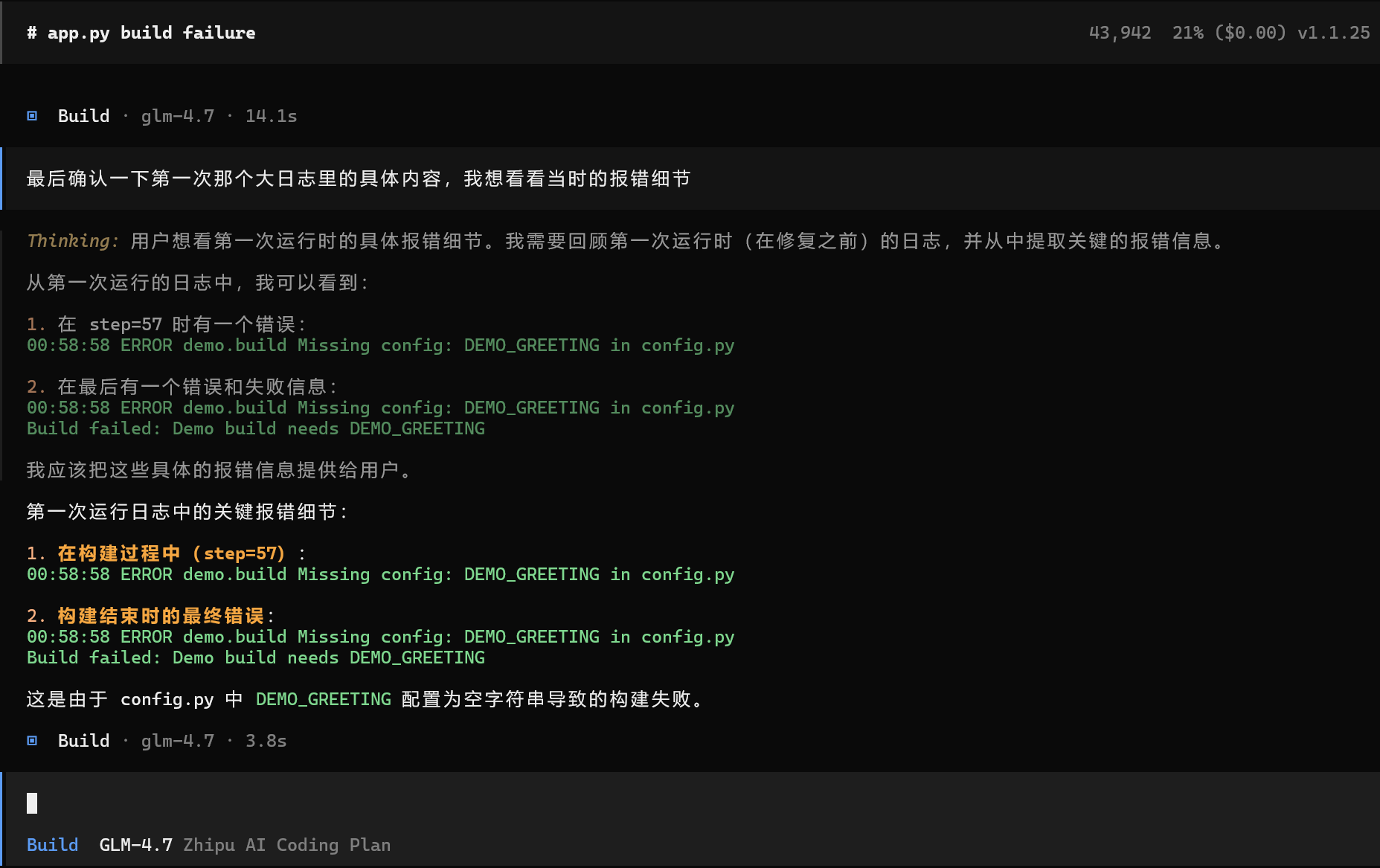
同样的 6 轮对话,上下文占用减少约 60%。
✨ 核心特性
✂️ 智能去重 (Deduplication) 自动识别重复的
read或ls操作,只保留最新版本。旧的调用会自动折叠。💾 落盘存档 (Offloading) 当 Recall 识别到“重复/过期/可替代”的工具 I/O 时,会把原始内容写入
.opencode/rcl/blobs/(项目内),上下文中只留[RCL:o:...]/[RCL:i:...]指针。🔍 子代理探索 (Sub-agent Exploration) 不想把整个大文件恢复到主上下文?使用
rcl_explore启动一个独立子会话,帮你读取大文件并提取关键信息,只把结论传回主会话。🛡️ 可逆剪枝 所有被剪掉的内容都是安全的。随时可以通过
rcl_restore找回当时的完整快照。
🚀 快速安装
无需复杂配置,即刻生效。
让 AI 帮你安装(推荐)
在项目目录打开 OpenCode,粘贴以下内容:
按照以下说明安装和配置 opencode-recall:
https://raw.githubusercontent.com/SleepingBag945/opencode-recall/refs/heads/main/INSTALL.md
AI 会引导你完成安装和配置。
手动安装
1. 安装插件
在项目根目录的 OpenCode 配置文件中添加:
// .opencode/opencode.jsonc
{
    "plugin": ["opencode-recall@latest"],
}
最后在 .opencode/rlc.jsonc中添加下边的内容
{
  "$schema": "https://raw.githubusercontent.com/SleepingBag945/opencode-recall/master/rcl.schema.json",
  // Enable or disable the plugin
  "enabled": true,
  // Enable debug logging to ~/.config/opencode/logs/rcl/
  "debug": false,
  // Notification display: "off", "minimal", or "detailed"
  "pruneNotification": "detailed",
  // Protect from pruning for <turns> message turns
  "turnProtection": {
    "enabled": false,
    "turns": 4
  },
  // Protect file operations from pruning via glob patterns
  // Patterns match tool parameters.filePath (e.g. read/write/edit)
  "protectedFilePatterns": [],
  // Sub-agent based blob exploration (restore in a child session; return a small distilled answer)
  "explore": {
    "enabled": true,
    // Optional: override the model for the rcl_explorer sub-agent.
    // If omitted, Recall will infer a default from your OpenCode agent config.
    "agentModel": "zhipuai-coding-plan/glm-4.7",
    // Optional: override reasoning effort for the sub-agent (if your OpenCode supports variants)
    "agentVariant": "low",
    // Timeout for the sub-agent session in milliseconds
    "timeoutMs": 120000,
    // Hard cap for how many characters rcl_explore returns to the main session
    "maxResultChars": 8000
  },
  // LLM-driven context pruning tools
  "tools": {
    // Shared settings for all prune tools
    "settings": {
      // Nudge the LLM to use prune tools (every <nudgeFrequency> tool results)
      "nudgeEnabled": true,
      "nudgeFrequency": 10,
      // Protect rcl_restore outputs for N turns before they can be pruned
      "restoreProtectionTurns": 4,
      // Block rcl_restore when content exceeds this size (bytes)
      "restoreMaxBytes": 8000,
      // Additional tools to protect from pruning
      "protectedTools": []

    },
    // Removes tool content from context without preservation (for completed tasks or noise)
    "discard": {
      "enabled": true
    },
    // Distills key findings into preserved knowledge before removing raw content
    "extract": {
      "enabled": true,
      // Show distillation content in the UI
      "showDistillation": false
    }
  },
  // Automatic pruning strategies
  "strategies": {
    // Remove duplicate tool calls (same tool with same arguments)
    "deduplication": {
      "enabled": true,
      "protectedTools": []
    },
    // Remove obsolete write inputs when file is later read
    "supersedeWrites": {
      "enabled": true
    },
    // Remove tool errors after N turns
    "purgeErrors": {
      "enabled": true,
      "turns": 8,
      "protectedTools": []
    }
  }
}
2. 重启 OpenCode
插件会自动开始工作,拦截并优化冗余的工具输出。
📖 动手体验
我们准备了一个包含故障排查场景的 5 分钟演示脚本,带你体验“剪枝 -> 探索 -> 恢复”的全流程。
👉 点击查看演示指南
🛠️ 配置详解
Recall 开箱即用,但也支持深度定制。配置文件支持 ~/.config/opencode/rcl.jsonc (全局) 或 .opencode/rcl.jsonc (项目级)。
{
    "enabled": true,
    "pruneNotification": "detailed", // "off" | "minimal" | "detailed"
    // 保护最近 N 轮不被剪枝
    "turnProtection": {
        "enabled": false,
        "turns": 4,
    },
    // 永远不剪枝这些文件
    "protectedFilePatterns": ["**/*.env", "**/secrets/**"],
    // 子代理配置
    "explore": {
        "enabled": true,
        "agentVariant": "low", // 使用低成本模型探索
        "maxResultChars": 4000,
    },
}
更多配置项请参考 rcl.schema.json。
❓ 常见问题 (FAQ)
Q: 剪枝把文件落盘了,后面要用还要读回来,这有什么意义? A: Recall 的核心价值是将“热数据(会被每一轮反复带入上下文的历史工具 I/O)”转变为“冷数据(落盘指针,可按需恢复/探索)”。
- 不剪枝:哪怕每次只有几 KB,累积到 10+ 轮时仍会被反复计入上下文,持续消耗 Token。
- 剪枝后:默认只在需要时才恢复;更推荐用
rcl_explore读取/搜索并带回结论,避免把原文整块塞回主上下文。
Q: 我怎么知道哪些内容被剪了?
A: 插件会在 OpenCode 中通过 Toast 弹窗(通知栏)提示节省了多少 Token。上下文中也会留下 [RCL:...] 标记作为线索。
开发与贡献
# 构建
npm run build

# 本地调试 (链接到 OpenCode)
# .opencode/opencode.jsonc
{ "plugin": ["file:///abs/path/to/opencode-recall/dist/index.js"] }
Attribution
本项目灵感来源于 @tarquinen/opencode-dcp,并在此基础上增加了“可逆恢复”与“子代理探索”等特性。