
opencode-delegations-sidebaropencode TUI plugin that shows sub-agent delegations (subtasks) in the session sidebar.
0
17
近 7 天 7
23.8
生态多维模型
2 个月前
2026-06-04
快速安装与配置
opencode.json写入当前项目的 opencode.json,只对这个仓库生效。
opencode.json
{
  "$schema": "https://opencode.ai/config.json",
  "plugin": ["opencode-delegations-sidebar@0.1.0"]
}
写入 ~/.config/opencode/opencode.json,对所有项目生效。
~/.config/opencode/opencode.json
{
  "$schema": "https://opencode.ai/config.json",
  "plugin": ["opencode-delegations-sidebar@0.1.0"]
}
若你要在本地改造这个插件,先装到项目里再从本地路径引用。
shell
pnpm add -D opencode-delegations-sidebaropencode 启动时会通过内嵌运行时自动加载 npm 依赖并缓存至本地目录,无需手动在全局环境执行安装。
Browser tabs for your opencode sub-agents.
Third-party plugin — not built by the OpenCode team and not affiliated with it.





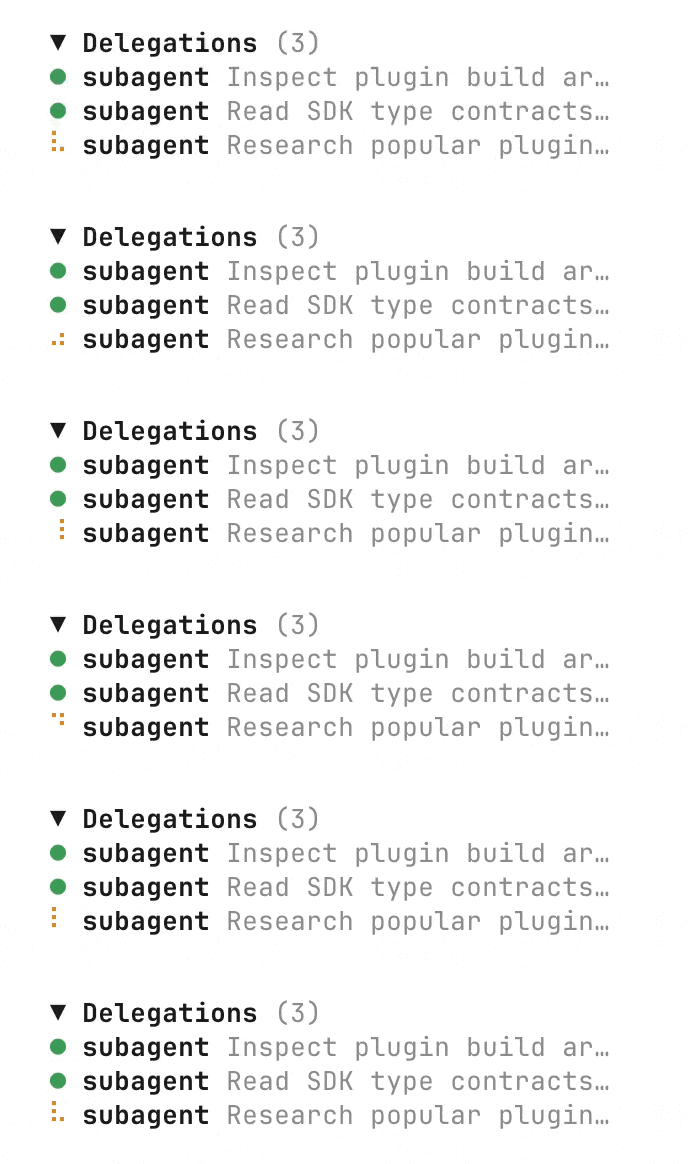
A TUI plugin for opencode that adds a Delegations section to the session sidebar, showing every sub-agent your session has spawned — running, done, failed — with a live status indicator and one-click navigation.
Demo
Why?
Long opencode sessions fan out into a tree of sub-agent (task tool) delegations. By the time you've run a handful of explorations and refactors, switching between them looks like this:
ctrl+xto open the session list- mash arrow keys — up, left, right, down — through a flat list of every session in the project
- hit enter
- realize you picked the wrong one, repeat
When the parent session has spawned a dozen delegations, the navigation gets noisy fast — there's no way to tell at a glance which are still running, which finished, and which failed. Delegations Sidebar puts that information in front of you, in order, with color-coded status — no more arrow-juggling, no more guessing.
Think of it as the browser tab bar for your sub-agents.
What it looks like
In the right-hand sidebar of a session that has used the task tool:
┌─────────────────────────────┐
│ Delegations                 │
│ ● explore  find TODOs       │
│   scan repo for unfinished  │
│ ◐ general  refactor auth    │
│   restructure the auth flow │
│ ✗ general  summarize changes│
└─────────────────────────────┘
The section auto-hides when the current session has no delegations, so sessions that never used the task tool look exactly like before.
Features
- Live status indicator. Color-coded dot per delegation that updates in real time as children transition between idle, busy, and retry states — driven by opencode's
session.statusevent stream. - Click to navigate. Click a row to jump straight into the child session's chat view via
api.route.navigate("session", { sessionID }). No morectrl+x+ arrow-key hunting. - Spawn-order rows. Children are listed in the order they were spawned, with the agent name, the child's title, and the task's description (or the first line of its prompt).
- Collapsible header. Once you have more than two delegations, a chevron appears in the section header so you can collapse the list to save space.
- Auto-hide. The section disappears entirely when the parent has no children — zero visual cost for sessions that never spawned a sub-agent.
- No runtime dependencies.
@opencode-ai/plugin,@opentui/solid, andsolid-jsare peer-deps that opencode's own runtime provides.
Installation
From npm (recommended)
Add the package to your opencode.jsonc. opencode installs the package and resolves peer dependencies from its own runtime — no manual npm install needed.
// ~/.config/opencode/opencode.jsonc
{
  "$schema": "https://opencode.ai/config.json",
  "plugin": [
    "opencode-delegations-sidebar"
  ]
}
From a local checkout (development)
git clone https://github.com/alcidesbsilvaneto/opencode-delegations-sidebar.git
cd opencode-delegations-sidebar
npm install        # pulls in solid-js, @opentui/solid, @opencode-ai/plugin
npx bun run build  # compiles src/tui.tsx + src/server.ts into dist/
// ~/.config/opencode/opencode.jsonc
{
  "$schema": "https://opencode.ai/config.json",
  "plugin": [
    "/absolute/path/to/opencode-delegations-sidebar"
  ]
}
Pointing at the package directory (not a file) is important: the loader reads package.json from that directory to decide which entry to use for the server vs. the TUI. We ship two compiled files:
dist/server.js— a no-opserver()stub. The opencode server loader requires every plugin to default-export aserver()function; this stub satisfies that without doing anything.dist/tui.js— the real TUI plugin. Reached viaexports["./tui"]inpackage.json.
The runtime JSX transform from the opencode binary's bunfig.toml doesn't apply to dynamically-imported plugin files, so we pre-compile with Bun.build using the @opentui/solid/bun-plugin plugin (transforms JSX → createElement calls at build time).
Status legend
| Glyph | Color | Meaning |
|---|---|---|
● |
green | idle / completed |
◐ |
yellow | busy (animated spinner) |
✗ |
red | retrying |
○ |
muted | unknown |
How it works
- On every session change, the plugin calls
client.session.childrento list the child sessions (parentID === current) andclient.session.messagesto walk the parent's assistant messages and collect everysubtaskPart (the in-message record thetasktool emits). - Each child session is matched with its
subtaskPart in spawn order. The row shows the agent name, the child session's title, and the task's description (or the first line of its prompt). - Live updates: subscribes to
session.created,session.updated,session.deleted,message.part.updated, andsession.statusand re-fetches as needed. The status dot re-renders on everysession.statusevent for any of the listed children. - Clicking a row calls
api.route.navigate("session", { sessionID: child.id }), which drops you into the child session's normal chat view. Use the session switcher (or your normalgo backkeybind) to return.
The sidebar slot used is sidebar_content with order: 150, so the section appears just below the built-in Context panel and above the MCP / LSP / Todo / Files sections.
Configuration
This plugin has no configuration. It reads from opencode's runtime and renders automatically.
If you want to change the row order, the slot order, or the row truncation length, the implementation is small enough to fork — see src/tui.tsx.
Development
npm run typecheck    # tsc --noEmit
npx bun run build    # invokes scripts/build.mjs
npm run typecheck—tsc --noEmitagainst the locally installed@opencode-ai/plugin@1.15.13and@opencode-ai/sdk@1.15.13(usesjsxImportSource: "@opentui/solid").npx bun run build— invokesscripts/build.mjswhich callsBun.buildwith the@opentui/solid/bun-pluginplugin, producingdist/tui.js(the actual TUI plugin) anddist/server.js(a no-opserver()stub) with the JSX already transformed tocreateElementcalls.
Project layout
src/
  tui.tsx       The actual TUI plugin (Solid + @opentui/solid)
  server.ts     No-op server() stub (the opencode server loader requires every plugin to default-export one)
scripts/
  build.mjs     Bun.build script with the @opentui/solid JSX transform
Peer dependencies
@opencode-ai/plugin >= 1.4.0@opentui/solid >= 0.1.0solid-js >= 1.8.0
These are resolved from opencode's runtime in production. When developing from a local checkout, the plugin's own node_modules provides them so tsc and bun both work standalone.
Related projects
opencode-subagent-statusline— surfaces subagent session state in the statusline. Complementary: statusline vs. sidebar.@opencode-ai/plugin— the official plugin SDK used by this project.