
14
近 30 天 +1
252
近 7 天 53
45.3
生态多维模型
23 天前
2026-07-27
快速安装与配置
opencode.json写入当前项目的 opencode.json,只对这个仓库生效。
opencode.json
{
  "$schema": "https://opencode.ai/config.json",
  "plugin": ["opencode-agents-sidebar@1.0.8"]
}
写入 ~/.config/opencode/opencode.json,对所有项目生效。
~/.config/opencode/opencode.json
{
  "$schema": "https://opencode.ai/config.json",
  "plugin": ["opencode-agents-sidebar@1.0.8"]
}
若你要在本地改造这个插件,先装到项目里再从本地路径引用。
shell
pnpm add -D opencode-agents-sidebaropencode 启动时会通过内嵌运行时自动加载 npm 依赖并缓存至本地目录,无需手动在全局环境执行安装。
Universal OpenCode TUI sidebar plugin for browsing agents and subagents. OhMyOpenAgent metadata is treated as an optional bootstrap/enrichment source, not the core product model.




| Field | Value |
|---|---|
| Status | Actively maintained personal OpenCode tool/plugin |
| Type | OpenCode TUI plugin / host extension |
| Host app | OpenCode >= v1.14.49 documented; @opencode-ai/plugin >=1.4.0 peer dependency |
| Package | opencode-agents-sidebar 1.0.8, published on npm |
| Runtime | Bun >=1.1.0 |
| Maintainer checks | bun install && bun run build:all && bun test && bun run typecheck |
Screenshots
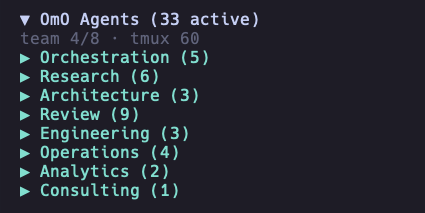
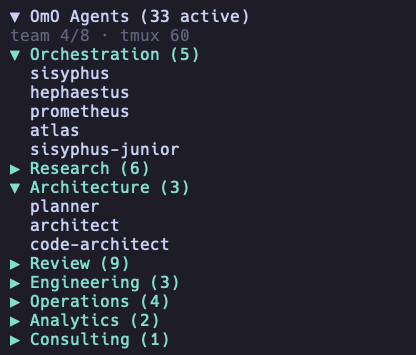
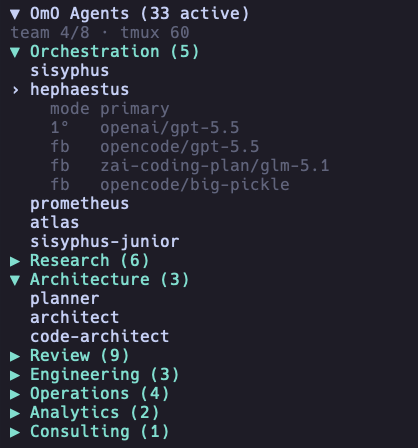
The plugin renders agent categories and details inside the OpenCode terminal UI sidebar.
Summary
- Displays OpenCode agents in the OpenCode sidebar.
- Uses a normalized provider boundary so OpenCode-native, custom, and optional OhMyOpenAgent sources can feed the same UI.
- Groups agents into neutral categories such as primary, subagents, built-in, project, global, custom, disabled, hidden, and other.
- Supports collapsible category sections and a collapsible main sidebar panel.
- Shows provider, model, variant, fallback, and disabled-agent information according to display settings.
- Supports compact and split row layouts for different terminal widths.
- Supports provider, model, and variant aliases for shorter terminal output.
- Reloads provider data by polling and fingerprint comparison.
- Handles missing or invalid configuration files with explicit sidebar states.
Quick start
# install the published OpenCode plugin globally
opencode plugin opencode-agents-sidebar@latest --global --force

# optional: build from a local checkout for development
git clone https://github.com/Mark1708/opencode-agents-sidebar.git
cd opencode-agents-sidebar
bun install
bun run build:all
This release is a provider-boundary foundation: the UI is OpenCode-first, while native OpenCode agent discovery is planned for the next implementation phase.
Installation
OpenCode plugin install
opencode plugin opencode-agents-sidebar@latest --global --force
This is the recommended path for users because the plugin is published on npm and OpenCode can install it directly.
Local checkout for development
git clone https://github.com/Mark1708/opencode-agents-sidebar.git
cd opencode-agents-sidebar
bun install
bun run build:all
The build emits the plugin entry and TUI bundle into dist/.
For local OpenCode testing, install the checkout directly:
opencode plugin "file:/absolute/path/to/opencode-agents-sidebar" --global --force
Compatibility
| Component | Supported version | Source |
|---|---|---|
| Host app | OpenCode >= v1.14.49 |
README compatibility note |
| Plugin API | @opencode-ai/plugin >=1.4.0 |
package.json peer dependency |
| TUI runtime | @opentui/solid >=0.1.0, solid-js >=1.8.0 |
package.json peer dependencies |
| Local runtime | Bun >=1.1.0 |
package.json engines and Bun-based scripts |
| TypeScript | ^5.5.0 |
package.json dev dependency |
Configuration
The sidebar is being redesigned around normalized agent providers. In this foundation release, the temporary bootstrap provider still reads:
~/.config/opencode/oh-my-openagent.json
That file is no longer the core product model. It is only an optional/bootstrap source until native OpenCode agent discovery is implemented.
Top-level sections such as agents, agent_order, disabled_agents, team_mode, and tmux are shared OhMyOpenAgent data. The sidebar renders that data when present, but those sections are not separate sidebar plugin configuration.
The provider seam is already in place: src/providers/omo.ts adapts the temporary bootstrap data, and src/providers/custom.ts is the minimal placeholder for explicit custom agents.
Smallest useful configuration:
{
  "tui": {
    "sidebar_width": 34,
    "name_width": 18,
    "title": "Agents"
  }
}
Full documented shape:
{
  "tui": {
    "sidebar_width": 34,
    "name_width": 18,
    "poll_interval_ms": 2000,
    "slot_order": 850,
    "title": "Agents",
    "category_order": ["Primary", "Subagents", "Built-in", "Project", "Global", "Custom", "Disabled", "Hidden", "Other"],
    "model_display": "details-only",
    "show_provider": true,
    "show_variant_in_details": false,
    "show_disabled": "dimmed",
    "agent_row_mode": "compact",
    "symbols": "unicode",
    "provider_aliases": {
      "openai": "oa",
      "opencode": "oc",
      "zai-coding-plan": "zai"
    },
    "model_aliases": {
      "gpt-5.4-mini-fast": "gpt-5.4mf",
      "gpt-5.4-mini": "gpt-5.4m",
      "gpt-5.5": "5.5",
      "glm-4.5-air": "glm-4.5a"
    },
    "variant_aliases": {
      "medium": "M",
      "high": "H",
      "xhigh": "XH"
    }
  }
}
When using the current OhMyOpenAgent bootstrap source, keep a legacy category order if you want the familiar grouping:
{
  "tui": {
    "title": "Agents",
    "category_order": ["Orchestration", "Research", "Architecture", "Review", "Engineering", "Operations", "Analytics", "Consulting", "Other"]
  }
}
Supported values:
model_display:"inline","details-only", or"hidden".show_disabled:"hidden","dimmed", or"grouped".agent_row_mode:"compact"or"split".symbols:"unicode"or"ascii".
Usage
- Start OpenCode with the plugin installed.
- The sidebar appears on the right side of the TUI.
- Click the main header to collapse or expand the full sidebar.
- Click category headers to collapse or expand provider groups.
- Click an agent row to show model, variant, and fallback details.
- Tune width, model display, aliases, and symbol mode in provider metadata/config.
Agent categories
The default product categories are neutral OpenCode/provider categories from src/defaults.ts:
| Category | Examples |
|---|---|
| Primary | Main OpenCode agents when the native provider lands |
| Subagents | OpenCode subagents when the native provider lands |
| Built-in | Built-in host agents |
| Project | Project-local agents |
| Global | User-level agents |
| Custom | Custom provider agents |
| Disabled | Disabled agents when grouped |
| Hidden | Reserved for providers that expose hidden entries |
| Other | Agents not mapped to a known category |
The temporary OhMyOpenAgent bootstrap provider keeps its legacy lifecycle mapping inside src/providers/omo.ts so it does not become the generic product model.
Display options
By default, the sidebar uses agent_row_mode: "compact" with model_display: "details-only". That means the agent list stays focused on names, while the selected agent shows model details below the row.
The runtime display includes the main header, optional team status line, expanded or collapsed categories, details-only agent rows, and selected agent details:
▼ Agents (33 active)
team 2/4
▼ Custom (5)
› local-helper
    mode primary
    source custom
    1°   zai-coding-plan/glm-5.1
    fb   openai/gpt-5.5
    fb   opencode/big-pickle
  reviewer
  planner
▶ Other (3)
agent_row_mode:"compact"keeps each agent on one row."split"uses two rows whenmodel_displayis"inline".model_display:"details-only"shows provider and model details only for the selected agent."inline"shows model information in the agent row."hidden"hides model information from rows and details.
Project structure
.
├── assets/                    # Local screenshots used by this README
├── dist/                      # Built package output
├── src/
│   ├── agents/                # Normalized agent types, grouping, merge logic
│   ├── providers/             # AgentProvider boundary and source implementations
│   ├── agents.ts              # Agent list/view-state helpers
│   ├── config.ts              # Raw JSON reading and sidebar config merge helpers
│   ├── defaults.ts            # Neutral sidebar defaults
│   ├── format.ts              # Text formatting and display utilities
│   ├── index.ts               # OpenCode plugin entry
│   ├── render.ts              # TUI plugin render entry
│   ├── tui.ts                 # TUI component implementation
│   └── types.ts               # TypeScript type definitions
├── package.json               # Package metadata, scripts, peer dependencies
├── tsconfig.json              # TypeScript configuration
└── LICENSE
Troubleshooting
- If the published plugin does not load, run
opencode plugin opencode-agents-sidebar@latest --global --forceagain and restart OpenCode. - If a local checkout does not load, rebuild with
bun run build:all, then reinstall withopencode plugin "file:/absolute/path/to/opencode-agents-sidebar" --global --force. - If agents do not appear in this foundation release, verify the temporary bootstrap provider has agent metadata available.
- If provider data is invalid, the sidebar shows neutral provider diagnostics.
- If content is cut off, adjust
sidebar_width,name_width, oragent_row_mode. - If model names are too long, use
model_aliases,provider_aliases, orvariant_aliases. - If config changes do not appear immediately, wait for the polling interval or restart OpenCode.
Limitations / Security
- The foundation release reads local provider metadata, not provider credentials. The current built-in data source is the temporary OhMyOpenAgent bootstrap provider, plus a minimal custom-provider seam.
- Config reload uses provider file watchers with polling fallback and fingerprint comparison.
- Sidebar width behavior is constrained by terminal and OpenCode TUI rendering.
- Styling depends on the host OpenCode and OpenTUI theme capabilities.
- Example configuration values are placeholders and can be adjusted per local setup.
Status
Actively maintained personal OpenCode tool/plugin. Public issues and improvements are welcome, but the project is primarily maintained around the author's own workflow.
Links / License
- Package: https://www.npmjs.com/package/opencode-agents-sidebar
- Repository: https://github.com/Mark1708/opencode-agents-sidebar
- Host app: https://opencode.ai/
- Listed under Plugins in the curated awesome-opencode directory.
- License: MIT, see
LICENSE