
0
808
近 7 天 808
37.9
生态多维模型
8 小时前
2026-08-20
快速安装与配置
opencode.json写入当前项目的 opencode.json,只对这个仓库生效。
opencode.json
{
  "$schema": "https://opencode.ai/config.json",
  "plugin": ["open-sidebar@1.2.15"]
}
写入 ~/.config/opencode/opencode.json,对所有项目生效。
~/.config/opencode/opencode.json
{
  "$schema": "https://opencode.ai/config.json",
  "plugin": ["open-sidebar@1.2.15"]
}
若你要在本地改造这个插件,先装到项目里再从本地路径引用。
shell
pnpm add -D open-sidebaropencode 启动时会通过内嵌运行时自动加载 npm 依赖并缓存至本地目录,无需手动在全局环境执行安装。
Sidebar customization plugin for OpenCode.
NOT COMPLETE - tested only on Windows 10 LTSC IoT. Linux/Mac planned but not guaranteed to work. PRs/forks welcome.
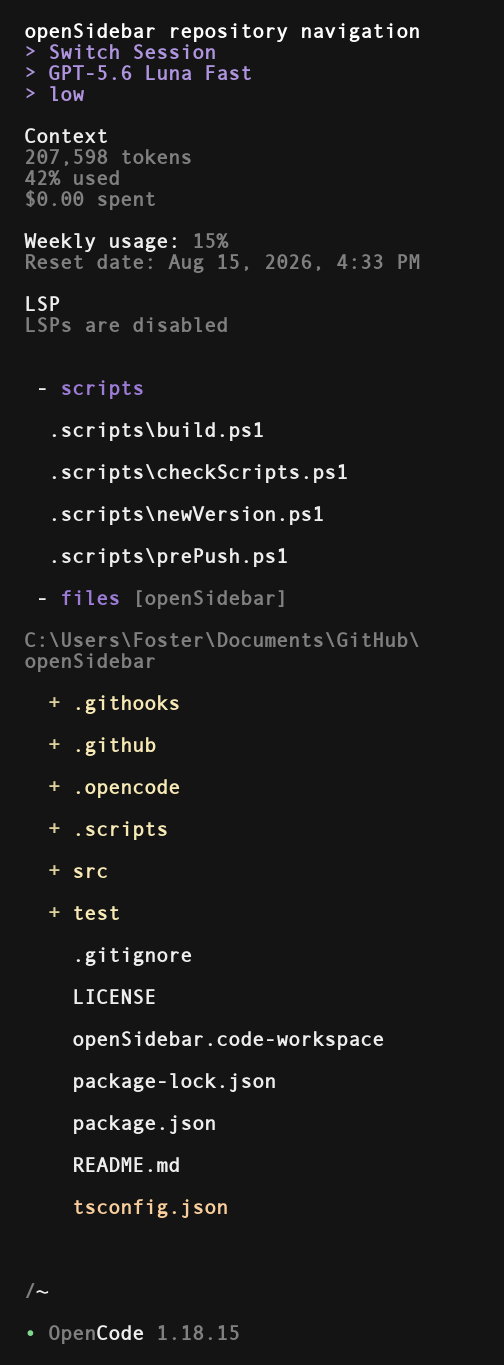
Features
Header buttons
> Switch Session : clicking here invokes the 'switch session' command
> model : brings up the 'select model' menu. the label shows the current model
> weight : toggle through model weight / variant options
Usage Meter
Supported subscriptions
- Codex
- OpenCode Go
- Cursor
Supported API services
- OpenRouter
Files / Scripts
Scripts
Quickly run or reference project scripts. Left-click a script to run it, right-click to drop the path into chat. Runs go through the configured shell/language runner.
Files
Browse files right in the sidebar. Folders expand on left-click. Left-click a file, or right-click anything, to paste its quoted path into chat. Current directory tries to auto-set based on how the OpenCode session was started, but this can also be manually entered by clicking on the files header.
Built in search leverages Everything by Void Tools to quickly search files/folders in your active OpenCode session directory.
Install
opencode plugin -g open-sidebar
Restart OpenCode.