
@kidsinai/kids-opencode-pluginopencode plugin that turns opencode into a kid-safe coding mentor: kid-safe system prompt, tool whitelist (no shell), DeepRouter routing, audit emission.
1
217
近 7 天 11
33.3
生态多维模型
2 个月前
2026-06-12
快速安装与配置
opencode.json写入当前项目的 opencode.json,只对这个仓库生效。
opencode.json
{
  "$schema": "https://opencode.ai/config.json",
  "plugin": ["@kidsinai/kids-opencode-plugin@0.0.24"]
}
写入 ~/.config/opencode/opencode.json,对所有项目生效。
~/.config/opencode/opencode.json
{
  "$schema": "https://opencode.ai/config.json",
  "plugin": ["@kidsinai/kids-opencode-plugin@0.0.24"]
}
若你要在本地改造这个插件,先装到项目里再从本地路径引用。
shell
pnpm add -D @kidsinai/kids-opencode-pluginopencode 启动时会通过内嵌运行时自动加载 npm 依赖并缓存至本地目录,无需手动在全局环境执行安装。
Kids OpenCode
A kid-safe command-line AI coding mentor for kids 12+. Built on opencode (MIT).
Status: 🟡 V0 in development — v0.0.16, Phase 1 done, Phase 2 in progress. Not yet safe for actual kids; see PLAN.md for what's left and CHANGELOG.md for what shipped.
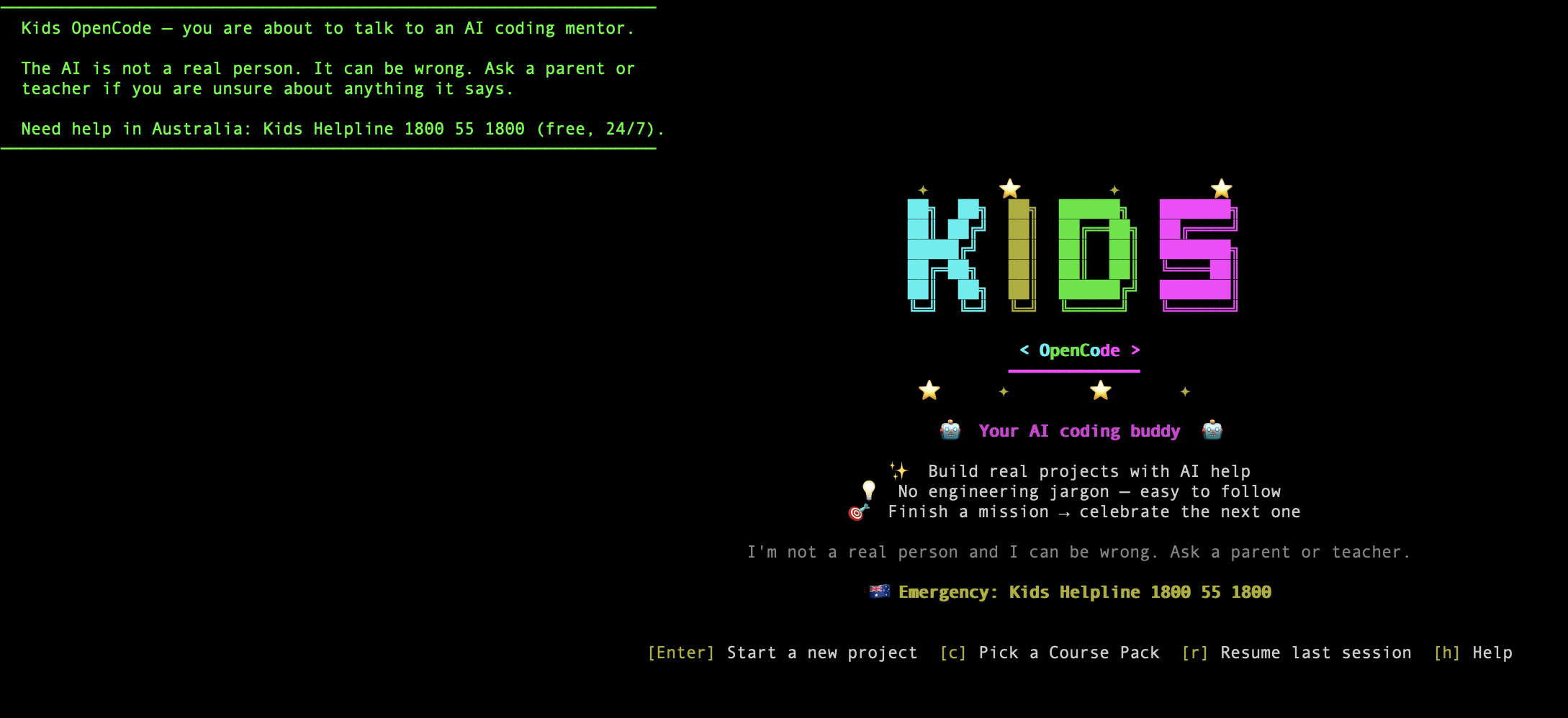
What it is
You run one command in a terminal:
kids-opencode
A kid-safe AI coding mentor starts up in your current folder. With no flags, the kid lands on a friendly project-type picker — "What do you want to make today?" — instead of a blank prompt:
- 🎮 A game you can play (
gamepack — HTML5 canvas, 3 missions) - 🌐 A website about you (
websitepack — HTML/CSS/JS, the original portfolio missions) - ✏️ Free play — press
[f]to just describe whatever you want to build
Each project type runs a short guided flow: a one-sentence idea prompt plus a set of named vibes (palette + font bundles the kid picks by a single word). A template scaffolder pre-renders a starting file so the kid sees something on screen within ~5 minutes — no new tool, the read/write/edit/glob/grep/webfetch whitelist is unchanged.
Throughout, the mentor will:
- Help your kid plan and build a small project, one step at a time
- Refuse to run shell commands or touch files outside the project folder
- Ask before every single tool use ("I'm about to write
index.html— OK?") - Never pretend to be human, never introduce adult topics; pops a Kids Helpline overlay if a dangerous topic comes up
- Print an AI-disclosure banner on first run each session (compliance artefact)
- Route all AI calls through DeepRouter so the family gets consistent moderation + a single bill (or use your own API key for free local use; see "Modes" below)
That's the entire user-facing experience. No web app, no desktop GUI, no installer wizard.
Install
curl -fsSL https://airbotix.ai/install/kids | sh
The installer:
- Installs the upstream
opencodeCLI if not present. - Installs our
@kidsinai/kids-opencode-pluginviaopencode plugin install. - Drops a kid-safe config at
~/.config/kids-opencode/opencode.json. - Puts a
kids-opencodewrapper in/usr/local/bin.
macOS + Linux supported. Windows installer planned for V1.
Use
cd ~/my-project
kids-opencode
You'll be prompted for what you want to build. Try:
"Help me make a personal portfolio website about my favourite hobby."
The mentor will plan it, then ask before writing each file.
Commands
The kids-opencode wrapper dispatches a small set of kid- and parent-facing subcommands before launching the mentor:
| Command | What it does |
|---|---|
kids-opencode |
Start at the project-type picker (default). |
kids-opencode --course <pack> |
Jump straight into a Course Pack (game, website). |
kids-opencode --course <pack> --mission <id> |
Start a specific mission, e.g. --course website --mission mission-1. |
kids-opencode check <mission> |
Run the mission's acceptance.yml against the kid's project folder and report pass/fail per check. |
kids-opencode register |
Parent does this once to register the family (links the DeepRouter wallet). |
kids-opencode --shutdown |
Stop the background opencode serve AI engine. |
kids-opencode --update |
Update to the latest version (the wrapper also nudges when one is available). |
kids-opencode --version |
Show the version. |
kids-opencode --kids-help |
Show kid-friendly help. |
Modes
| Mode | Who pays the LLM bill | When to use |
|---|---|---|
| DeepRouter (default) | Family Stars wallet (Airbotix-billed) | Most families. Set DEEPROUTER_API_KEY from app.airbotix.ai/portal/wallet. Includes the kid-safety moderation pipeline server-side. |
| Bring-your-own-key | The family's own Anthropic / OpenAI account | Power users + privacy-first families. Edit ~/.config/kids-opencode/opencode.json and point provider at your own key. You lose Airbotix's moderation pipeline; client-side plugin still enforces tool whitelist + system prompt. |
| School workshop | School credit pool | When launched via a Workshop class code. Stars bill goes to the school, not the family. |
How it's different from "just opencode"
| Vanilla opencode | kids-opencode | |
|---|---|---|
| Target age | adult devs | kids 12+ |
| Bash / shell tool | ✅ available | ❌ removed entirely |
| System prompt | dev-style ("write the code") | mentor-style ("never give the whole answer") |
| File access | wherever you run it | restricted to current project folder |
| Web access | open | whitelist: MDN, web.dev, W3C specs, airbotix.ai/docs |
| Provider routing | direct (you bring your own keys) | DeepRouter by default (Airbotix-managed moderation + billing); BYOK supported |
| First-run | configure providers | parent onboarding + age-band selection |
Packages
This is a Bun workspaces monorepo. Four packages ship to npm in lock-step under a single version:
| Package | Role |
|---|---|
@kidsinai/kids-opencode |
The CLI — bin/kids-opencode wrapper that dispatches subcommands and exec's the AI engine. |
@kidsinai/kids-opencode-plugin |
The opencode plugin: kid-safe system prompt, tool whitelist (no shell), DeepRouter routing, Course Pack loading, audit emission. |
@kidsinai/kids-opencode-tui-plugin |
TUI skin for upstream opencode: kid-warm theme, simplified 8-binding keymap, kid-friendly status text, Mission progress sidebar, Kids Helpline overlay. |
@kidsinai/kids-client |
Own-client TUI — talks to local opencode serve via the SDK, with the project-type picker, setup wizard, error screens ([c] Change settings, port_taken, stars_exhausted), and [w] Wallet / Top-up. |
Repo layout
kids-opencode/
├── bin/kids-opencode                       # Shell wrapper (the CLI entry point)
├── install.sh                              # Curl-able installer
├── config/
│   ├── opencode.json.template              # Default config installed to ~/.config/kids-opencode/
│   └── system-prompt.md                    # Canonical kid-safe prompt (also bundled in plugin)
├── packages/
│   ├── kids-opencode/                      # @kidsinai/kids-opencode (CLI)
│   ├── kids-plugin/                        # @kidsinai/kids-opencode-plugin
│   │   ├── src/                            # Plugin hooks + check-runner
│   │   └── course-packs/                   # Bundled missions (ship with the npm package)
│   │       ├── _stub/                      # Public CI fixture
│   │       └── private/                    # → kidsinai/kids-flows submodule (game, website)
│   ├── kids-tui-plugin/                    # @kidsinai/kids-opencode-tui-plugin
│   └── kids-client/                        # @kidsinai/kids-client (own-client TUI)
├── docs/
│   ├── upstream-architecture.md            # 1-page audit of opencode internals
│   ├── product/project-types-prd.md        # Project-type picker + guided flow PRD
│   └── compliance/                         # Per-jurisdiction compliance audit (au.md, etc.)
├── CHANGELOG.md / SECURITY.md / CONTRIBUTING.md
├── PLAN.md                                 # Phase-by-phase to V0
└── KIDSINAI.md                             # Product notes
Cross-repo dependencies
- DeepRouter (
~/Documents/sites/deeprouter-ai/deeprouter/) — LLM gateway. All managed-mode traffic flows through it. Where moderation, OpenAI ZDR injection, and per-family billing actually happen. Airbotix-AI/platform-backend— issues per-family DeepRouter API keys, stores parental consent records, persists audit log. TheAirbotix-AI/airbotix-appSPA is the parent-facing portal that surfaces all of this.Airbotix-AI/airbotix— marketing site, hostsairbotix.ai/install/kidsand public compliance docs.
Backed by


Kids OpenCode is built by Airbotix in formal collaboration with the University of Southern Queensland (UniSQ) and CSIRO (via the RUIC program).
License
MIT — same as upstream opencode. Repo is currently private; will go public alongside V0 launch.
V0 what-works / what-doesn't
✅ Works now (v0.0.16):
- Wrapper script + subcommands (
check/register/--course/--mission/--shutdown/--update/--version/--kids-help), install script, config template - Kid-safe plugin (tool whitelist, system prompt, Course Pack loading, per-tool Stars cost estimate, audit emission)
- Project-type picker + per-type guided flow (game + website packs, vibes, template scaffolders)
- Own-client TUI (
kids-client) + TUI plugin skin (kids-warm theme, simplified keymap, Mission sidebar, Kids Helpline overlay) - Wallet / Stars top-up flow (
[w]shortcut → parent portal in the browser; TUI never touches card data) - Acceptance check runner (
kids-opencode check <mission>againstacceptance.yml) - Security hardening: random
OPENCODE_SERVER_PASSWORD(auth on the local serve),chmod 700config dir, SHA-256 wrapper verification, per-install device-id - CI (typecheck + plugin/TUI-plugin unit tests + shell lint) and npm/installer release pipelines
- Compliance audit for AU jurisdiction (
docs/compliance/au.md)
🟡 In progress:
- Real end-to-end run on a kid's machine with a live DeepRouter key
- npm publish of all four packages (
@kidsinaiscope auth) - TUI slot-rendering (logo / prompt / sidebar widget) — Phase 2.4b
kids-opencode registerwired to per-family key issuance (platform-backend side)
🔴 Hard blockers before any real kid uses this:
- Lawyer review of AU compliance (
docs/compliance/au.md§9 — 8 open items) - Public privacy policy + ToS + parental consent forms on airbotix.ai
- Real DeepRouter staging tenant + per-family key issuance (platform-backend side)
- Red-team test set: at least 50 prompt-injection / jailbreak attempts that the plugin + DeepRouter must safely refuse
See PLAN.md for the full punch list.