
1
300
近 7 天 19
37.3
生态多维模型
13 天前
2026-08-06
快速安装与配置
opencode.json写入当前项目的 opencode.json,只对这个仓库生效。
opencode.json
{
  "$schema": "https://opencode.ai/config.json",
  "plugin": ["@foae/opencode-timings@0.4.0"]
}
写入 ~/.config/opencode/opencode.json,对所有项目生效。
~/.config/opencode/opencode.json
{
  "$schema": "https://opencode.ai/config.json",
  "plugin": ["@foae/opencode-timings@0.4.0"]
}
若你要在本地改造这个插件,先装到项目里再从本地路径引用。
shell
pnpm add -D @foae/opencode-timingsopencode 启动时会通过内嵌运行时自动加载 npm 依赖并缓存至本地目录,无需手动在全局环境执行安装。
A tiny OpenCode TUI sidebar plugin that shows per-session timing — how much wall-clock the session has taken and how much of that was actually spent waiting on the model.
It renders into the same right-hand sidebar as the Quota / MCP / LSP / Todo / Files panels, reading the session's messages directly from the TUI's reactive state. Nothing is ever injected into the message stream, so there is zero context-window pollution.
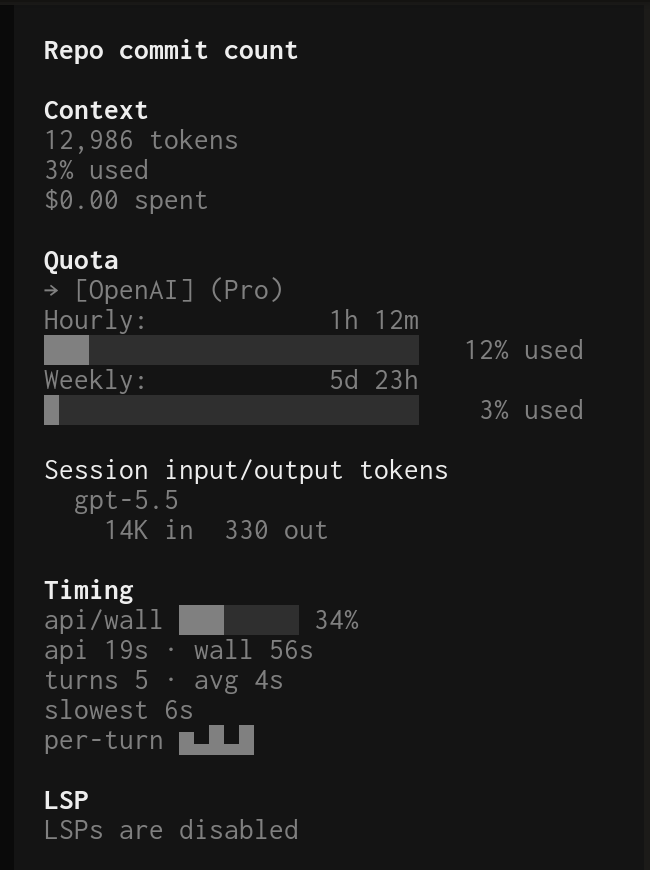
Timing
api/wall ██████░░ 78%
api 31s · wall 40s
turns 4 · avg 8s
slowest 19s
tok/s avg 43 · last 51
tok in 1.2M · out 45k
per-turn ▄█▂▂
speed ▂▄█▆
Every row names itself, so there are no unlabeled numbers or glyphs to decode.
Metrics
| Row | Meaning |
|---|---|
api/wall |
How much of wall-clock was actual model inference, as a bar gauge and percent. |
api |
Total assistant inference time — the sum of time.completed − time.created over every completed assistant message. |
wall |
Span from the first to the last message timestamp. Includes the time you spend reading/typing between turns, so api is always a fraction of it. |
turns |
Number of completed assistant messages, plus the average per-turn duration. |
slowest |
The single slowest assistant message. |
tok/s |
Generation speed: tokens the model generated (output + reasoning) over api time — avg across the session, last for the most recent turn. |
tok in / out |
Total tokens the model read (input + cache read/write) vs generated (output + reasoning), across completed turns. |
per-turn |
Sparkline of each recent turn's duration. |
speed |
Sparkline of each recent turn's tok/s. |
The panel is always shown; before the first turn its values read zero.
A note on honesty: no metric reads the clock — everything derives from message
timestamps, so idling between turns (or leaving a session open) moves only
wall and the api/wall ratio, which exist precisely to show that contrast.
The one thing timestamps can't separate is time inside a turn: a turn's span
(completed − created) includes tool execution and any wait on you (permission
prompts, questions), so on such turns api reads high and tok/s reads low —
it's the effective speed you experienced, not the model's raw decode speed.
Install
Add it to the plugin array of the TUI config that OpenCode loads
(~/.config/opencode/tui.json or tui.jsonc) — this is a TUI plugin, so it
belongs in tui.json, not opencode.json:
{
  "$schema": "https://opencode.ai/tui.json",
  "plugin": ["@foae/opencode-timings@latest"]
}
OpenCode installs the plugin and its dependencies with Bun at startup. Restart
OpenCode and open the session sidebar to see the Timing panel.
You can also pin a version, e.g. @foae/opencode-timings@0.1.2.
Configuration
Pass options using the tuple form ([spec, options]) in tui.json:
{
  "$schema": "https://opencode.ai/tui.json",
  "plugin": [
    ["@foae/opencode-timings@latest", {
      "mode": "fancy",
      "fields": {
        "ratio": true, "api": true, "wall": true, "turns": true, "avg": true, "slow": true,
        "tps": true, "lastTps": true, "tokIn": true, "tokOut": true,
        "sparkline": true, "speedline": true
      }
    }]
  ]
}
| Option | Values | Default | Meaning |
|---|---|---|---|
mode |
"fancy" | "simple" |
"fancy" |
fancy draws the gauge bar on the api/wall row and adds the two sparklines; simple is the same rows without the bar or sparklines. |
fields |
object of booleans | all true |
Each toggles exactly one value: ratio (the api/wall gauge + percent), api, wall, turns, avg, slow, tps (session-average tok/s), lastTps (latest turn's tok/s), tokIn, tokOut, sparkline (per-turn durations), speedline (per-turn tok/s) — the last two are fancy-only. Values that share a line drop out individually. |
With no options (a plain "@foae/opencode-timings@latest" string), it defaults to fancy mode with all fields shown.
Requirements
- OpenCode
1.15.xor newer (uses the TUI slot plugin API).
Development
Built and run with Bun.
src/timing.ts— pure timing math, formatting, and config parsing (no JSX), unit-tested.src/tui.tsx— the SolidJS sidebar component and the slot registration.
bun install
bun run typecheck   # tsc --noEmit
bun test            # unit tests for the pure logic in src/timing.ts
bun run build       # compile src/ to dist/ with babel-preset-solid
The package ships dist/tui.js, pre-compiled with babel-preset-solid
(universal renderer, moduleName: "@opentui/solid"). Shipping raw .tsx no
longer works: OpenCode installs plugins under a node_modules path, and since
@opentui/solid 0.4.x the host's Solid JSX transform skips node_modules, so
raw JSX gets compiled by Bun's plain (non-reactive) JSX runtime and the panel
renders once and never updates. The compiled output imports bare
@opentui/solid / solid-js specifiers, which the host maps onto its own
shared runtime instances.
opentui, solid-js, and the OpenCode plugin/SDK are peer dependencies — at runtime they come from the OpenCode host so the plugin shares its renderer; the devDependencies mirror them for local typecheck and tests.
License
MIT — see LICENSE.