@bojackduy/opencode-telescopeOpenCode TUI plugin for fuzzy and semantic search across local conversation history, session transcripts, and AI coding chats
1
2,714
近 7 天 701
43.5
生态多维模型
2 天前
2026-08-17
快速安装与配置
opencode.json写入当前项目的 opencode.json,只对这个仓库生效。
opencode.json
{
  "$schema": "https://opencode.ai/config.json",
  "plugin": ["@bojackduy/opencode-telescope@1.2.4"]
}
写入 ~/.config/opencode/opencode.json,对所有项目生效。
~/.config/opencode/opencode.json
{
  "$schema": "https://opencode.ai/config.json",
  "plugin": ["@bojackduy/opencode-telescope@1.2.4"]
}
若你要在本地改造这个插件,先装到项目里再从本地路径引用。
shell
pnpm add -D @bojackduy/opencode-telescopeopencode 启动时会通过内嵌运行时自动加载 npm 依赖并缓存至本地目录,无需手动在全局环境执行安装。
OpenCode TUI plugin for fast keyword search across local conversation history, session transcripts, and past AI coding chats.
Install the npm package @bojackduy/opencode-telescope to grep OpenCode chat history, find old code snippets, scope searches to user asks / assistant replies / thoughts / patches, and jump back to any session instantly.
Inspired by telescope.nvim — a fuzzy finder for your conversation history.
Links
- Documentation: https://bojackduy.github.io/opencode-telescope/
- npm: https://www.npmjs.com/package/@bojackduy/opencode-telescope
- GitHub: https://github.com/bojackduy/opencode-telescope
- Issues: https://github.com/bojackduy/opencode-telescope/issues
Use cases
- "I know I discussed this somewhere" — grep all your sessions by keyword
- "What did I ask about auth caching?" — scope search to only your prompts with
user:auth caching - "Find that code snippet" — search for code you saw in a past LLM response
- "Find that patch" — scope search to edits and patches with
patch:validateForSubmit - "Revisit a decision" — find the conversation where you chose approach X
- "Session journal" — browse your entire conversation history like a timeline
Features
- Fuzzy grep — fast sidecar FTS search across your prompts and assistant replies
- Scoped queries — opt into noisier fields with
thought:,patch:, ortool:name, or narrow withuser:andassistant: - Semantic memory search — optional opt-in local vector search with
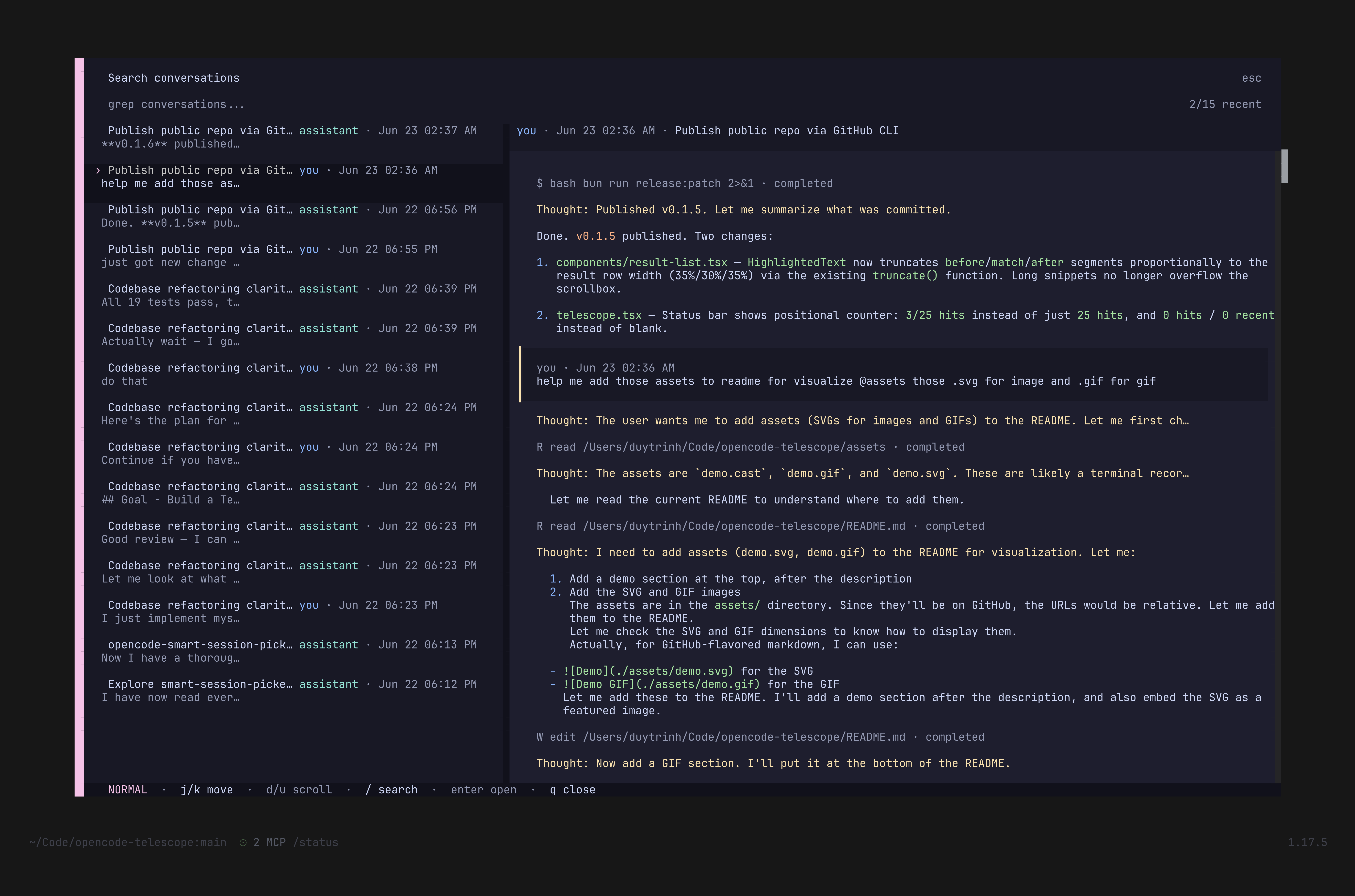
llama-serverembeddings andsqlite-vec - Live preview — preview the matched conversation result before opening
- Find & jump — select any result and jump straight to that session
- Neovim Telescope-style UX — familiar
<leader>fkeybind and/telescopecommand - Local-first search — reads your OpenCode session database without sending chat history to a remote service
Installation
Install from npm as @bojackduy/opencode-telescope.
Add the plugin to your tui.json:
{
  "plugin": ["@bojackduy/opencode-telescope"],
}
To use it from a local clone:
"plugin": ["./path/to/opencode-telescope"]
Usage
| Action | Key / Command |
|---|---|
| Open search | <leader>f or /telescope |
| Type to filter | Fuzzy match against conversation text |
| Navigate results | ↑ / ↓ or j / k |
| Preview | Select a result to see the conversation preview |
| Open | Press Enter to jump to the selected session |
| Owner filter | Press o to cycle all / you / assistant |
Scoped Search Queries
Telescope defaults to fast keyword search across user prompts and assistant replies only. Thoughts, patches, file names inside patches, and tool output are intentionally excluded from bare search so normal typing stays low-noise. Add a scope prefix when you want those fields:
| Query | Searches |
|---|---|
user:timeout |
Your prompts only |
assistant:timeout |
Assistant replies only |
thought:indexing |
Assistant reasoning/thought parts |
patch:SearchResponse |
Code edits from apply_patch, edit, and write tools |
in:patch SEARCH_WORKER_TIMEOUT_MS |
Same as patch:..., useful when you prefer in:<scope> |
tool:apply_patch SearchResponse |
A specific tool's indexed content |
timeout patch:SearchResponse |
One-line OR search: bare conversation text for timeout or patches for SearchResponse |
user:auth patch:SearchResponse |
One-line OR search across mutually exclusive scopes |
patch:"SearchResponse kind" |
Quoted scoped search value with spaces |
text:patch:SearchResponse |
Literal conversation text that looks like scope syntax |
\patch:SearchResponse |
Same literal search using a leading backslash escape |
Scoped queries highlight only the searched term, so patch:SearchResponse highlights SearchResponse, not the patch: prefix. Multiple one-line clauses use OR, which keeps mixed scopes useful because one indexed row cannot be both user and patch. Explicit scopes override the owner filter.
Semantic Search
Semantic search is optional and opt-in. Keyword and scoped search work out of the box; set OPENCODE_TELESCOPE_ENABLE_VECTOR=1 to enable the local vector path.
The semantic path stays local-first:
- OpenCode's SQLite database is opened read-only.
- Derived keyword and vector indexes are stored in Telescope's sidecar database.
- Keyword updates are incremental: Telescope serves the last-good index while new conversation parts synchronize in small background batches.
- Search and preview workers stay warm across picker openings; keyboard navigation never performs SQLite work directly.
- Embeddings are generated through your local
llama-serverendpoint. - If embeddings or
sqlite-vecare unavailable, Telescope falls back to keyword search.
Quick setup:
mkdir -p "$HOME/.local/share/opencode-telescope/models"

huggingface-cli download \
  nomic-ai/nomic-embed-text-v1.5-GGUF \
  nomic-embed-text-v1.5.f16.gguf \
  --local-dir "$HOME/.local/share/opencode-telescope/models" \
  --local-dir-use-symlinks false

llama-server \
  -m "$HOME/.local/share/opencode-telescope/models/nomic-embed-text-v1.5.f16.gguf" \
  --embedding \
  --pooling mean \
  -c 8192 \
  -ub 8192 \
  --host 127.0.0.1 \
  --port 8081
Then launch OpenCode with OPENCODE_TELESCOPE_ENABLE_VECTOR=1. Telescope uses http://127.0.0.1:8081 by default and will rebuild the vector sidecar from your local session history.
Useful environment variables:
OPENCODE_TELESCOPE_EMBED_BASE_URL=http://127.0.0.1:8081
OPENCODE_TELESCOPE_EMBED_MODEL=nomic-embed-text-v1.5
OPENCODE_TELESCOPE_HYBRID_ALPHA=0.45
OPENCODE_TELESCOPE_ENABLE_VECTOR=1
OPENCODE_TELESCOPE_DISABLE_VECTOR=1
OPENCODE_TELESCOPE_SQLITE_LIB=/opt/homebrew/opt/sqlite/lib/libsqlite3.dylib
OPENCODE_TELESCOPE_SQLITE_VEC_EXT=/path/to/vec0
See the full tutorial in docs/semantic-search.md.
Configuration
Telescope reads optional plugin-specific config from:
~/.config/opencode/opencode-telescope/config.json
If $XDG_CONFIG_HOME is set, the path is:
$XDG_CONFIG_HOME/opencode/opencode-telescope/config.json
Missing config, invalid JSON, and invalid individual fields are ignored. Defaults are kept for anything not configured.
Example:
{
  "openKey": "<leader>f",
  "keys": {
    "moveDown": ["down", "j"],
    "moveUp": ["up", "k"],
    "scrollPreviewDown": ["d"],
    "scrollPreviewUp": ["u"],
    "open": ["enter", "return"],
    "close": ["q", "escape"],
    "insertMode": ["/"],
    "normalMode": ["ctrl+q"],
    "toggleOwner": ["o"]
  }
}
Key strings support simple names like j, k, down, up, enter, return, and escape, plus modifier strings like ctrl+q.
How it works
Reads the OpenCode local SQLite session database in read-only mode, parses conversations into searchable text, builds a Telescope-owned sidecar index, and opens the selected session through the existing TUI route. Optional semantic search adds local embeddings and sqlite-vec vector retrieval on top of the same sidecar.
Keywords
OpenCode plugin, OpenCode TUI, fuzzy finder, semantic search, vector search, embeddings, sqlite-vec, llama-server, conversation search, chat history search, AI coding session search, LLM history, local session search, Telescope-style picker.