
@aundal/opencode-token-monstersOpenCode plugin that shows Token Monsters token usage breakdowns in the TUI sidebar.
0
52
近 7 天 14
30.6
生态多维模型
5 天前
2026-08-14
快速安装与配置
opencode.json写入当前项目的 opencode.json,只对这个仓库生效。
opencode.json
{
  "$schema": "https://opencode.ai/config.json",
  "plugin": ["@aundal/opencode-token-monsters@0.1.5"]
}
写入 ~/.config/opencode/opencode.json,对所有项目生效。
~/.config/opencode/opencode.json
{
  "$schema": "https://opencode.ai/config.json",
  "plugin": ["@aundal/opencode-token-monsters@0.1.5"]
}
若你要在本地改造这个插件,先装到项目里再从本地路径引用。
shell
pnpm add -D @aundal/opencode-token-monstersopencode 启动时会通过内嵌运行时自动加载 npm 依赖并缓存至本地目录,无需手动在全局环境执行安装。
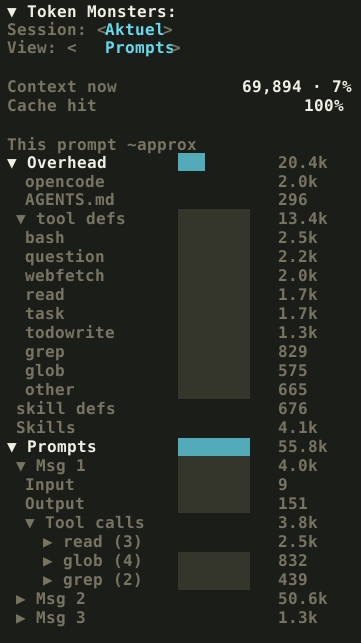
Token Monsters adds a token usage sidebar to OpenCode. It shows the current context size, cache hit percentage, session totals, current prompt totals, prompt/tool/file breakdowns, and tool-definition overhead.
All numbers are approximate and counted with gpt-tokenizer using the OpenAI o200k tokenizer. For Claude, Copilot, and other non-OpenAI models, treat the numbers as a ballpark.
Install
Add the plugin to both OpenCode config files.
~/.config/opencode/opencode.json
{
  "$schema": "https://opencode.ai/config.json",
  "plugin": [
    "@aundal/opencode-token-monsters@latest"
  ]
}
Restart OpenCode after saving. OpenCode installs npm plugins automatically at startup.
~/.config/opencode/tui.json
{
  "$schema": "https://opencode.ai/tui.json",
  "plugin": [
    "@aundal/opencode-token-monsters@latest"
  ]
}
Install with OpenCode
Paste this prompt into OpenCode:
Install the OpenCode plugin @aundal/opencode-token-monsters@latest into my global opencode.json and tui.json plugin arrays. Preserve my existing config, validate config shapes against https://opencode.ai/config.json and https://opencode.ai/tui.json, and tell me to restart OpenCode when done.
Usage
Token Monsters appears in the session sidebar.
Use /tokenmonster to fold or unfold the sidebar panel.
You can also click the Token Monsters header to fold or unfold it with the mouse.
Views
Session: Totalshows everything captured since the session started.Session: Aktuelshows the last request only.View: Promptsgroups usage per prompt turn.View: Toolsaggregates tool and file usage.
Package
The package exports one OpenCode plugin module with both server and TUI hooks. The server hook writes token capture data, and the TUI hook renders the sidebar.
End users only install the npm package in opencode.json and tui.json. No build step is needed for end users. The published package ships the compiled files.
Development
bun install
bun run build
npm pack
Publish
bun run build
npm pack
npm publish --access public
License
MIT