
@aeondave/opencode-tokenomicsReal-time token usage & cost dashboard for OpenCode, split by project. Boots a local web server on startup and opens it in the browser.
2
24
近 7 天 6
29.3
生态多维模型
2 个月前
2026-06-17
快速安装与配置
opencode.json写入当前项目的 opencode.json,只对这个仓库生效。
opencode.json
{
  "$schema": "https://opencode.ai/config.json",
  "plugin": ["@aeondave/opencode-tokenomics@0.1.0"]
}
写入 ~/.config/opencode/opencode.json,对所有项目生效。
~/.config/opencode/opencode.json
{
  "$schema": "https://opencode.ai/config.json",
  "plugin": ["@aeondave/opencode-tokenomics@0.1.0"]
}
若你要在本地改造这个插件,先装到项目里再从本地路径引用。
shell
pnpm add -D @aeondave/opencode-tokenomicsopencode 启动时会通过内嵌运行时自动加载 npm 依赖并缓存至本地目录,无需手动在全局环境执行安装。
Real-time token usage & cost for OpenCode, split by project, in a live web dashboard.
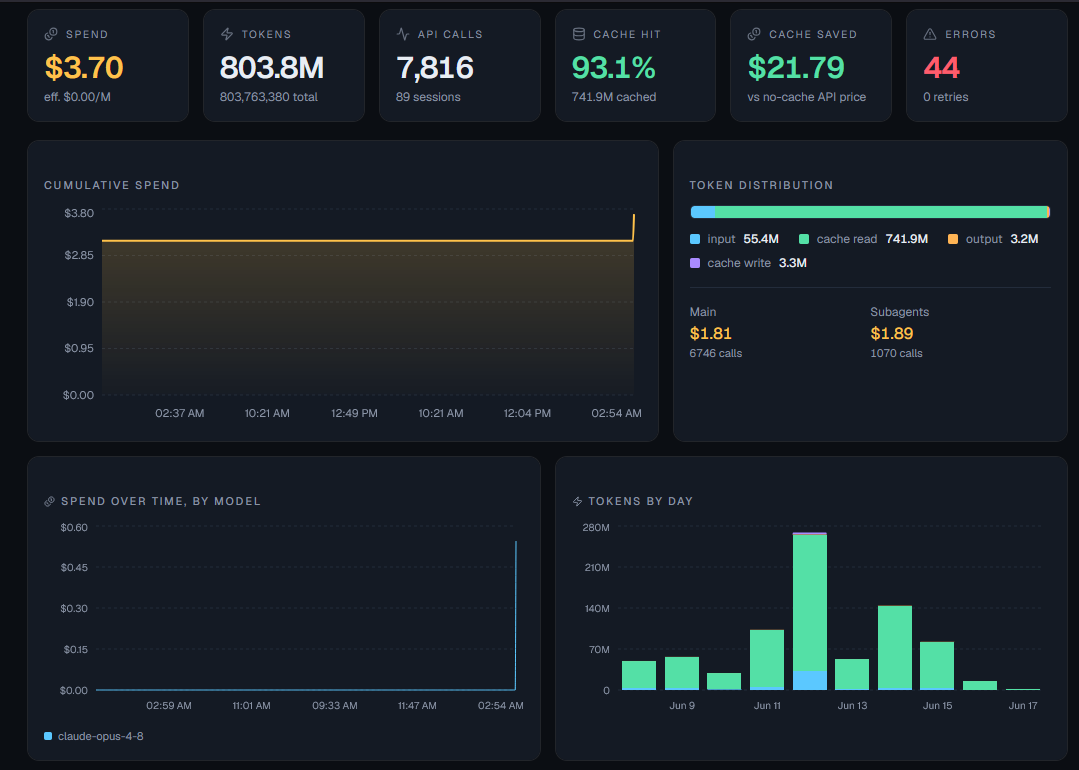
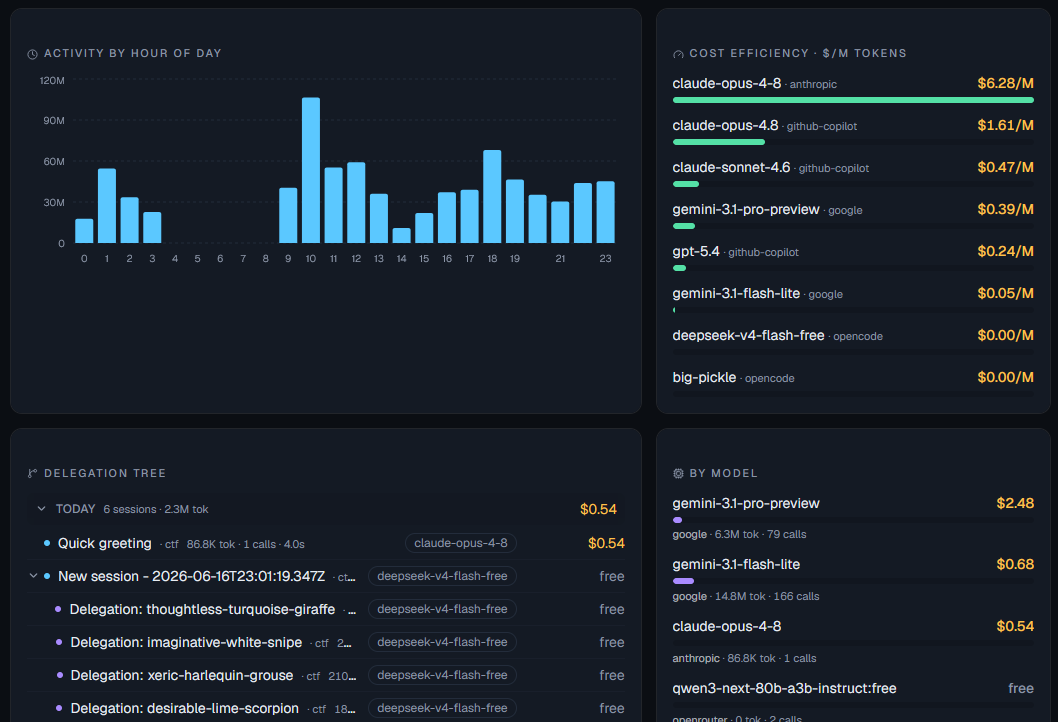
When opencode starts, this plugin boots a small local web server and opens a dashboard in your browser. It listens to opencode's event stream and shows — live, as you work — how much each project, model, and subagent is spending, with cache-efficiency and savings analysis. It's always-on, real-time, per-project, and in a real UI with charts rather than a one-shot text report.
What you get
- Live spend — total USD cost, tokens, and API calls, updating in real time over SSE.
- Per-project split — usage is keyed by project root, so every repo you touch is tracked separately, navigable from a searchable, sortable sidebar that scales to hundreds of projects.
- Agents & subagents — child sessions shown as a tree with who (agent), what (title/model), how much (cost/tokens/calls) and how long (wall-clock duration) for each.
- Agent × model — cross-breakdown of which agent spent how much on which
provider/model. - By model — cost and tokens per
provider/model. - Cache efficiency — cache hit rate, and the real money caching saved (counted only where opencode actually billed a per-token cost, so free/self-hosted usage never shows phantom savings).
- Token distribution — fresh input / cache read / output / cache write channels.
- Context breakdown — estimated split of input tokens across system prompt, tool definitions, environment, project tree and custom instructions.
- Tool usage — per tool: call count, failed calls, estimated output tokens, schema size, complexity, total time.
- Skills loaded — which skills were loaded (via the
skilltool), how many times, and the tokens of skill content pulled into context. - Reliability — errored assistant messages and provider retries, rolled up per model, per session and overall.
- Charts — cumulative spend, spend over time stacked by model, tokens by day (by channel), activity by hour of day, and cost efficiency ($/M tokens) per model.
- Configurable cards — a settings panel (gear, top-right) toggles every card on/off and saves to
~/.config/opencode/tokenomics.json. Hidden cards are also skipped in computation, so heavy views don't tax low-resource machines. Everything starts on. - Real vs estimated cost — "Spend" is always what opencode actually bills (so a free model
reads
$0/free, never phantom spend). On subscription/zen plans that reportcost: 0, a clearly labeled~$x/ "≈ at API rates" estimate is shown alongside so you still gauge API-equivalent value.
How it works
opencode (Bun)                          your browser
┌───────────────────────────┐          ┌─────────────────────────────┐
│ plugin (src/plugin)       │   SSE    │ dashboard (Vite+React+      │
│  events → aggregator      │ ───────► │  shadcn/ui + recharts)      │
│  per-project snapshots    │  /api/   │  KPIs · charts · tree       │
│  Bun.serve on :5757 ──────┼──────────┤  served from dashboard/dist │
└──────────┬────────────────┘          └─────────────────────────────┘
           │ persists snapshots to ~/.local/share/opencode/tokenomics
           ▼
   projects/<key>.json   ← also read/merged across opencode windows
- The plugin translates
message.updated(assistant billing),session.created/updated(subagent tree), and tool/agent message parts into per-projectUsageRecords. - The first opencode instance to grab the port runs the web server; other instances (other projects/windows) act as writers, and their data reaches the dashboard through the shared data directory — so the dashboard shows all your projects at once.
- Costs come straight from opencode when available; otherwise they're estimated from
pricing.ts(override in~/.local/share/opencode/tokenomics/pricing.json).
Installation
From npm
Add the package to the plugin array in your OpenCode config at ~/.config/opencode/opencode.json:
{
  "plugin": ["@aeondave/opencode-tokenomics@latest"]
}
OpenCode installs the plugin and its dependencies automatically on the next start. To pin a
version, replace @latest with a specific version (e.g. @0.1.0). The published package ships
the built dashboard, so nothing else is needed — restart OpenCode and it opens the dashboard.
From source (git clone)
Run from a local checkout — useful before publishing or while hacking on the plugin.
Clone the repository and install dependencies (plugin + dashboard), then build the dashboard once
(the plugin serves the built assets from dashboard/dist):
git clone https://github.com/AeonDave/opencode-tokenomics.git
cd opencode-tokenomics
bun install
npm --prefix dashboard install
npm run dashboard:build      # outputs dashboard/dist
Create a shim file in your global plugin directory that re-exports the checkout's entry point. The
directory is plugin (singular):
- Path:
~/.config/opencode/plugin/tokenomics.ts - Content — a single line pointing at the absolute path of the cloned entry point:
export { default } from "/absolute/path/to/opencode-tokenomics/src/plugin/index.ts"
On Windows, use forward slashes and include the drive letter:
export { default } from "C:/opencode-tokenomics/src/plugin/index.ts"
Restart OpenCode. On startup it prints [tokenomics] live dashboard → http://localhost:5757 and
opens it. The plugin loads from your working tree, so edits to src/ take effect on the next
restart. Delete the shim file to uninstall. Until you build the dashboard, a built-in live page is
served instead (same data, fewer charts).
Use one method at a time. If you add the npm entry, remove the local shim (and vice versa) to avoid loading the plugin twice.
Dashboard development
npm --prefix dashboard run dev # Vite dev server on :5173, proxies /api → :5757
Run opencode (so the plugin server is up on :5757), then open the Vite dev URL for hot reload.
Configuration (environment variables)
| Variable | Default | Purpose |
|---|---|---|
OPENCODE_TOKENOMICS_PORT |
5757 |
Preferred web server port (auto-scans upward if busy) |
OPENCODE_TOKENOMICS_DIR |
~/.local/share/opencode/tokenomics |
Data directory |
OPENCODE_TOKENOMICS_OPEN |
(on) | Set to 0 to not auto-open the browser |
The port is a preferred starting point: if it's taken by another server (e.g. another plugin), tokenomics scans upward to the next free port and opens the browser there. A second opencode window detects the running tokenomics server and shares it (one dashboard, all projects) instead of starting a duplicate.
pricing.json in the data dir overrides per-model rates (USD per 1M tokens):
{ "anthropic/claude-opus-4-8": { "input": 5, "output": 25, "cacheRead": 0.5, "cacheWrite": 6.25 } }
Set every rate to 0 to treat a model as free — handy for self-hosted / custom providers whose
id doesn't contain free (e.g. a local vLLM model), so they don't show an API-rate estimate.
API
GET /api/health→{ ok: true, service: "opencode-tokenomics" }GET /api/stats→ mergedGlobalSnapshot(all projects)GET /api/stream→text/event-stream, pushes theGlobalSnapshoton every changeGET /api/config→{ cards: { <id>: boolean } }(which cards are enabled)PUT /api/config→ body{ cards }— persists the card selection to~/.config/opencode/tokenomics.jsonDELETE /api/projects/:key·DELETE /api/projects→ delete one project's stored data, or all
Notes & limitations
- Per-token cost is taken from opencode when present; the price table is a fallback/estimate.
- Genuinely free models (id contains a
freetoken, e.g.deepseek-v4-flash-free,…:free) are treated as$0with no estimate — their tokens are still tracked, only the dollar figure is zero. - The cache-savings figure counts only records opencode actually billed (real cost > 0): it's the difference between paying full input price and the cache-discounted price at table rates. Free, self-hosted and subscription ($0) usage contributes no savings — caching saves no real money there.
- The native input/output/cache/reasoning token channels are exact (straight from opencode).
The context breakdown, per-tool output/schema sizes and tool complexity are estimates from a
lightweight, dependency-free tokenizer (
~chars/4blended with word count) applied to the system prompt and tool schemas — good for proportions, not billing.
MIT