
@whomwah/opencode-nelson-muntzNelson Muntz iterative development loop plugin for OpenCode
3
18
6 in 7 days
22.1
Multi-signal model
6 months ago
2026-02-03
Install and configure
opencode.jsonWrites to this project's opencode.json — applies to this repository only.
opencode.json
{
  "$schema": "https://opencode.ai/config.json",
  "plugin": ["@whomwah/opencode-nelson-muntz@1.2.0"]
}
Writes to ~/.config/opencode/opencode.json — applies to every project.
~/.config/opencode/opencode.json
{
  "$schema": "https://opencode.ai/config.json",
  "plugin": ["@whomwah/opencode-nelson-muntz@1.2.0"]
}
If you want to modify the plugin locally, install it into the project and reference the local path.
shell
pnpm add -D @whomwah/opencode-nelson-muntzopencode loads npm dependencies through its embedded runtime on startup and caches them locally — no manual global install needed.


Plan-based iterative development loops for OpenCode. Create structured plans, execute tasks automatically, and commit progress as you go.
Why "Nelson Muntz"? Named after the Simpsons character. Inspired by the Ralph Wiggum technique. Ha-ha!
What is Nelson?
Nelson is a development plugin that combines structured planning with automated execution. Create a plan with tasks, then let Nelson work through them one by one, committing progress after each task.
The plugin listens for OpenCode's session.idle event to continue work automatically, creating a feedback loop where the AI iteratively builds on its own work.
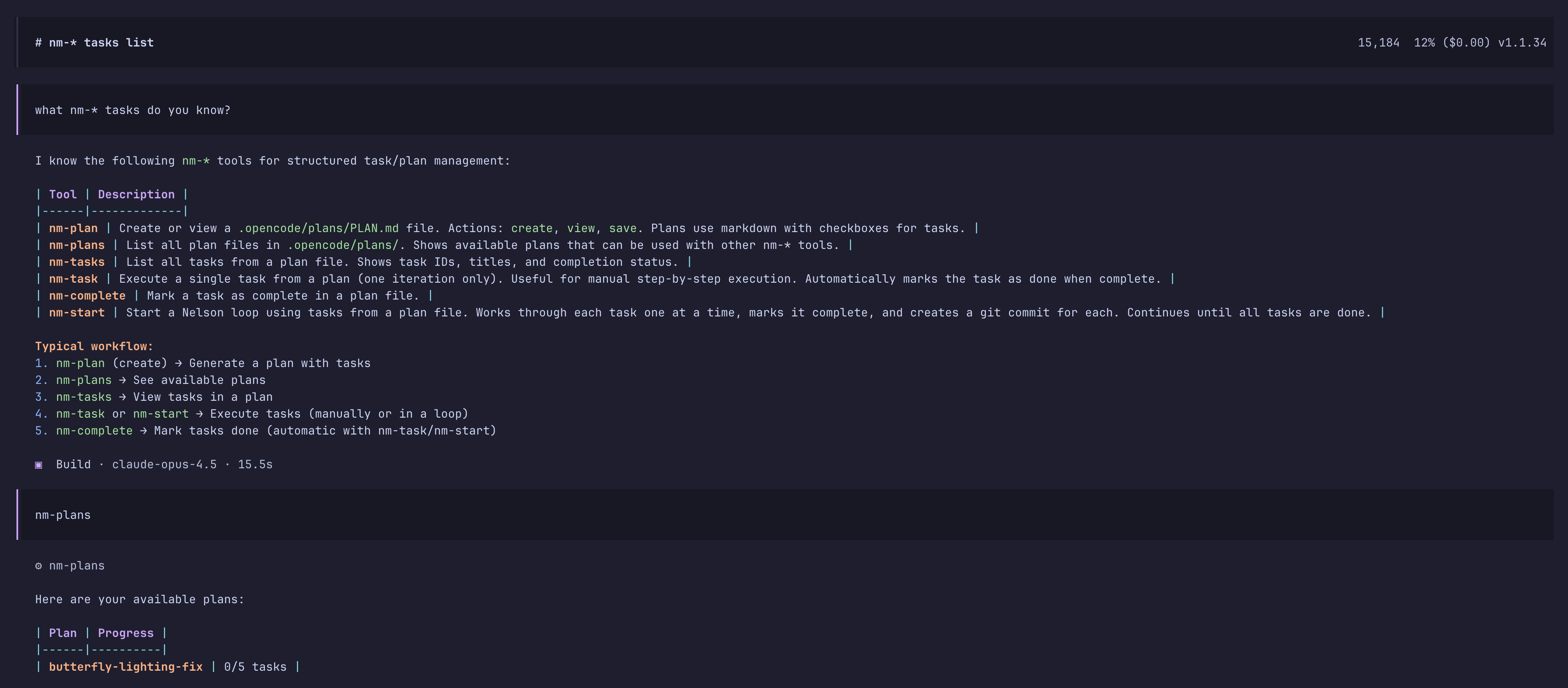
Core Workflow
# Create a plan through conversation:
nm-plan name="my-api"

# Work through tasks automatically:
nm-start

# Loop works through tasks one by one
# Stops when: all tasks marked [x] OR maxIterations reached
Installation
Note: This plugin has been primarily tested with Anthropic models (Claude) and works best with them.
From npm (recommended for end users)
Add the plugin to your opencode.json:
{
  "$schema": "https://opencode.ai/config.json",
  "plugin": ["@whomwah/opencode-nelson-muntz"]
}
OpenCode will automatically install it on startup.
From source (for development)
# Clone the repository
git clone https://github.com/whomwah/opencode-nelson-muntz.git
cd opencode-nelson-muntz

# Install dependencies
just install

# Link to OpenCode for local development
just link-local    # Global: ~/.config/opencode/plugin/
just link-project  # Project: .opencode/plugin/
Usage
Nelson's tools are designed to complement OpenCode's built-in Plan and Code modes:
- OpenCode Plan mode - For thinking, designing, and conversation without making changes
- OpenCode Build mode - For executing tasks and writing code
Nelson's nm-plan and nm-start tools align with this workflow:
| OpenCode Mode | Nelson Tool | What Happens |
|---|---|---|
| Plan mode | nm-plan |
Design and refine your plan in conversation |
| Build mode | nm-start |
Execute tasks, write code, commit changes |
Plan Mode
Use OpenCode's Plan mode with nm-plan to create and refine your plan before any code is written. This is an iterative conversation where you shape the plan until you're happy with it.
Start planning - Ask the AI to create a plan:
You: "Create a plan for building a REST API for todos"The AI calls
nm-planand generates a draft plan, showing it to you in the conversation. No file is written yet.Iterate on the plan - Refine it through conversation:
You: "Add a task for authentication"
You: "Split the database task into schema design and migrations"
You: "Remove the Docker task, I'll handle that manually"
You: "Reorder so database setup comes before the API endpoints"
The AI updates the plan and shows you each revision.
Task ordering matters! Tasks are executed top-to-bottom, so ensure foundational work (setup, data models, infrastructure) comes before features that depend on it. Get the order right during planning - it's easier than reordering later.
Confirm and save - When you're satisfied, confirm it:
You: "Looks good, save it"The AI calls
nm-planwithaction='save'to write the plan file to.opencode/plans/rest-api.md.
Build Mode
Once your plan is saved, switch to OpenCode's Build mode and use nm-start to execute tasks. The AI reads the plan file and works through each task.
Start the loop - Execute all pending tasks automatically:
You: "Use nm-start rest-api"Nelson works through each task, marking them complete and creating git commits.
Or run tasks one at a time - For more control:
You: "Use nm-tasks"          # List tasks and their status
You: "Use nm-task 2"         # Execute task #2 only
Available Tools
When the plugin is installed you can ask opencode for all "nm-* tasks" and it will list them.
| Tool | Description |
|---|---|
nm-plan |
Create or view a PLAN.md file |
nm-plans |
List all available plan files |
nm-start |
Start loop from PLAN.md (auto-commits per task) |
nm-tasks |
List all tasks from the plan |
nm-task |
Execute a single task (auto-completes, no commit) |
nm-complete |
Manually mark a task complete (rarely needed) |
Tool Parameters
nm-start
| Parameter | Type | Required | Description |
|---|---|---|---|
name |
string | No | Plan name (e.g., 'rest-api' or 'My API') - resolves to .opencode/plans/{slug}.md |
file |
string | No | Explicit plan file path (default: .opencode/plans/PLAN.md) |
maxIterations |
number | No | Safety limit on iterations (default: 0 = unlimited). Rarely needed. |
You can specify the plan by name or file path. If both are provided, name takes precedence.
nm-plan
| Parameter | Type | Required | Description |
|---|---|---|---|
action |
string | No | 'create', 'view', or 'save' (default: create) |
name |
string | No | Plan name - used to generate filename (e.g., 'My API' → my-api.md) |
description |
string | No | Project description (also used for filename if no name) |
file |
string | No | Explicit file path (overrides auto-generated name) |
content |
string | No | Plan content to save (required when action='save') |
Filename generation priority:
- Explicit
fileparameter if provided - Slugified
nameparameter - Slugified
descriptionparameter - Falls back to "plan.md"
All plans are stored in .opencode/plans/ by default.
nm-task
| Parameter | Type | Required | Description |
|---|---|---|---|
task |
string | Yes | Task number (1, 2, 3...) or name |
name |
string | No | Plan name (e.g., 'rest-api' or 'My API') - resolves to .opencode/plans/{slug}.md |
file |
string | No | Explicit plan file path (default: .opencode/plans/PLAN.md) |
nm-tasks
| Parameter | Type | Required | Description |
|---|---|---|---|
name |
string | No | Plan name (e.g., 'rest-api' or 'My API') - resolves to .opencode/plans/{slug}.md |
file |
string | No | Explicit plan file path (default: .opencode/plans/PLAN.md) |
nm-complete
| Parameter | Type | Required | Description |
|---|---|---|---|
task |
string | Yes | Task number (1, 2, 3...) or name |
name |
string | No | Plan name (e.g., 'rest-api' or 'My API') - resolves to .opencode/plans/{slug}.md |
file |
string | No | Explicit plan file path (default: .opencode/plans/PLAN.md) |
Development
Prerequisites
Setup
# Clone the repository
git clone https://github.com/whomwah/opencode-nelson-muntz.git
cd opencode-nelson-muntz

# Install dependencies
just install

# Type check
just typecheck

# Build for distribution
just build
Tasks
This project uses just as a command runner. Run just with no arguments to see all available tasks.
Local Files and Folders
Nelson creates files in your project's .opencode/ directory:
.opencode/
├── plans/                      # Your plan files (persistent)
│   ├── my-api.md
│   └── another-project.md
└── nelson-state.local.json     # Loop state (temporary)
File Details
| File/Folder | Purpose | Lifecycle |
|---|---|---|
.opencode/plans/ |
Stores PLAN.md files with your tasks | Persistent - you create and manage these |
.opencode/nelson-state.local.json |
Tracks active loop state (iteration count, current task, session ID) | Temporary - created when loop starts, deleted when loop completes or is cancelled |
Git Recommendations
Add to your .gitignore:
# Nelson Muntz plugin state (temporary, local only)
.opencode/nelson-state.local.json
Your plan files in .opencode/plans/ can be committed if you want to share them with your team, or gitignored if they're personal.
How It Works
Loop Activation: When you call
nm-start, the plugin reads PLAN.md and creates a state file at.opencode/nelson-state.local.jsonTask Execution: The plugin generates a prompt for the first pending task and sends it to the AI
Session Monitoring: The plugin listens for the
session.idleevent which fires when the AI finishes its responseTask Completion: When idle, the plugin marks the current task as
[x]in PLAN.md and creates a git commitLoop Continuation: The plugin finds the next pending task and sends a new prompt. If no pending tasks remain, the loop ends.
When to Use Nelson
Good for:
- Multi-step projects with distinct phases
- Greenfield development where you want git commits per task
- Projects where you want to review progress task-by-task
Not good for:
- One-shot operations that don't benefit from iteration
- Tasks with unclear success criteria
- Production debugging (use targeted debugging instead)
Learn More
- OpenCode Plugins: https://opencode.ai/docs/plugins/
License
MIT