
opencode-usage-widgetTUI plugin that shows OpenCode Go plan usage (rolling/weekly/monthly) in the sidebar
0
249
249 in 7 days
34.7
Multi-signal model
1 day ago
2026-08-18
Install and configure
opencode.jsonWrites to this project's opencode.json — applies to this repository only.
opencode.json
{
  "$schema": "https://opencode.ai/config.json",
  "plugin": ["opencode-usage-widget@0.1.1"]
}
Writes to ~/.config/opencode/opencode.json — applies to every project.
~/.config/opencode/opencode.json
{
  "$schema": "https://opencode.ai/config.json",
  "plugin": ["opencode-usage-widget@0.1.1"]
}
If you want to modify the plugin locally, install it into the project and reference the local path.
shell
pnpm add -D opencode-usage-widgetopencode loads npm dependencies through its embedded runtime on startup and caches them locally — no manual global install needed.
English | 中文
OpenCode TUI plugin that shows OpenCode Go plan usage in the sidebar: rolling, weekly, and monthly quota, with passive auto-refresh (after each response, on a timer, and manually).
Sidebar
The Go Usage section is collapsible. Click the title to fold or expand.
It starts expanded; the fold state is stored in OpenCode KV
(opencode.usage.open) and restored on the next launch.
When expanded, each window has its own bar, percent, and reset countdown
(precise to leftover minutes, for example in 3h 15m or in 2d 4h 15m):
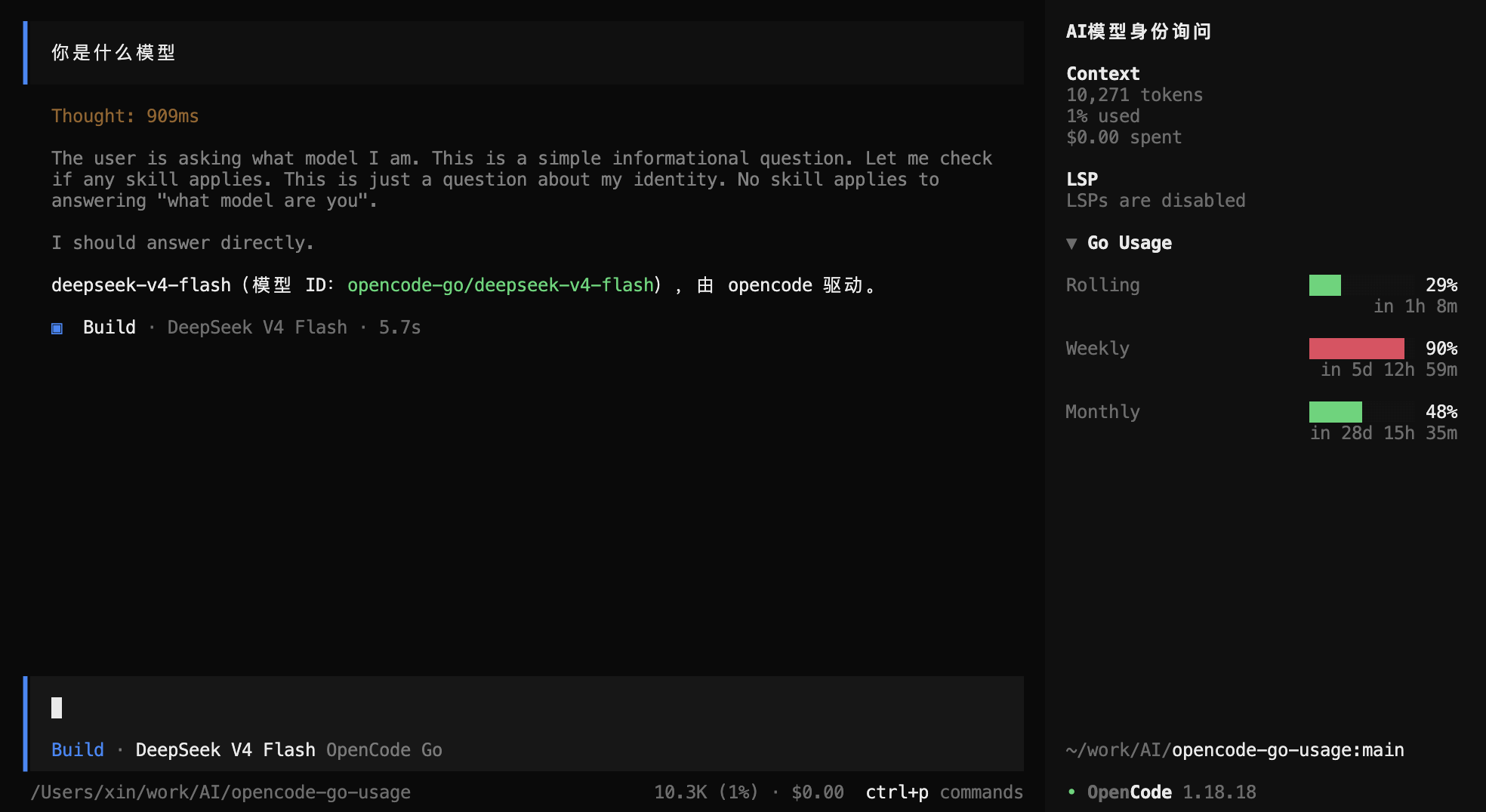
When collapsed, the title shows the highest of the three percents:
▶ Go Usage 90%
Zero units are omitted (in 3h, in 2d), except a due/past reset which is
in 0m.
Requirements
- opencode >= 1.18.0 (TUI plugin system)
- An OpenCode account with a plan (e.g. OpenCode Go) and an API key from https://opencode.ai/auth connected in opencode
- Local source install only:
bun installin this repo
Install from npm
After the package is published:
opencode plug opencode-usage-widget -g
Omit -g to install for the current project only. You can also install from
the TUI Plugins dialog (shift+i). Fully quit and relaunch opencode afterwards.
That writes a tui.json entry like ["opencode-usage-widget", { "order": 600 }].
Pin a version with opencode plug opencode-usage-widget@0.1.1 -g. Re-run with
--force to replace an existing entry.
Install from source (local)
Point TUI config at the source file and let OpenCode compile the JSX. Use
this form while developing; do not point at dist/tui.js (bundling a second
solid-js / @opentui/solid breaks rendering).
Edit ~/.config/opencode/tui.json (create it if missing), preserving any
existing keys, and add:
{
  "$schema": "https://opencode.ai/tui.json",
  "plugin": [
    ["file:///Users/xin/work/AI/opencode-go-usage/src/index.tsx", { "order": 600 }]
  ]
}
Use a file:// URL, not a bare path. Fully quit and relaunch opencode after
changing tui.json or plugin source. The Go Usage section appears in the
sidebar below the files section.
Publish to npm
Need an npm account and npm login. Do not set a main field (OpenCode would
treat the package as a server plugin). The TUI bundle is compiled with
esbuild-plugin-solid (same as working OpenCode TUI plugins) and keeps
solid-js / @opentui/solid / @opentui/core external so the host copies
are used. Plain bun build emits jsx-dev-runtime and the sidebar stays
blank even though the plugin is active.
npm whoami
bun test && bun run typecheck && bun run build
npm pack --dry-run    # confirm dist/tui.js is included, no secrets
npm publish --access public
prepublishOnly runs the test / typecheck / build steps again. Plugin installs
use --ignore-scripts, so the tarball must already contain dist/tui.js.
Configuration
| Option | Type | Default | Description |
|---|---|---|---|
apiKey |
string | — | Explicit OpenCode API key (optional) |
baseUrl |
string | https://opencode.ai |
Console base URL (self-hosted/enterprise) |
order |
number | 600 |
Sidebar section order |
refreshInterval |
number | 300 |
Auto-refresh seconds (0 disables timer) |
showWhenUnavailable |
boolean | true |
Hide the whole section when no credential |
The API key is resolved in this order (first match wins):
apiKeyoptionOPENCODE_API_KEYenvironment variableauth.jsonthenopencode.db, searched in:api.state.path.state(XDG state dir, often~/.local/state/opencode)OPENCODE_DATA_DIRif set$XDG_DATA_HOME/opencodeor~/.local/share/opencode
- In
auth.json, providersopencode-gothenopencode(type: "api") - In
opencode.db, thecredentialtable (CredentialKey.key)
If you connected opencode via OAuth only, set apiKey or OPENCODE_API_KEY
explicitly — OAuth tokens are not accepted by the usage endpoint.
Manual refresh
Run the usage.refresh command from the command palette.
Development
bun install
bun test          # unit tests (fetch/parse, credential, format, store)
bun run typecheck
bun run build     # produces dist/tui.js for npm (gitignored)
The dist/ bundle is a build artifact kept out of git; local source install
does not need it. Design notes live in
docs/superpowers/specs/2026-08-18-opencode-usage-widget-design.md.