
Usage Monitor
OpenCode TUI sidebar plugin that displays API usage quotas for OpenAI and Z.AI (GLM) providers
9
+2 in 30 days
336
87 in 7 days
43.4
Multi-signal model
2 months ago
2026-07-28
Install and configure
opencode.jsonWrites to this project's opencode.json — applies to this repository only.
opencode.json
{
  "$schema": "https://opencode.ai/config.json",
  "plugin": ["opencode-usage-monitor@2.0.1"]
}
Writes to ~/.config/opencode/opencode.json — applies to every project.
~/.config/opencode/opencode.json
{
  "$schema": "https://opencode.ai/config.json",
  "plugin": ["opencode-usage-monitor@2.0.1"]
}
If you want to modify the plugin locally, install it into the project and reference the local path.
shell
pnpm add -D opencode-usage-monitorOpenCode loads npm dependencies through its embedded runtime on startup and caches them locally — no manual global install needed.
OpenCode TUI sidebar plugin that shows OpenAI, Z.AI / GLM, and DeepSeek quota/balance usage without exposing provider credentials in the UI.




| Field | Value |
|---|---|
| Status | Actively maintained personal OpenCode tool/plugin |
| Type | OpenCode TUI plugin / host extension |
| Host app | OpenCode >= v1.14.49 documented; @opencode-ai/plugin >=1.15.0 peer dependency |
| Package | opencode-usage-monitor 2.0.1 package metadata |
| Runtime | Bun >= 1.1.0 documented for local development |
| Maintainer checks | bun install && bun run build:all && bun test && bun run typecheck |
Screenshots
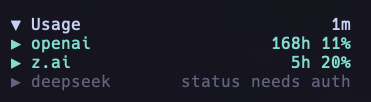
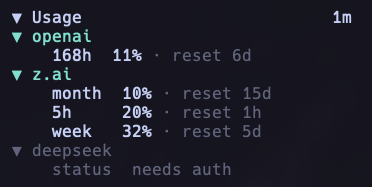
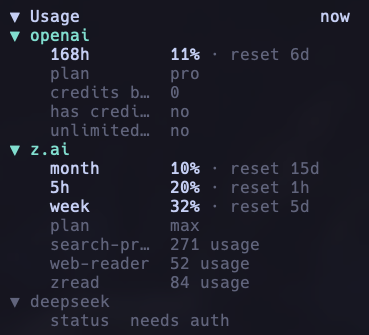
The plugin renders inside the OpenCode terminal UI sidebar.
Summary
- Displays OpenAI ChatGPT usage windows such as 5h/week with reset timing and optional plan or credits details.
- Displays Z.AI and GLM 5h/week/month quota windows with reset timing and optional plan details. Supports enterprise/org coding plans via organization and project scoping.
- Displays DeepSeek account balance (CNY) with an optional granted/topped-up breakdown.
- Standardizes provider output as explicit usage windows plus typed provider-owned details; DeepSeek balance is displayed as a balance detail rather than a reset window.
- Discovers credentials from OpenCode auth storage and supported environment variables.
- Redacts secrets from error messages before rendering them in the TUI.
- Rejects raw provider attribute dumps in runtime snapshots; providers must map safe attributes into ordered details.
- Uses stale-data indicators and guarded refreshes to avoid overlapping API calls.
- Supports two-level collapse/expand behavior: the full panel and per-provider detail views.
Quick start
# install the published OpenCode plugin globally
opencode plugin opencode-usage-monitor@latest --global --force

# optional: build from a local checkout for development
git clone https://github.com/Mark1708/opencode-usage-monitor.git
cd opencode-usage-monitor
bun install
bun run build:all
Installation
OpenCode plugin install
opencode plugin opencode-usage-monitor@latest --global --force
This is the recommended path for users because the plugin is published on npm and OpenCode can install it directly.
Package install for local development
bun add opencode-usage-monitor
Use this when you need the package in a local development workspace rather than installing it into OpenCode globally.
Local checkout
git clone https://github.com/Mark1708/opencode-usage-monitor.git
cd opencode-usage-monitor
bun install
bun run build:all
The build emits the plugin entry and TUI bundle into dist/.
Local OpenCode install without npm publish
For release-candidate testing, build and pack the local checkout, then install the generated tarball into the global OpenCode config:
bun run build:all
npm pack
opencode plugin "$(pwd)/opencode-usage-monitor-2.0.1.tgz" --global --force
This updates both server and TUI plugin entries when the OpenCode CLI supports the plugin installer. If your OpenCode build does not support opencode plugin, add the built package or tarball path manually to your OpenCode config instead.
Compatibility
| Component | Supported version | Source |
|---|---|---|
| Host app | OpenCode >= v1.14.49 |
README compatibility note |
| Plugin API | @opencode-ai/plugin >=1.15.0 |
package.json peer dependency |
| TUI runtime | @opentui/keymap >=0.2.10, @opentui/solid >=0.2.10, solid-js >=1.9.12 |
package.json peer dependencies |
| Local runtime | Bun >=1.1.0 |
README requirements; Bun-based scripts in package.json |
| TypeScript | ^5.5.0 |
package.json dev dependency |
Configuration
Version 2.0 uses the versioned configuration contract only. Legacy flat fields such as show_openai, show_zai, show_deepseek, and refresh_ms are rejected with an actionable configuration error in the TUI instead of being interpreted as fallback settings.
The plugin first reads a dedicated config file:
~/.config/opencode/usage-monitor.json
Smallest useful configuration:
{
  "version": 2,
  "providers": {
    "openai": {},
    "zai": {},
    "deepseek": {}
  }
}
Full documented shape:
{
  "version": 2,
  "enabled": true,
  "keybindings": {
    "refresh_all": "<leader>q",
    "refresh_provider": null
  },
  "ui": {
    "width": 34,
    "symbols": "unicode",
    "panel_initial_state": "expanded",
    "provider_initial_state": "collapsed"
  },
  "refresh": {
    "mode": "automatic",
    "interval_ms": 300000,
    "timeout_ms": 15000,
    "stale_after_ms": 600000
  },
  "diagnostics": {
    "debug": false
  },
  "providers": {
    "openai": {
      "credential": { "source": "opencode", "entry": "openai" }
    },
    "zai": {
      "credential": { "source": "opencode", "entry": "zai-coding-plan" },
      "options": { "plan": "personal" }
    },
    "deepseek": {
      "credential": { "source": "opencode", "entry": "deepseek" }
    }
  }
}
The providers object controls provider activation. Presence enables a provider; omission disables it and prevents credential, cache, and network work for that provider. Provider-specific refresh policies are intentionally unsupported.
Alternatively, add a usage_monitor section to oh-my-openagent.json. Dedicated usage-monitor.json values take precedence.
Credentials
OpenAI
OpenAI displays ChatGPT/Codex subscription quota windows from the OpenCode OAuth session, not from OpenAI Platform API keys. The plugin reads OpenCode auth storage and uses:
$.openai.access
$.openai.accountId
$.openai.expires
$.openai.type == "oauth"
The auth file is discovered using OS-neutral OpenCode data paths, starting with ${XDG_DATA_HOME}/opencode/auth.json and falling back to ~/.local/share/opencode/auth.json, legacy config locations, and Windows local/roaming app data paths. OPENAI_API_KEY and OPENAI_ADMIN_KEY are not used for subscription quota.
Z.AI and GLM
The plugin supports Z.AI and Zhipu / GLM credentials from OpenCode auth storage or environment variables:
export ZAI_API_KEY="your-zai-key"
export ZAI_CODING_PLAN_API_KEY="your-coding-plan-key"
export ZHIPU_API_KEY="your-zhipu-key"
export ZHIPUAI_API_KEY="your-zhipuai-key"
Enterprise / organization coding plan
Enterprise (organization-scoped) GLM coding plans require both an organization id and a project id. When both are provided the plugin queries {baseUrl}/api/monitor/usage/quota/limit?type=2 with Bigmodel-Organization and Bigmodel-Project headers; otherwise it uses the personal plan endpoint.
Configure them in usage-monitor.json:
{
  "version": 2,
  "providers": {
    "zai": {
      "options": {
        "plan": "enterprise",
        "organization_id": "your-org-id",
        "project_id": "your-project-id"
      }
    }
  }
}
Or via environment variables when provider options are not set:
export ZHIPU_ORGANIZATION_ID="your-org-id"
export ZHIPU_PROJECT_ID="your-project-id"
DeepSeek
The plugin displays the DeepSeek account balance (CNY) from the balance endpoint. Configure an API key via OpenCode auth storage or:
export DEEPSEEK_API_KEY="your-deepseek-key"
The balance row shows the total CNY amount; expanding the provider reveals the granted (promotional) and topped-up (paid) breakdown.
Usage
- Click the main usage header to collapse or expand the full panel.
- Click provider rows to toggle provider details independently.
- Use
/usage-refreshor the configured refresh keybind, default<leader>q, to refresh manually. - Runtime refreshes use the account-safe provider cache under
/tmp/opencode-usage-monitor-v2/. - Render errors are caught and displayed inside an error boundary.
Project structure
.
├── assets/                    # Local screenshots used by this README
├── dist/                      # Built package output
├── src/
│   ├── auth.ts                # OpenCode auth and environment credential discovery
│   ├── provider-cache.ts      # Account-safe provider cache
│   ├── runtime-config.ts      # Versioned runtime config parsing and validation
│   ├── credentials.ts         # Credential resolver for provider registrations
│   ├── index.ts               # OpenCode plugin entry
│   ├── refresh*.ts            # Runtime refresh coordinator modules
│   ├── sanitize.ts            # Secret redaction helpers
│   ├── snapshot-validation.ts # Snapshot validation before publication/cache
│   ├── tui.ts                 # TUI plugin module
│   ├── providers/             # OpenAI, Z.AI / GLM, and DeepSeek provider clients
│   └── views/                 # TUI view rendering helpers
├── package.json               # Package metadata, scripts, peer dependencies
├── tsconfig.json              # Strict TypeScript config
└── LICENSE
Troubleshooting
- If OpenAI shows
auth missing,oauth missing,oauth expired, oraccount id missing, runopencode providers loginfor OpenAI and verify the OpenCode auth entry contains non-expired OAuthopenai.access,openai.accountId,openai.expires, andopenai.type: "oauth". - If Z.AI shows
auth missing, configure a supported Z.AI or Zhipu environment variable or OpenCode auth entry. - If Z.AI shows
partialon an enterprise/org account, setproviders.zai.options.organization_idandproviders.zai.options.project_id(orZHIPU_ORGANIZATION_ID/ZHIPU_PROJECT_ID) so the?type=2endpoint is used. - If DeepSeek shows
auth missing, setDEEPSEEK_API_KEYor add an OpenCodeauth.jsondeepseek entry. - If the panel shows a
configerror, migrateusage-monitor.jsonto theversion: 2shape and define at least one provider underproviders. - If the panel is too wide or narrow, adjust
ui.widthinusage-monitor.json. - If refreshes appear stale, lower
refresh.interval_msor check provider API connectivity. - If build output is missing, run
bun run build:alland verifydist/index.jsanddist/tui.jsexist. - If cached data appears stale, check
/tmp/opencode-usage-monitor-v2/.
Limitations / Security
- The plugin reads local OpenCode auth metadata and supported environment variables, but examples in this README use placeholders only.
- Secrets are redacted from rendered error messages before they reach the TUI.
- Provider data depends on external OpenAI, Z.AI, Zhipu, and DeepSeek API availability and credential permissions.
- The package is a host extension; runtime behavior depends on compatible OpenCode and OpenTUI APIs.
Status
Actively maintained personal OpenCode tool/plugin. Public issues and improvements are welcome, but the project is primarily maintained around the author's own workflow.
Links / License
- Package: https://www.npmjs.com/package/opencode-usage-monitor
- Repository: https://github.com/Mark1708/opencode-usage-monitor
- Host app: https://opencode.ai/
- Listed under Plugins in the curated awesome-opencode directory.
- License: MIT, see
LICENSE
Similar plugins

Agents Sidebar
opencode-agents-sidebar
Universal OpenCode TUI sidebar for browsing provider agents and subagents

Tui Quota Usage
opencode-tui-quota-usage
OpenCode quota usage sidebar tracker for OpenCode V2 CLI/TUI

Providers Balances
opencode-providers-balances
OpenCode TUI plugin that shows provider account balances in the session sidebar. Providers are configured entirely in opencode.jsonc.