
opencode-synthetic-usageOpenCode TUI plugin for Synthetic API quota usage
Actively maintained
GitHub stars
0
Monthly installs
10
1 in 7 days
Composite scoreSCORE
20.2
Multi-signal model
Last commit
3 months ago
2026-04-23
Install and configure
opencode.jsonWrites to this project's opencode.json — applies to this repository only.
opencode.json
{
  "$schema": "https://opencode.ai/config.json",
  "plugin": ["opencode-synthetic-usage@1.0.0"]
}
Writes to ~/.config/opencode/opencode.json — applies to every project.
~/.config/opencode/opencode.json
{
  "$schema": "https://opencode.ai/config.json",
  "plugin": ["opencode-synthetic-usage@1.0.0"]
}
If you want to modify the plugin locally, install it into the project and reference the local path.
shell
pnpm add -D opencode-synthetic-usageopencode loads npm dependencies through its embedded runtime on startup and caches them locally — no manual global install needed.
README.md
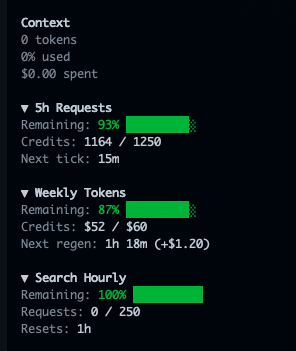
View original→An OpenCode TUI plugin that displays your Synthetic quota usage in the sidebar.
Install
Add to your tui.json:
- Global:
~/.config/opencode/tui.json - Project:
tui.jsonin your project root
{
  "$schema": "https://opencode.ai/tui.json",
  "plugin": [
    ["opencode-synthetic-usage", {}]
  ]
}
Set your API key:
export SYNTHETIC_API_KEY="your-api-key"
Configuration
Options are passed as the second element of the plugin tuple:
{
  "plugin": [
    ["opencode-synthetic-usage", { "showSearchHourly": false, "refreshMs": 30000 }]
  ]
}
| Option | Type | Default | Description |
|---|---|---|---|
showRollingFiveHour |
boolean | true |
Show the 5-hour rolling quota panel |
showWeeklyToken |
boolean | true |
Show the weekly token budget panel |
showSearchHourly |
boolean | true |
Show the hourly search quota panel |
refreshMs |
number | 60000 |
Refresh interval in ms (min: 15000) |
apiUrl |
string | https://api.synthetic.new |
Custom API base URL |