
opencode-status-ballA lightweight macOS floating indicator for opencode sessions
0
8
3 in 7 days
24.1
Multi-signal model
1 month ago
2026-07-13
Install and configure
opencode.jsonWrites to this project's opencode.json — applies to this repository only.
opencode.json
{
  "$schema": "https://opencode.ai/config.json",
  "plugin": ["opencode-status-ball@0.1.0"]
}
Writes to ~/.config/opencode/opencode.json — applies to every project.
~/.config/opencode/opencode.json
{
  "$schema": "https://opencode.ai/config.json",
  "plugin": ["opencode-status-ball@0.1.0"]
}
If you want to modify the plugin locally, install it into the project and reference the local path.
shell
pnpm add -D opencode-status-ballopencode loads npm dependencies through its embedded runtime on startup and caches them locally — no manual global install needed.
A lightweight macOS floating indicator for opencode sessions. Shows one colored dot per active session in a capsule that floats above all windows — including fullscreen apps, on every Space.
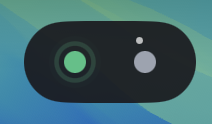
Status Colors
| Color | Meaning |
|---|---|
🟢 Emerald #3DC284 |
Running — the agent is actively working (pulses) |
⚪ Gray #9CA3AF |
Idle — session is open but not active |
🔵 Blue #60A5FA |
Waiting for a sub-agent to complete |
🟡 Amber #F59E0B |
Asking a question or waiting for permission (pulses) |
🔴 Rose #FB7185 |
Stopped or errored (auto-dismisses after 1.2s) |
Sessions with active sub-agents show tiny white orbiting satellites around their dot.
Features
- Always on top — uses
NSPanelwithlevel = .statusBar+fullScreenAuxiliary, visible over every window - Per-session dots — new dot appears for each opencode session, color reflects current state
- Sub-agent satellites — when a session spawns background agents, small orbiting dots appear around it
- Hover tooltip — shows session label, status, model name, current task, and running duration
- Auto-eviction — idle dots disappear after 3 seconds; stopped dots after 1.2s
- No Dock icon — runs as a background accessory
- LaunchAgent — auto-starts at login, restarts on crash
Prerequisites
- macOS 13 (Ventura) or later
- opencode (tested with recent versions)
- Swift 5.9+ (included with Xcode or Command Line Tools)
Installation
1. Install the App
Option A — DMG (recommended)
Download OpenCodeStatusBall.dmg from the releases, open it, and drag OpenCodeStatusBall.app to the Applications folder.
The DMG includes a custom background with the app icon and an Applications folder shortcut.
Option B — ZIP
Download OpenCodeStatusBall.zip from the releases, unzip and drag to /Applications/.
Option C — Build from source
git clone https://github.com/nbxuhao/OpenCodeStatusBall.git
cd OpenCodeStatusBall
swift build -c release
.build/release/OpenCodeStatusBall &
2. Install the opencode Plugin
Add the plugin to your opencode.json (global or project-level):
{
  "plugin": ["opencode-status-ball"]
}
✅ Published on npm: https://www.npmjs.com/package/opencode-status-ball
opencode will automatically install the plugin via Bun at startup. No extra steps needed.
Restart opencode after adding the plugin entry.
Verify
- Launch OpenCodeStatusBall App
- Restart opencode
- Open a new session — a gray dot appears (idle)
- Start a conversation — dot turns green (running)
3. Install the Hermes Agent Hook (optional)
Hermes users can show Hermes agent activity as an amber/gray dot in StatusBall:
cd hermes-hook
./install.sh
This adds shell hooks to ~/.hermes/config.yaml that push running/idle status to StatusBall's unix socket whenever a Hermes agent starts or finishes processing.
Uninstall:
cd hermes-hook
./uninstall.sh
Troubleshooting
| Issue | Cause | Fix |
|---|---|---|
| No dots appear | App not running | Launch OpenCodeStatusBall first |
| Plugin load error | Missing dependency | opencode auto-installs @opencode-ai/plugin, restart opencode |
| Sub-agent satellites not showing | Event not received | Ensure opencode version supports session.updated |
| Plugin cached | Bun cached old config | Restart opencode |
Uninstall
cd StatusBall
./launch/uninstall.sh
Remove the plugin entry from opencode.json.
How it works
┌─────────────┐  events   ┌───────────────────┐  JSON lines  ┌──────────────┐
│  opencode   │ ────────▶ │  TS plugin        │ ────────────▶ │  macOS App   │
│  (session)  │           │  (per-session)    │  unix socket  │  (SwiftUI)   │
└─────────────┘           └───────────────────┘               └──────────────┘
- MacOS app — Swift Package executable. Runs as an accessory, opens a transparent
NSPanelwith the capsule UI. Listens on/tmp/opencode-status.sockfor JSON status updates. - Plugin — TypeScript plugin loaded by opencode per session. Tracks session state (idle/running/error, model name, current task) and pushes changes to the socket.
Project Structure
StatusBall/
├── Package.swift
├── Sources/OpenCodeStatusBall/
│   ├── AppDelegate.swift          — @main, NSApp.accessory, wires panel + server
│   ├── FloatingBallPanel.swift    — NSPanel subclass, always-on-top configuration
│   ├── CapsuleBarView.swift       — SwiftUI capsule with session dots and tooltip
│   ├── StatusModel.swift          — Multi-session state container with auto-eviction
│   └── StatusServer.swift         — Unix domain socket server
├── plugin/
│   └── opencode-status-ball.ts    — opencode plugin
├── hermes-hook/
│   ├── hermes-status-hook.sh      — Hermes shell hook script
│   ├── install.sh                 — Hermes hook installer
│   └── uninstall.sh               — Hermes hook uninstaller
├── launch/
│   ├── com.opencode.statusball.plist  — LaunchAgent template
│   ├── install.sh                     — Build + install + bootstrap
│   └── uninstall.sh                   — Bootout + remove plist
├── screenshots/
├── LICENSE
└── README.md
License
MIT