
opencode-provider-balanceOpenCode TUI plugin displaying DeepSeek account balance in the sidebar
Actively maintained
GitHub stars
0
Monthly installs
49
19 in 7 days
Composite scoreSCORE
26.4
Multi-signal model
Last commit
2 months ago
2026-06-02
Install and configure
opencode.jsonWrites to this project's opencode.json — applies to this repository only.
opencode.json
{
  "$schema": "https://opencode.ai/config.json",
  "plugin": ["opencode-provider-balance@0.1.1"]
}
Writes to ~/.config/opencode/opencode.json — applies to every project.
~/.config/opencode/opencode.json
{
  "$schema": "https://opencode.ai/config.json",
  "plugin": ["opencode-provider-balance@0.1.1"]
}
If you want to modify the plugin locally, install it into the project and reference the local path.
shell
pnpm add -D opencode-provider-balanceopencode loads npm dependencies through its embedded runtime on startup and caches them locally — no manual global install needed.
README.md
View original→OpenCode TUI 插件 · 在侧边栏实时显示 DeepSeek 账户余额

功能
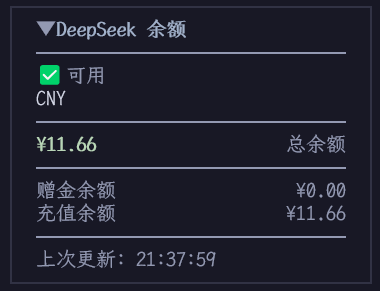
- 余额展示:在 TUI 侧边栏显示 DeepSeek 账户的总余额、赠金余额、充值余额
- 可用状态:实时显示账户是否可调用 API
- 自动刷新:每次 LLM 输出完成后自动查询余额
- 手动刷新:输入
/balance命令立即刷新 - 折叠面板:默认折叠,点击标题展开查看详情
- 自适应主题:颜色跟随 OpenCode 主题自动适配
安装
方式一:命令面板安装
在 OpenCode 中按 Ctrl + P 打开命令面板,搜索 install plugin,输入:
opencode-provider-balance@latest
方式二:手动配置
创建或编辑 ~/.config/opencode/tui.jsonc:
{
  "$schema": "https://opencode.ai/tui.json",
  "plugin": ["opencode-provider-balance@latest"]
}
使用
安装后重启 OpenCode,侧边栏即可看到余额面板:

点击展开:
斜杠命令
| 命令 | 功能 |
|---|---|
/balance |
手动刷新余额 |
API Key 配置
插件按以下优先级自动获取 DeepSeek API Key:
- auth.json — 通过
/connect选择 DeepSeek 时自动存储于~/.local/share/opencode/auth.json - 环境变量 —
DEEPSEEK_API_KEY
开发
git clone <repo-url>
cd opencode-provider-balance
pnpm install
pnpm tsc          # 编译
pnpm typecheck    # 类型检查
License
MIT