
opencode-plan-canvas-pluginOptional opencode plugin that auto-spawns (or nudges) an opencode-plan-canvas watch server when a plan or boulder file changes
2
423
423 in 7 days
40.0
Multi-signal model
3 days ago
2026-08-17
Install and configure
opencode.jsonWrites to this project's opencode.json — applies to this repository only.
opencode.json
{
  "$schema": "https://opencode.ai/config.json",
  "plugin": ["opencode-plan-canvas-plugin@0.3.1"]
}
Writes to ~/.config/opencode/opencode.json — applies to every project.
~/.config/opencode/opencode.json
{
  "$schema": "https://opencode.ai/config.json",
  "plugin": ["opencode-plan-canvas-plugin@0.3.1"]
}
If you want to modify the plugin locally, install it into the project and reference the local path.
shell
pnpm add -D opencode-plan-canvas-pluginopencode loads npm dependencies through its embedded runtime on startup and caches them locally — no manual global install needed.
Turn a Prometheus-style work plan (Markdown) into a single, self-contained, offline HTML canvas styled like GitHub's dark theme. One input file, one output file, zero network calls at view time.
What it is
opencode-plan-canvas reads a plan Markdown file and emits one .html file. The
output is a static canvas: a hero header, a critical-path flow, execution waves
with expandable task cards, objectives and guardrails, a verification section,
decisions, and a final verification wave. Everything (CSS included) is inlined
into the single HTML file, so it opens straight from disk with no server, no
CDN, and no build step.
The generator is deterministic: the same plan produces byte-identical HTML on every run.
Screenshots
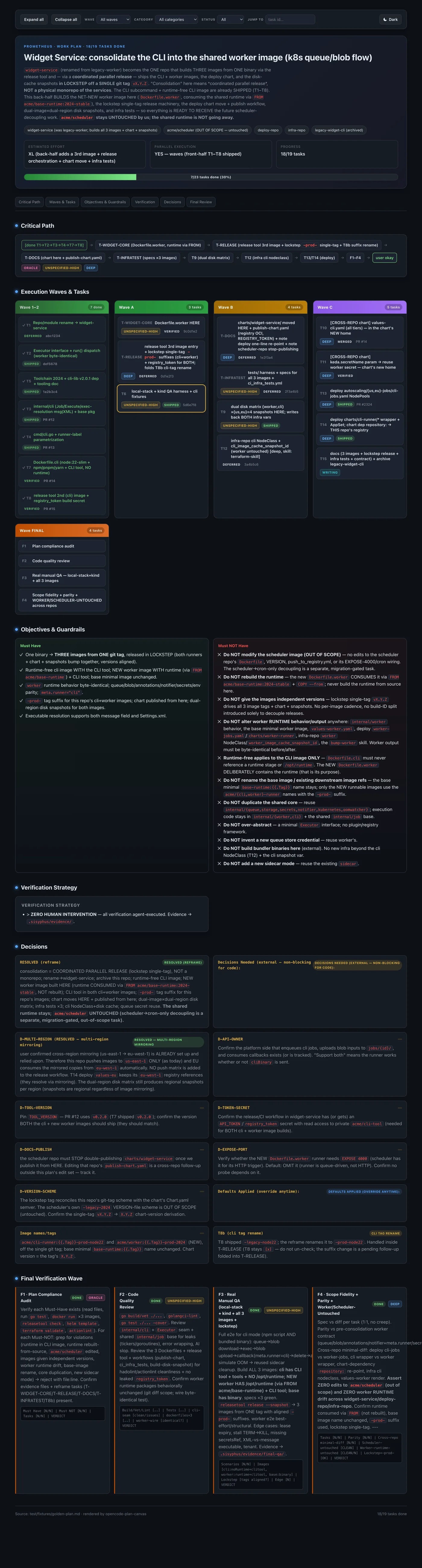
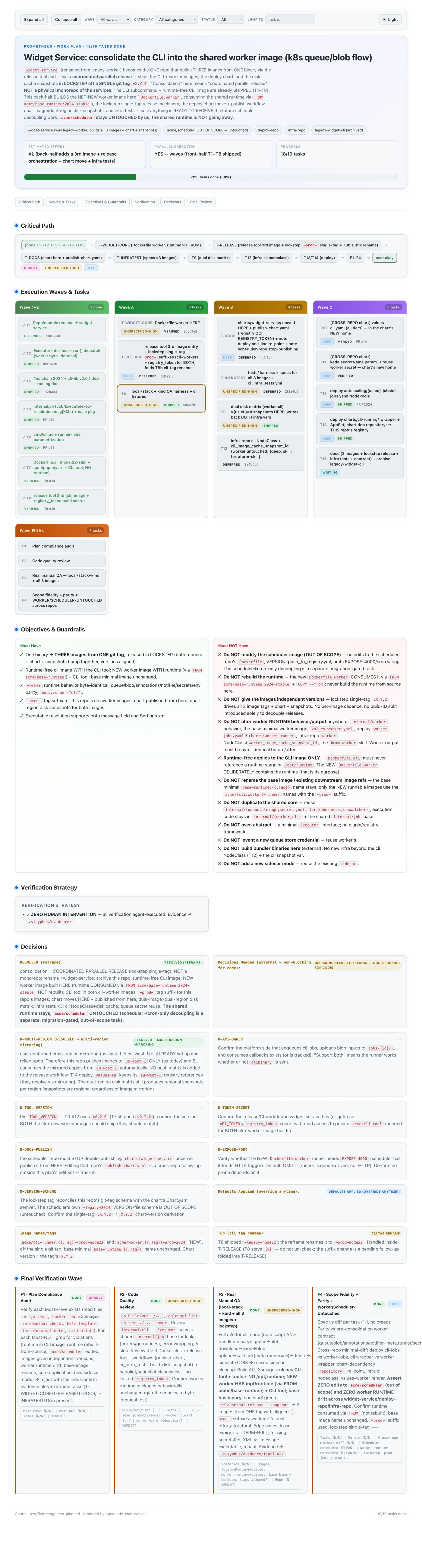
The canvas below is generated from the bundled synthetic plan
(test/fixtures/golden-plan.md) — hero, critical path, execution waves with
category badges, and the reverse "message the agent" prompt bar (shown in watch
mode with --enable-messaging). It ships both dark and light themes:
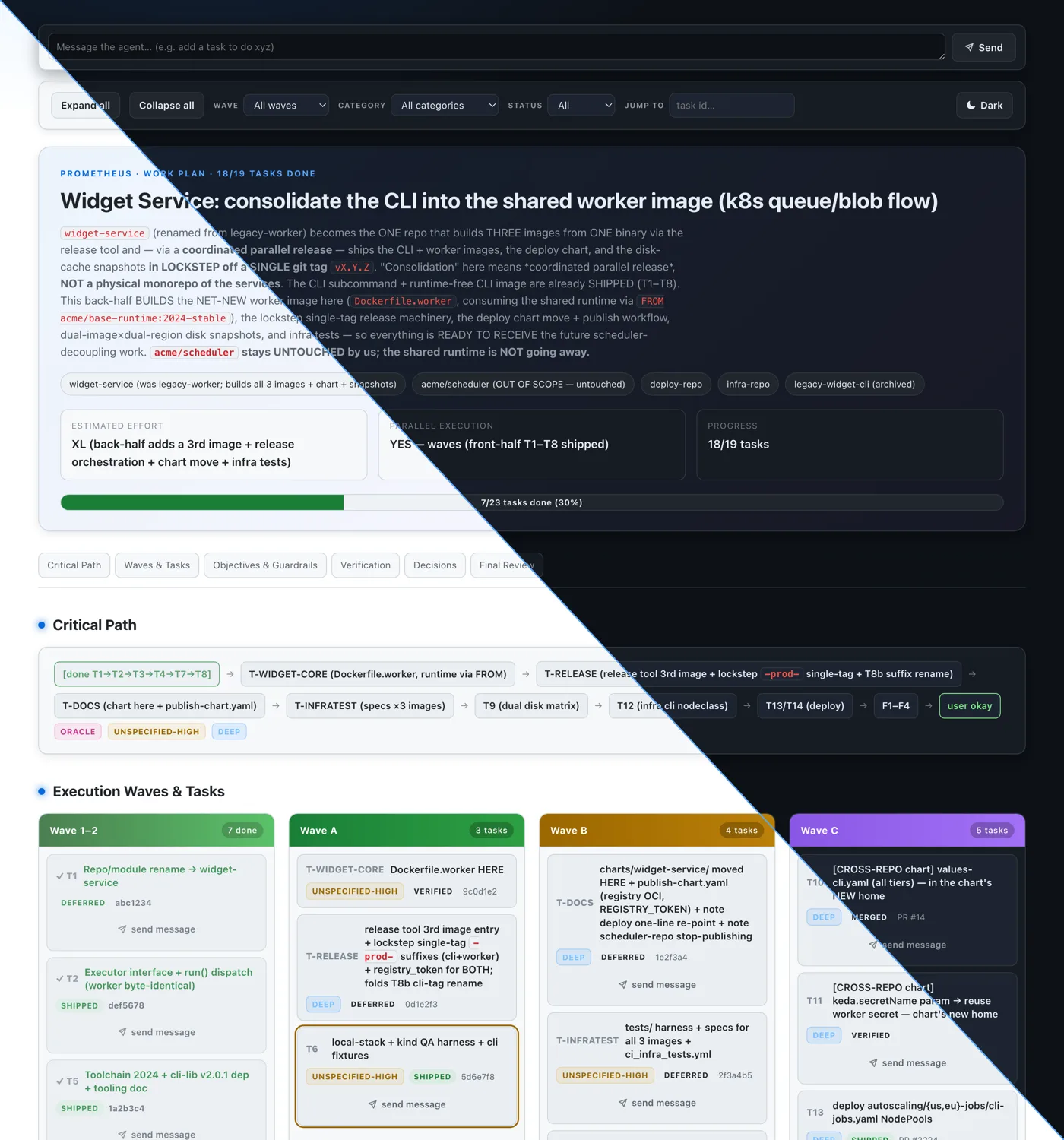
Full page — dark theme
Full page — light theme
Install
From npm (Node or Bun)
opencode-plan-canvas is published to npm and runs on both Node ≥20.11 and
Bun. The published package ships compiled JavaScript (dist/), so no build
step is needed to use it.
Run it once, without installing, via npx:
npx opencode-plan-canvas <plan.md>
Or install it globally to get an opencode-plan-canvas binary on your PATH:
npm i -g opencode-plan-canvas
opencode-plan-canvas <plan.md>
Watch / live-reload mode works the same way:
npx opencode-plan-canvas watch <plan.md>            # serves http://127.0.0.1:4499, live-reloads on edit
npx opencode-plan-canvas watch <plan.md> --port 4500 --no-open --out out.html
The package also exposes a small library API for programmatic use:
import { generate } from "opencode-plan-canvas";

const { html, warnings } = generate(planMarkdown);
From source (Bun)
For local development the tool runs straight from TypeScript source under Bun:
bun install
bun run src/cli.ts <plan.md>
Or expose a global opencode-plan-canvas binary via Bun's linker:
bun link
opencode-plan-canvas <plan.md>
package.json also defines a generate script (bun run src/cli.ts):
bun run generate <plan.md>
To produce the Node-compatible dist/ build locally:
npm run build # compiles src/ → dist/ (ESM) with a node shebang on the CLI
Usage
Primary command, generate a canvas from a plan:
bun run src/cli.ts test/fixtures/golden-plan.md -o /tmp/readme-check.html
That command exits 0 and writes the HTML to the path you pass with -o. Drop
-o and the output lands next to the input as <plan-basename>.canvas.html:
bun run src/cli.ts my-plan.md
# writes my-plan.canvas.html in the same directory
Flags:
bun run src/cli.ts --help      # or -h: print usage and exit 0
bun run src/cli.ts --version   # or -v: print version and exit 0
Arguments:
<plan.md>(positional): the input plan Markdown file. Required for the default command.-o,--output <file>: output HTML path. Default:<plan-basename>.canvas.htmlnext to the input.--help,-h: print help and exit 0.--version,-v: print the version and exit 0.
Exit codes: 0 on success (including --help/--version), 1 on a usage
error (missing or nonexistent input file, or a bad --port). Warnings go to
stderr; stdout stays empty during file generation, so piping is safe. See
Watch / live mode for the watch subcommand.
Plan format
The parser is a small, forgiving Markdown reader. It does not run a full
CommonMark engine. It splits the document on ## / ### headings and hands
each recognized section to a dedicated parser. Heading matching is normalized:
the parser strips a trailing parenthetical (Work Objectives (details) becomes
work objectives), case-folds, and matches on an exact or prefix basis. So
section titles can carry extra decoration and still be recognized.
The single # H1 becomes the plan title. Content before the H1 is warned
about and skipped.
Recognized sections:
- TL;DR: blockquote lines of the form
> **Label**: value. Labels are free-form (no fixed vocabulary). Known labels feed the hero:Quick Summary,Repos(split on the middle dot into chips),Estimated Effort,Parallel Execution,Critical Path. - Work Objectives:
### Must Haveand### Must NOT Havebecome the two guardrail lists (bullet items). Any other###subsection is kept as a named block and may surface under Verification. - Verification Strategy: free-form lines, rendered as a card list.
- Execution Strategy with a
### Parallel Execution Wavessubsection: a fenced code block (```) holding an ASCII-tree wave layout. A wave header looks likeWave 1-2 (description):; entries look like├── T1: [x] Title (note)or└── T7: [ ] Title. ACritical Path: ...line inside the fence, before any wave header, is captured too. A trailing(depends: 1, 9)note on an entry is parsed as that task's dependencies and shown as a subtleNeeds …line on the card (ids may be1,T2, orT-WIDGET-CORE; adepends:note is consumed, so it is not also shown as a plain note). The reverseBlocks …line is derived automatically — if task 3 depends on task 1, task 1's card showsBlocks 3. - Decisions Needed / Defaults Applied: bold-label entries, either as list
items (
- **Name (status)**: body) or paragraphs (**RESOLVED**: body). A trailing(status)parenthetical drives the badge;RESOLVED,OPEN, and anything matchingdefaultmap to their statuses, everything else defaults toopenwith a warning. - TODOs (task grammar): the task list. Each task starts with
- [x] <id>. Titleor- [ ] <id>. Title. Ids are flexible:1,T8b,T-WIDGET-COREall parse. A trailing<!-- ... -->HTML comment on the task line is the state comment; its text drives the badge (MERGED,DEFERRED,VERIFIED/VERIFICATION-ONLY,REVIEW_REQUIRED,DONE/SHIPPED) and a reference (#140becomesPR #140, a bare 7-to-40-char hex becomes a commit sha). When several markers appear,DEFERREDwins overDONE. Any checked task with no explicit marker gets ashippedbadge. Indented**Field**:blocks under a task become ordered fields, each classified as prose text, a fenced code block, or a checklist. - Final Verification Wave (F-grammar, separate from TODOs): lines of the
form
- [x] F1. **Title** — \category`, optionally followed by anOutput:line and a description. Ids start withF(F1,F2, ...). Category is a plain string; the six known categories (deep,ultrabrain,quick,unspecified-high,writing,oracle`) get themed chips, anything else renders as a neutral chip.
Task state comments (the <!-- ... --> trailers) are read for badges and refs
only. They are not executed or trusted as markup.
Escaping policy
The generator escapes everything. Every piece of plan-derived text is
HTML-escaped before any transformation, and there is no path to inject raw HTML
from plan content. The only markup the output contains is what the generator
itself emits, plus a tiny inline-markdown allowlist applied to already-escaped
text: `code`, **bold**, and [label](url) links where the URL starts
with http://, https://, or #.
The trade-off: if a plan contains literal HTML like <owner> or <code>, it
renders as visible escaped text (<owner>), not as an element. That is
intentional. Correctness and XSS-safety beat honoring embedded HTML. Plans are
often produced by tools and pasted from many sources, so trusting their raw
angle brackets would be a footgun.
Lenient parsing
The parser never hard-fails on a plan it can partly understand. It renders what parses and moves on:
- A section that is absent is simply omitted, and its table-of-contents anchor is dropped with it.
- A section that is present but empty stays as an empty shell where that makes
sense (for example, a
TODOssection with no valid tasks still yields the waves region). - A malformed line is skipped with a warning rather than aborting the run.
- All diagnostics go to stderr as
warn: <line>: <message>(orwarn: <message>when there is no line), and are also returned to callers of thegenerateAPI. Generation still exits 0.
Example warning emitted while rendering the bundled golden plan:
warn: 217: Decision "D-API-OWNER" has no (status); defaulting to open
A hard error (missing input file, unreadable input) exits 1. Everything else is a warning.
Interactivity
The static HTML canvas isn't just a flat page. Every generated artifact carries a small, inlined, read-only interactivity layer as a progressive enhancement. No network, no CDN, no build. If JavaScript is off, the page still reads fine; the extras just don't appear.
What you get in the static file:
- A progress bar in the hero showing how many tasks are done.
- Expand-all / collapse-all buttons for the task cards.
- Filters for wave, category, and status (done / pending).
- A "jump to task" box with id autocomplete that opens and highlights the card.
All of this is read-only. Nothing here writes back to the plan or hits the
network. The controls appear only when the page loads in a browser with
scripting; view the file over file:// and it behaves as a normal document.
Watch / live mode (v2)
watch runs a local live-reload server. It renders the plan, serves it on
127.0.0.1, and re-renders whenever you save the file. Your browser reloads on
its own over Server-Sent Events (SSE).
bun run src/cli.ts watch <plan.md>            # serves http://127.0.0.1:4499, live-reloads on edit
bun run src/cli.ts watch <plan.md> --port 4500 --no-open --out out.html
bun run src/cli.ts watch <plan.md> --enable-actions     # guarded two-way controls (default OFF)
bun run src/cli.ts watch <plan.md> --enable-messaging   # send prompts back to the agent (default OFF)
The server prints its URL to stdout and, unless you pass --no-open, opens your
browser. Stop it with Ctrl-C; it closes the watcher and frees the port.
Watch flags:
--port <n>: port to bind on127.0.0.1. Default4499. A bad value (non-integer, or outside0–65535) exits 1.--no-open: don't launch the browser automatically.--out <file>: also write the plain static HTML (no SSE client injected) to this path on every regen, so you always have a shareable file on disk.--enable-actions: opt in to the guarded two-way controls. Default off. See below.--enable-messaging: opt in to the served-only prompt box that queues messages for the opencode plugin to relay to the agent. Default off. See below.
How the server behaves:
GET /serves the latest canvas with the tiny SSE client script injected. Responses areno-store, so you never see a stale cached page.GET /eventsis the SSE stream. On each regen it emitsevent: reload, and the injected client callslocation.reload().POST /refreshis a localhost-only, no-payload nudge that forces an immediate re-read and regen (handy for the optional adapter below). It returns204.POST /promptexists only under--enable-messaging. It accepts a small JSON body{ text, taskId? }, validates it, and queues it as a file for the plugin to deliver (see below). It returns202on success,400on invalid input.
The watcher is fs.watch-based and debounced, and it keeps the last good render
if a save momentarily produces an empty or unparseable file, so a mid-write
buffer never blanks your page. If your platform's fs.watch misses an event, a
lightweight stat-based poll picks up the change as a fallback.
Two-way controls (--enable-actions, guarded stretch)
--enable-actions is a guarded, default-off stretch feature. It is
served-only: the extra controls exist only while the page is served by the watch
server, never in the static --out artifact. It stays read-only-safe. There are
exactly two actions and neither mutates the plan or any file:
- copy task prompt: copies the task title (plus its "What to do" field, if present) to the clipboard, entirely client-side.
- open ref: only appears when a task carries a full
http(s)reference URL. It POSTs toPOST /action(allowlisted to a singleopen-reftype), the server re-checks the URL against its resolved allowlist, and opens it in your browser. Anything without a fullhttp(s)URL is refused.
There is no endpoint that edits the plan. --enable-actions cannot write back
to disk.
Message the agent (--enable-messaging, guarded stretch)
--enable-messaging is a guarded, default-off stretch feature that adds a
reverse channel from the canvas back to the opencode agent. Like
--enable-actions, it is served-only: the UI exists only while the page is
served by the watch server, never in the static --out artifact. It requires
the optional opencode plugin adapter to
actually reach the agent — without the plugin loaded, messages are queued on
disk but nothing relays them.
What you get in the served page:
- A prompt bar at the top of the canvas. Type anything (for example, "add a
task to do xyz") and send it to the agent.
Cmd/Ctrl+Enteralso sends. - A per-task "send message" button on each expandable task card. It opens a small composer scoped to that task, so the delivered prompt is prefixed with the task id for context.
How it flows:
- The browser POSTs
{ text, taskId? }toPOST /prompt. - The server validates the text (trimmed, non-empty, ≤ 8000 chars) and writes
one JSON file per message, atomically, into
<root>/.sisyphus/outbox/. The plan normally lives at<root>/.sisyphus/plans/<name>.md, so the outbox is the sibling<root>/.sisyphus/outbox. Nothing about the plan file is modified. - The opencode plugin adapter watches that outbox directory. For each message
it picks the most recently active opencode session and forwards the text as a
user prompt (via the SDK's
session.promptAsync), then deletes the file. A message is only removed after a successful send, so delivery is at-least-once; if no session is available yet, the message stays queued until one is.
The server never edits the plan and never runs the message itself — it only
writes a bounded text file that the plugin relays. Filenames are
server-generated; the optional taskId is stored for context only and is never
used as a filesystem path.
A couple of guarantees worth knowing:
- Layout requirement. The relay only works when the plan lives under a
.sisyphus/tree (the normal case inside opencode), because the plugin only watches<root>/.sisyphus/outbox. If you runwatch ./plan.md --enable-messagingon a plan outside a.sisyphus/directory, the server still accepts and queues messages, but the plugin has nowhere to pick them up, so they will not be delivered. - Freshness. The plugin drops messages older than ~10 minutes rather than
relaying them, so a message you queued in a previous, unrelated session never
gets injected into a fresh one. Delivery is best-effort: a
202fromPOST /promptmeans "queued," not "delivered."
Optional opencode plugin adapter
adapter/opencode-plugin/ is an optional opencode plugin. You don't need it:
the fs.watch watcher already regenerates and live-reloads on its own with zero
opencode dependency. Inside an opencode session, file writes are sometimes
buffered, so the adapter just makes updates snappier by listening for opencode's
file.watcher.updated event and, when a plan or boulder.json file changes,
sending the POST /refresh nudge to the running watch server. Skip it and
everything still works, just at normal fs.watch latency. The core never
imports from the adapter. See adapter/opencode-plugin/README.md for setup.
Roadmap
Everything below is genuinely not built yet. The shipped v2 features (watch mode,
SSE live reload, read-only interactivity, the guarded --enable-actions
controls) are documented above, not here.
- Richer plan writes: no control today edits the plan on disk. Any future write path stays a guarded, opt-in stretch, never on by default.
Relationship to opencode
The core has zero omo / opencode dependencies. It is plain Bun + TypeScript
with no runtime packages. opencode is the producer of the plan Markdown
files this tool reads, not a runtime dependency of the tool. You can generate a
canvas from any plan that follows the format above, regardless of how it was
authored.