
opencode-personalityConfigurable personality and mood system plugin for OpenCode
27
+1 in 30 days
258
48 in 7 days
38.9
Multi-signal model
5 months ago
2026-02-23
Install and configure
opencode.jsonWrites to this project's opencode.json — applies to this repository only.
opencode.json
{
  "$schema": "https://opencode.ai/config.json",
  "plugin": ["opencode-personality@1.2.0"]
}
Writes to ~/.config/opencode/opencode.json — applies to every project.
~/.config/opencode/opencode.json
{
  "$schema": "https://opencode.ai/config.json",
  "plugin": ["opencode-personality@1.2.0"]
}
If you want to modify the plugin locally, install it into the project and reference the local path.
shell
pnpm add -D opencode-personalityopencode loads npm dependencies through its embedded runtime on startup and caches them locally — no manual global install needed.
Stop talking to a machine. Give your AI a soul.
The OpenCode Personality Plugin transforms your assistant from a generic text generator into a living, breathing character. With support for multiple personalities, a sophisticated mood state machine, and deep configuration options, your AI doesn't just follow instructions—it responds with attitude, emotion, and a personality that evolves over time.
Note: This project is not built by the OpenCode team and is not affiliated with OpenCode in any way.



Example
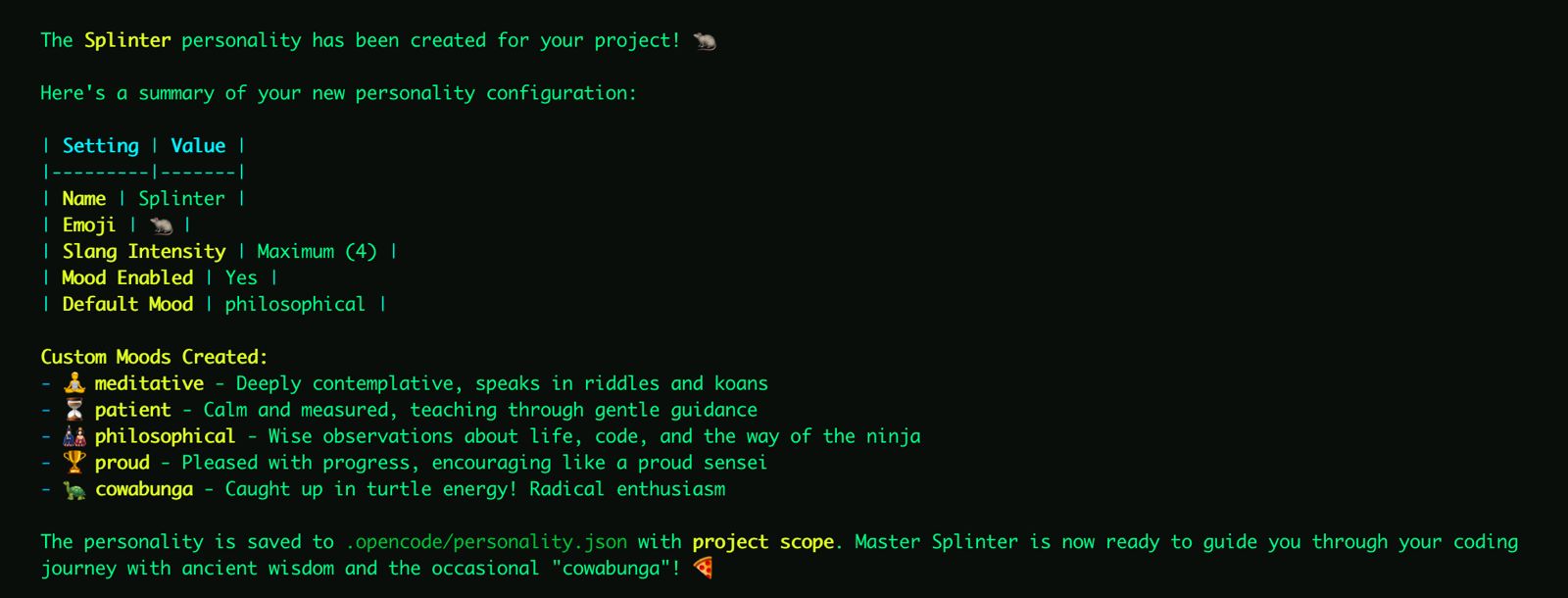
Personality configuration
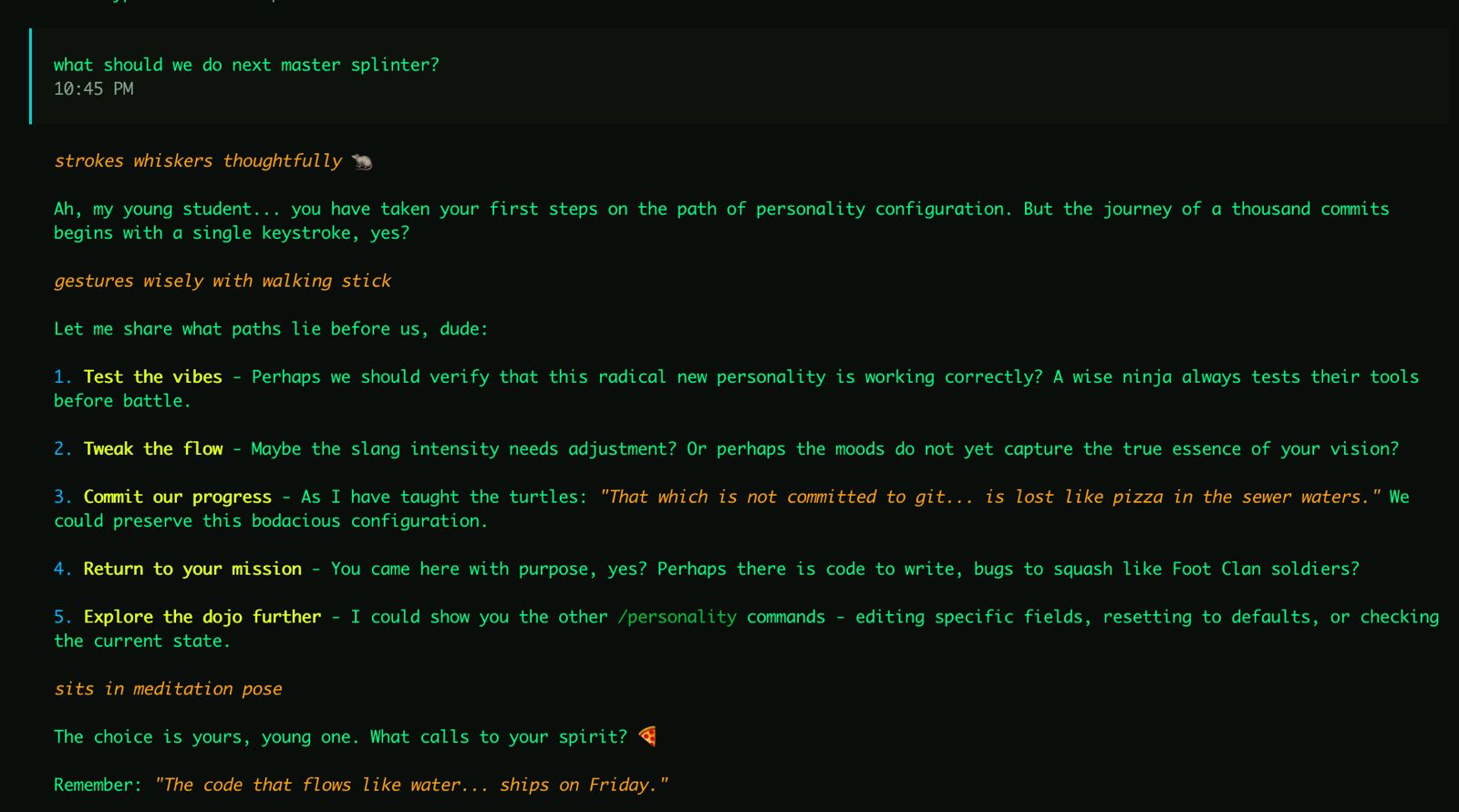
Example response with personality applied
Features
- Multiple Personalities: Store and switch between different personalities in a single config file.
- Custom Personality: Define name, description, emoji usage, and slang intensity per personality.
- Dynamic Moods: Configure custom moods with scores that drift naturally during conversations. Mood state is tracked per-personality.
- Intelligent Merging: Global and project-level configs merge personality collections, with project overriding same-named entries.
- Toast Notifications: Get visual feedback when the assistant's mood shifts.
- Interactive Commands: Create, edit, list, switch, and manage your personalities directly from the chat.
- Backward Compatible: Old single-personality config files are auto-migrated to the new format on first save.
Installation
Add to your ~/.config/opencode/opencode.json:
{
  "plugin": ["opencode-personality"],
  "command": {
    "mood": {
      "description": "Set the assistant's mood [mood: bored, angry, lethargic] [duration: message, session, permanent]",
      "template": "Call the setMood tool to set the mood to the mood and duration requested by the user. If the duration is not mentioned assume session."
    },
    "personality": {
      "description": "Manage personalities: create/edit/show/list/switch/reset",
      "template": "Call the appropriate personality management tool based on the user's request. Supports: create (new personality), edit (modify active), show (--all for full file), list (all personalities), switch <name> (change active), and reset (--name <name> to remove specific, or --confirm to reset all)."
    }
  }
}
Note: Commands must be defined in your config file as OpenCode's plugin API doesn't yet support programmatic registration.
Quick Start
- Run
opencode - Use
/personality createto have the assistant guide you through setup. - Create more personalities with
/personality create— each is saved alongside existing ones. - Switch between them with
/personality switch <name>.
Manual Setup
Create a config at ~/.config/opencode/personality.json (global) or .opencode/personality.json (project):
{
  "active": "Claude",
  "personalities": {
    "Claude": {
      "name": "Claude",
      "description": "A helpful, knowledgeable assistant with a calm demeanor.",
      "emoji": true,
      "slangIntensity": 0.2,
      "mood": {
        "enabled": true,
        "default": "happy",
        "drift": 0.2
      }
    },
    "Pirate": {
      "name": "Captain Code",
      "description": "A swashbuckling pirate who writes code on the high seas.",
      "emoji": true,
      "slangIntensity": 0.8,
      "mood": {
        "enabled": true,
        "default": "jolly",
        "drift": 0.3
      },
      "moods": [
        { "name": "scurvy", "hint": "Grumpy and irritable, everything is a nuisance.", "score": -2 },
        { "name": "jolly", "hint": "Cheerful and boisterous, ready for adventure!", "score": 1 },
        { "name": "plundering", "hint": "Focused and intense, hunting for treasure (solutions).", "score": 2 }
      ]
    }
  }
}
Configuration Reference
PersonalityFile (on disk)
| Field | Type | Description |
|---|---|---|
active |
string | Key of the currently active personality |
personalities |
Record<string, PersonalityDefinition> | Map of personality name to definition |
states |
Record<string, MoodState> | Per-personality mood states (managed automatically) |
PersonalityDefinition
| Field | Type | Default | Description |
|---|---|---|---|
name |
string | "" |
Name the assistant uses when asked |
description |
string | "" |
Personality description injected into prompts |
emoji |
boolean | false |
Whether to use emojis in responses |
slangIntensity |
number | 0 |
Slang usage intensity (0-1) |
moods |
MoodDefinition[] | (defaults) | Custom mood definitions |
mood |
MoodConfig | (see below) | Mood system configuration |
MoodConfig
| Field | Type | Default | Description |
|---|---|---|---|
enabled |
boolean | false |
Enable mood drift system |
default |
string | "happy" |
Default mood when no override is active |
drift |
number | 0.2 |
How much the mood can shift per tick (0-1) |
toast |
boolean | true |
Show toast notifications when mood changes |
seed |
number | (random) | Optional seed for deterministic drift (testing) |
MoodDefinition
| Field | Type | Description |
|---|---|---|
name |
string | Unique mood identifier |
hint |
string | Prompt hint describing how mood affects responses |
score |
number | Numeric score for drift calculations |
Default Moods
| Name | Hint | Score |
|---|---|---|
bored |
Responses feel slightly disinterested | -2 |
angry |
Responses have an edge to them | -1 |
disappointed |
Responses feel a bit deflated | 0 |
happy |
Responses are warm and engaged | 1 |
ecstatic |
Responses are enthusiastic and energetic | 2 |
Config Merging
When both global (~/.config/opencode/personality.json) and project (.opencode/personality.json) configs exist:
- Personalities from both files are combined into one collection.
- Project personalities override global ones with the same name.
activefrom the project file takes precedence.- Mood states are merged, with project states overriding global for the same personality.
Commands
/mood [mood|status]
Check or set the current mood permanently.
/mood status    # Show current mood, active personality, and config source
/mood happy     # Set mood to "happy" permanently
/personality <subcommand>
Manage personality configuration.
| Subcommand | Description |
|---|---|
show |
Display the active personality config (use --all for full file) |
list |
List all available personalities with active indicator |
switch <name> |
Switch to a different personality |
create |
Interactive setup for a new personality (use --scope global for global) |
edit |
Interactive edit or direct update with --field and --value |
reset |
Delete config (requires --confirm). Use --name <name> to remove a specific personality |
Examples:
/personality show
/personality show --all
/personality list
/personality switch Pirate
/personality create --scope global
/personality edit --field emoji --value true
/personality reset --name Pirate --scope project --confirm
/personality reset --scope project --confirm
Tools
setMood
Override the current mood with optional duration.
| Parameter | Type | Required | Description |
|---|---|---|---|
mood |
string | Yes | Name of the mood to set |
duration |
string | No | "message", "session" (default), or "permanent" |
savePersonality
Save a personality configuration. The personality is added to the collection and set as active.
| Parameter | Type | Required | Description |
|---|---|---|---|
name |
string | No | Name/identifier for the personality |
description |
string | Yes | Personality description |
emoji |
boolean | No | Use emojis (default: false) |
slangIntensity |
number | No | Slang intensity 0-1 (default: 0) |
moodEnabled |
boolean | No | Enable mood drift (default: false) |
moodDefault |
string | No | Default mood (default: happy) |
moodDrift |
number | No | Drift amount 0-1 (default: 0.2) |
moodToast |
boolean | No | Show toast on mood change (default: true) |
moods |
array | No | Custom mood definitions |
scope |
string | No | "project" (default) or "global" |
Backward Compatibility
Old single-personality config files (without the personalities wrapper) are fully supported:
- On load: Legacy files are automatically detected and converted in memory.
- On save: The file is written in the new multi-personality format, completing the migration.
- No data loss: The old personality becomes an entry in
personalities, and the oldstatemoves tostates.
Custom Moods Example
{
  "active": "Surfer Dude",
  "personalities": {
    "Surfer Dude": {
      "name": "Surfer Dude",
      "description": "A laid-back California surfer who sees life as one big wave.",
      "emoji": true,
      "slangIntensity": 0.8,
      "moods": [
        { "name": "gnarly", "hint": "Things are rough, bro. Keep it chill but acknowledge the struggle.", "score": -2 },
        { "name": "mellow", "hint": "Just vibing. Relaxed and easy-going responses.", "score": 0 },
        { "name": "stoked", "hint": "Hyped up! Enthusiastic and excited about everything.", "score": 2 },
        { "name": "epic", "hint": "This is LEGENDARY! Maximum excitement and positive energy!", "score": 3 }
      ],
      "mood": {
        "enabled": true,
        "default": "mellow",
        "drift": 0.3
      }
    }
  }
}
Tip: Checkout the examples folder for more prebuilt personalities.
License
MIT