
opencode-dashboardReal-time Kanban dashboard that visualizes OpenCode agent activity
2
52
9 in 7 days
25.1
Multi-signal model
5 months ago
2026-02-26
Install and configure
opencode.jsonWrites to this project's opencode.json — applies to this repository only.
opencode.json
{
  "$schema": "https://opencode.ai/config.json",
  "plugin": ["opencode-dashboard@0.3.0"]
}
Writes to ~/.config/opencode/opencode.json — applies to every project.
~/.config/opencode/opencode.json
{
  "$schema": "https://opencode.ai/config.json",
  "plugin": ["opencode-dashboard@0.3.0"]
}
If you want to modify the plugin locally, install it into the project and reference the local path.
shell
pnpm add -D opencode-dashboardopencode loads npm dependencies through its embedded runtime on startup and caches them locally — no manual global install needed.
A real-time browser-based Kanban board that visualizes agent activity in OpenCode. Watch beads (tasks) move through agent stages -- from ready to done -- as AI agents work on them. Columns are generated dynamically based on your configured agents.
Screenshots
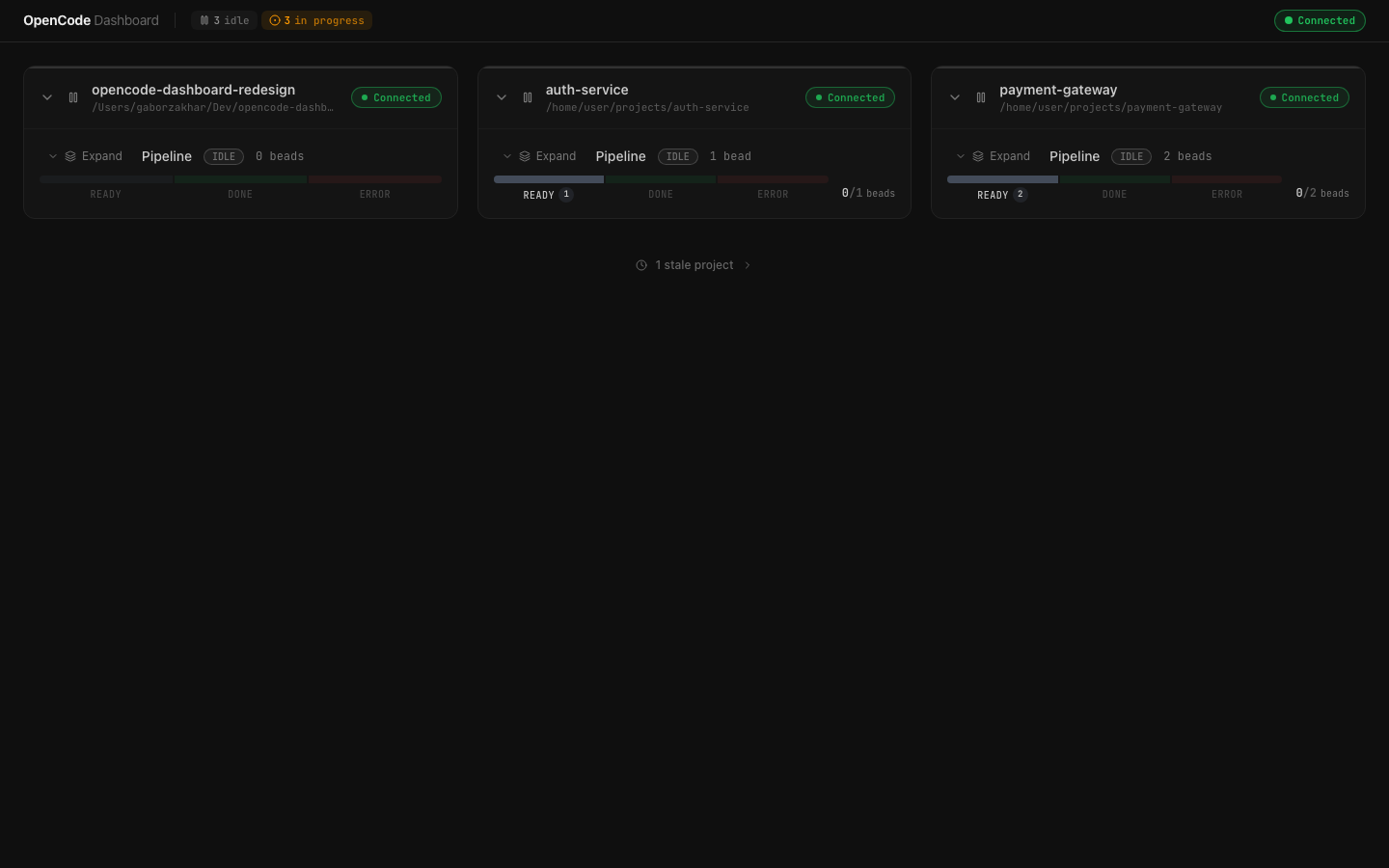
Multi-project overview
Monitor multiple OpenCode sessions simultaneously. Each project card shows connection status, pipeline state, and bead progress at a glance.
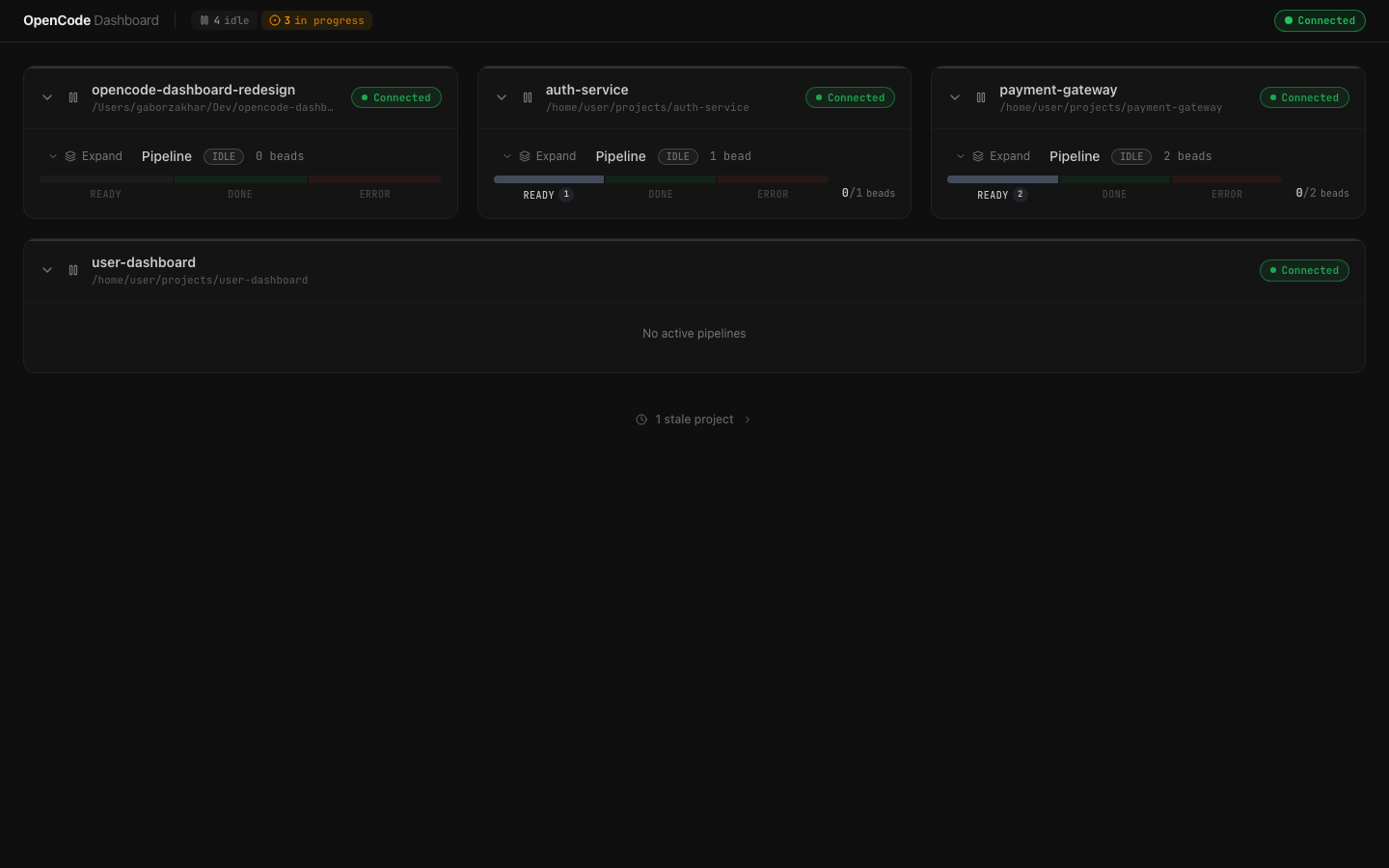
Full dashboard with stale projects
Projects that have disconnected are grouped separately, keeping the focus on active work.
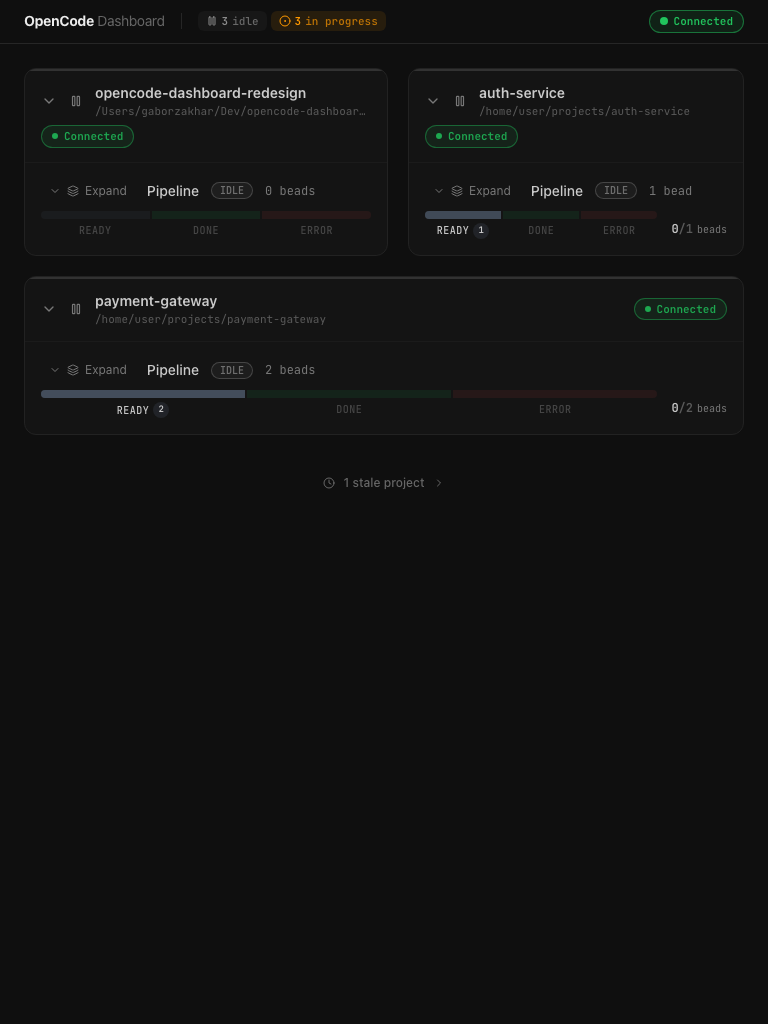
Responsive layout
The dashboard adapts to smaller viewports, reflowing project cards into a compact layout.
Installation
- Add the plugin to your OpenCode config:
// opencode.json
{
  "plugin": ["opencode-dashboard"]
}
OpenCode will install the plugin automatically on next launch.
- Run the setup command to install slash commands and (optionally) agent definitions:
npx opencode-dashboard setup
This will prompt you to choose between global (~/.config/opencode/) or per-project (.opencode/) installation. It copies the /dashboard-start, /dashboard-stop, and /dashboard-status commands, plus the shipped agent definitions. Existing files are never overwritten.
Usage
Start the Dashboard
Use the slash command in OpenCode:
/dashboard-start
Or use the CLI directly:
npx opencode-dashboard start
The dashboard will be available at http://localhost:3333.
After the first activation, the dashboard auto-starts on subsequent OpenCode sessions — you don't need to run /dashboard-start again. This works across terminals: if you open a second OpenCode session while the dashboard is already running, it connects automatically.
Check Status
/dashboard-status
Or via CLI:
npx opencode-dashboard status
Stop the Dashboard
/dashboard-stop
Or via CLI:
npx opencode-dashboard stop
This also disables auto-start — the dashboard will stay dormant on future sessions until you explicitly run /dashboard-start again.
Custom Port
npx opencode-dashboard start --port 4000
Or set the DASHBOARD_PORT environment variable.
How It Works
The dashboard has three components:
OpenCode Plugin (plugin/index.ts)
       |
       |  POST /api/plugin/event
       v
  Bun Server (server/index.ts)
       |
       |  SSE /api/events
       v
  React Dashboard (dist/)
- Plugin -- An OpenCode plugin that hooks into agent lifecycle events, discovers configured agents, tracks bead state via
bd list --json, and pushes structured events to the server. Registers custom tools (dashboard_start,dashboard_stop,dashboard_status,dashboard_open) for controlling the dashboard from within OpenCode. - Server -- A Bun HTTP server that aggregates state from connected plugins, persists it to disk, serves the dashboard frontend, and broadcasts updates to browser clients via Server-Sent Events (SSE). The server automatically shuts down after 5 minutes of inactivity (no connected plugins or browser clients) to avoid leaving orphaned processes. Multiple OpenCode sessions share a single server instance — it only shuts down when all sessions have disconnected.
- Dashboard -- A React SPA that renders a dynamic Kanban board with real-time updates, animated card transitions, and connection resilience.
Kanban Columns
Columns are generated dynamically based on your configured agents. Three fixed columns are always present:
| Column | Description |
|---|---|
| Ready | Open beads not yet claimed by an agent |
| Done | Bead closed successfully |
| Error | Bead blocked, failed, or abandoned |
Agent columns appear between Ready and Done, one per discovered agent. For example, if you have orchestrator, pipeline-builder, pipeline-reviewer, and pipeline-committer agents configured, the board will show columns for each of them. Column colors are pulled from the agent's frontmatter color field when available.
Development
Prerequisites
- Bun >= 1.0
- OpenCode with plugin support
- A project using bd (beads) for issue tracking
Clone and Install
git clone https://github.com/GZakhar88/opencode-agents-dashboard.git
cd opencode-agents-dashboard
bun install
Running Locally (Frontend + Server only)
This starts the dashboard UI and server without the OpenCode plugin. Useful for working on the frontend or server code. No OpenCode or bd needed.
# Terminal 1: Start the Bun API server (port 3333)
bun run server

# Terminal 2: Start the Vite dev server with HMR (port 5173)
bun run dev
Open http://localhost:5173. The Vite dev server proxies /api/* requests to the Bun server at localhost:3333. The board will show "No projects connected" until a plugin registers — you can test by sending events directly:
# Register a fake plugin
curl -X POST http://localhost:3333/api/plugin/register \
  -H 'Content-Type: application/json' \
  -d '{"projectPath": "/tmp/test", "projectName": "test-project"}'
# Returns: {"pluginId": "some-uuid"}

# Push an event (use the pluginId from above)
curl -X POST http://localhost:3333/api/plugin/event \
  -H 'Content-Type: application/json' \
  -d '{"pluginId": "PASTE_ID_HERE", "event": "bead:discovered", "data": {"bead": {"id": "test-1", "title": "Test bead", "status": "open", "priority": "medium"}}}'
Running Locally (Full end-to-end with OpenCode)
This connects the plugin to a live OpenCode session so you can test the full pipeline: plugin hooks -> server -> dashboard.
Step 1: Symlink the plugin into your project
From the project directory where you run OpenCode (not this repo):
# Create the plugins directory if it doesn't exist
mkdir -p /path/to/your/project/.opencode/plugins

# Symlink the plugin entry point
ln -sf /path/to/opencode-agents-dashboard/plugin/index.ts \
       /path/to/your/project/.opencode/plugins/dashboard.ts
OpenCode auto-loads all .ts files from .opencode/plugins/ on startup. The symlink's relative imports resolve from the real file's location, so ../shared/types, ../server/pid, etc. all work.
Step 2: Install commands and agents
# From this repo's directory
bun run bin/cli.ts setup
Choose "project" to install into /path/to/your/project/.opencode/, or "global" for ~/.config/opencode/. This copies the /dashboard-start, /dashboard-stop, /dashboard-status commands and agent definitions.
Step 3: Launch OpenCode and start the dashboard
# In your project directory
DASHBOARD_DEBUG=1 opencode
Then in the OpenCode TUI, type /dashboard-start. The plugin will spawn the Bun server and open the dashboard at http://localhost:3333.
DASHBOARD_DEBUG=1 enables verbose plugin logging to stderr — useful for seeing what the plugin is doing.
Step 4: (Optional) Run Vite dev server for frontend HMR
If you're working on the frontend and want hot-reload instead of the pre-built dist/:
# In this repo's directory
bun run dev
Open http://localhost:5173 instead of :3333. Vite proxies API calls to the running Bun server.
Cleanup
To disconnect the plugin from your project:
rm /path/to/your/project/.opencode/plugins/dashboard.ts
Testing
bun test
| File | What it tests |
|---|---|
src/hooks/useBoardState.test.ts |
Board state reducer -- all 13 SSE event handlers |
src/hooks/useEventSource.test.ts |
SSE connection, backoff, retry logic |
src/lib/format.test.ts |
Formatting utilities (elapsed time, priority labels) |
server/state.test.ts |
Server state manager (event processing, persistence) |
server/routes.test.ts |
HTTP route handlers (register, event, heartbeat) |
server/sse.test.ts |
SSE client management and broadcasting |
server/pid.test.ts |
PID file and autostart marker management |
server/diffBeadState.test.ts |
Bead snapshot diffing algorithm |
Building
bun run build        # Build the frontend (outputs to dist/)
bun run build:check  # Run TypeScript type checking
Environment Variables
| Variable | Default | Description |
|---|---|---|
DASHBOARD_PORT |
3333 |
Port for the dashboard server |
DASHBOARD_DEBUG |
(unset) | Set to 1 to enable verbose plugin logging to stderr |
DASHBOARD_IDLE_TIMEOUT_MS |
300000 (5 min) |
Idle auto-shutdown timeout in milliseconds. Set to 0 to disable |
Project Structure
opencode-dashboard/
├── agents/                     # Shipped agent definitions (optional install)
│   ├── orchestrator.md
│   ├── pipeline-builder.md
│   ├── pipeline-refactor.md
│   ├── pipeline-reviewer.md
│   └── pipeline-committer.md
├── commands/                   # Slash commands (installed via setup)
│   ├── dashboard-start.md
│   ├── dashboard-stop.md
│   └── dashboard-status.md
├── plugin/
│   └── index.ts                # Main plugin entry (npm distribution)
├── server/
│   ├── index.ts                # Server entry point (Bun.serve)
│   ├── routes.ts               # HTTP route handlers (7 endpoints)
│   ├── sse.ts                  # SSE client management & broadcasting
│   ├── state.ts                # State manager (events -> state, persistence)
│   ├── pid.ts                  # PID file management
│   └── PLUGIN_EVENTS.md        # Event reference documentation
├── shared/
│   └── types.ts                # Shared TypeScript types
├── bin/
│   └── cli.ts                  # CLI entry (npx opencode-dashboard)
├── src/                        # React frontend source
│   ├── main.tsx
│   ├── App.tsx
│   ├── hooks/                  # SSE connection, board state reducer
│   ├── components/             # Kanban board, cards, columns
│   └── lib/                    # Utilities, constants, API client
├── plugins/
│   └── dashboard-bridge.ts     # Local dev plugin (not published)
└── dist/                       # Built frontend (generated by vite build)
API Reference
Plugin API (used by the OpenCode plugin)
| Method | Endpoint | Description |
|---|---|---|
POST |
/api/plugin/register |
Register a plugin instance |
POST |
/api/plugin/event |
Push an event |
POST |
/api/plugin/heartbeat |
Send heartbeat |
DELETE |
/api/plugin/:id |
Deregister a plugin |
Dashboard API (used by the frontend)
| Method | Endpoint | Description |
|---|---|---|
GET |
/api/state |
Full board state as JSON |
GET |
/api/events |
SSE stream for real-time updates |
GET |
/api/health |
Server health check |
Tech Stack
- Runtime: Bun
- Frontend: React 19, TypeScript 5.7
- Build: Vite 6
- Styling: Tailwind CSS 3.4, shadcn/ui
- Animation: Framer Motion 11.15
- State: React
useReducerwith SSE-driven updates - Transport: Server-Sent Events (SSE) with exponential backoff
Troubleshooting
Dashboard shows "No projects connected"
- Verify OpenCode is running with the plugin installed.
- Check that agents are configured (in
opencode.json,.opencode/agents/, or~/.config/opencode/agents/). Enable debug logging:DASHBOARD_DEBUG=1 opencode. - Confirm the server is reachable:
curl http://localhost:3333/api/health.
Beads not showing on the board
- Ensure the project uses
bdfor issue tracking (bd listshould return issues). - The plugin runs
bd list --jsonto discover beads. Ifbdis not installed or not initialized in the project, no beads will appear.
Server state persists across restarts
The server saves state to server/.dashboard-state.json. Delete this file to start fresh:
rm server/.dashboard-state.json
Dashboard keeps auto-starting (or won't auto-start)
The plugin stores an autostart marker at ~/.cache/opencode/opencode-dashboard.autostart. To reset auto-start behavior:
# Disable auto-start
rm ~/.cache/opencode/opencode-dashboard.autostart

# Or just run /dashboard-stop — it clears the marker for you
If the dashboard should auto-start but isn't, run /dashboard-start once to re-create the marker.