
open-sidebarDirectory browsing and pinned project scripts for the OpenCode TUI
0
808
808 in 7 days
37.9
Multi-signal model
8 hours ago
2026-08-20
Install and configure
opencode.jsonWrites to this project's opencode.json — applies to this repository only.
opencode.json
{
  "$schema": "https://opencode.ai/config.json",
  "plugin": ["open-sidebar@1.2.15"]
}
Writes to ~/.config/opencode/opencode.json — applies to every project.
~/.config/opencode/opencode.json
{
  "$schema": "https://opencode.ai/config.json",
  "plugin": ["open-sidebar@1.2.15"]
}
If you want to modify the plugin locally, install it into the project and reference the local path.
shell
pnpm add -D open-sidebaropencode loads npm dependencies through its embedded runtime on startup and caches them locally — no manual global install needed.
Sidebar customization plugin for OpenCode.
NOT COMPLETE - tested only on Windows 10 LTSC IoT. Linux/Mac planned but not guaranteed to work. PRs/forks welcome.
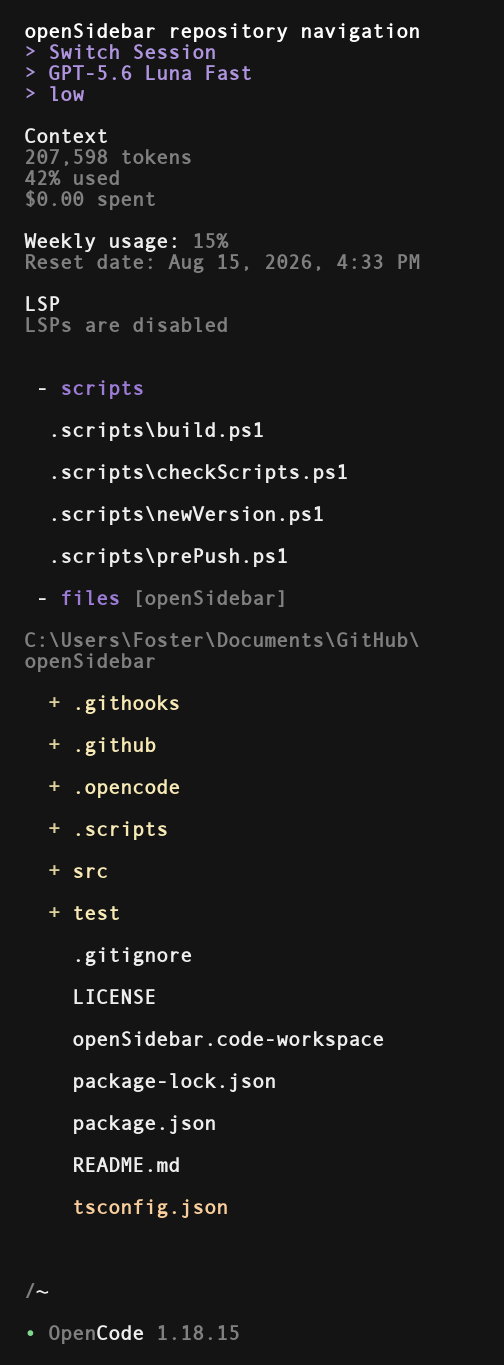
Features
Header buttons
> Switch Session : clicking here invokes the 'switch session' command
> model : brings up the 'select model' menu. the label shows the current model
> weight : toggle through model weight / variant options
Usage Meter
Supported subscriptions
- Codex
- OpenCode Go
- Cursor
Supported API services
- OpenRouter
Files / Scripts
Scripts
Quickly run or reference project scripts. Left-click a script to run it, right-click to drop the path into chat. Runs go through the configured shell/language runner.
Files
Browse files right in the sidebar. Folders expand on left-click. Left-click a file, or right-click anything, to paste its quoted path into chat. Current directory tries to auto-set based on how the OpenCode session was started, but this can also be manually entered by clicking on the files header.
Built in search leverages Everything by Void Tools to quickly search files/folders in your active OpenCode session directory.
Install
opencode plugin -g open-sidebar
Restart OpenCode.