
@geohar/opencode-svg-mcpOpenCode plugin: run the svg-mcp MCP server via sharedserver and register its endpoint with OpenCode. Stands down when a combiner already serves svg-mcp.
4
+2 in 30 days
1,174
544 in 7 days
47.9
Multi-signal model
16 hours ago
2026-08-19
Install and configure
opencode.jsonWrites to this project's opencode.json — applies to this repository only.
opencode.json
{
  "$schema": "https://opencode.ai/config.json",
  "plugin": ["@geohar/opencode-svg-mcp@0.7.0"]
}
Writes to ~/.config/opencode/opencode.json — applies to every project.
~/.config/opencode/opencode.json
{
  "$schema": "https://opencode.ai/config.json",
  "plugin": ["@geohar/opencode-svg-mcp@0.7.0"]
}
If you want to modify the plugin locally, install it into the project and reference the local path.
shell
pnpm add -D @geohar/opencode-svg-mcpopencode loads npm dependencies through its embedded runtime on startup and caches them locally — no manual global install needed.

svg-mcp
📖 Rendered documentation: docs.georgeharker.com/svg-mcp — with a gallery and cookbook.
A FastMCP server that exposes structured, hierarchical SVG authoring to an LLM — all primitives, gradients/patterns, paths, text-on-path, embedded raster, reusable styles — built around an inkex-backed document model the AI can navigate, query, and manipulate as groups, layers, transforms, and masks, with a fast construct → render → see → iterate loop.
The logo above was authored entirely through these tools — see Usage.
See DESIGN.md for the full architecture and the
INKEX_PRIMITIVES.md catalog for the inkex → tool mapping.
Quickstart
Prerequisites — Python ≥ 3.12 and uv. Every path below runs svg-mcp through uv — standalone and the Claude Code plugin — so install it first if you don't have it:
curl -LsSf https://astral.sh/uv/install.sh | sh   # macOS / Linux
# alternatives: brew install uv  ·  pipx install uv  ·  winget install astral-sh.uv (Windows)
Rendering happens in-process (the resvg engine ships as the
resvg-pydependency), so there's no separate renderer to install. Optionally, install the resvg CLI for a small per-render speedup — used automatically when onPATH:brew install resvg # OPTIONAL (macOS; or: cargo install resvg)Linux build headers. On macOS the install is pure wheels. On Linux, two dependencies — lxml and PyGObject (the latter pulled in by
inkex) — sometimes have no matching wheel for a recent interpreter and are compiled from source by pip, which needs C headers. Install them up front (see System packages (Linux) for the full per-library mapping and other distros). On Debian 13 (trixie) / Ubuntu:sudo apt-get install build-essential python3-dev pkg-config \ libxml2-dev libxslt1-dev libglib2.0-dev \ libgirepository-2.0-dev gir1.2-girepository-2.0 libcairo2-devInstall.
Recommended — no clone. Install svg-mcp into an environment you manage, so the entrypoint is stable and launches fast (no per-invocation dependency resolution):
uv tool install svg-mcp                                   # isolated tool; `svg-mcp` on PATH
# into your own venv instead:  uv pip install svg-mcp      # (with that venv active)
# track main (pre-release):    uv tool install "git+https://github.com/georgeharker/svg-mcp"
→ entrypoint:
svg-mcp(absolute:which svg-mcp, usually~/.local/bin/svg-mcp), or/path/to/your/venv/bin/svg-mcpfor theuv pip installcase.💡 Avoid
uvx svg-mcpas the MCP server command:uvxre-resolves dependencies on every launch — needless latency for a long-lived server. Install once (above) and point your client at the resulting entrypoint.Alternative: install from a clone (for development)
Pick one of two install layouts — this choice decides the path you point Claude at:
a) Project-local venv (self-contained). Creates
./.venvinside the repo and installs svg-mcp editable into it — nothing touches your other environments:uv sync # → ./.venv with svg-mcp + deps (from pyproject/uv.lock) # equivalently, without uv.lock: uv venv && uv pip install -e .→ entrypoint:
./.venv/bin/svg-mcp(absolute:$(pwd)/.venv/bin/svg-mcp).b) Into your own existing venv. Activate the venv you want first, then install editable:
source /path/to/your/venv/bin/activate      # or otherwise have VIRTUAL_ENV set
uv pip install -e .                          # or: pip install -e .
→ entrypoint:
/path/to/your/venv/bin/svg-mcp.⚠️
uv syncalways targets the project's./.venv, butuv pip install/pip installtarget whichever venv is currently active. If you already have one active, svg-mcp and its dependencies (fastmcp, inkex, fontTools, numpy, Pillow, …) get installed into it. Use option (a) — or an explicit fresh venv — unless you deliberately want it in an existing environment.Connect a client. svg-mcp is a standard stdio MCP server — point your client at the absolute entrypoint from step 2 (Claude can't resolve
PATH). Which Claude surface you use decides what you get: the inline PNG render works everywhere, but the interactiveshow_widgetwidget (zoom · pan · backdrop · save) only renders on a chat surface — not in Claude Code.Surface Wire it up inline PNG interactive show_widgetClaude Code (CLI · IDE · desktop app) plugin · claude mcp add·.mcp.json✅ — (falls back to the PNG) Claude Desktop — chat claude_desktop_config.json✅ ✅ claude.ai / remote HTTP transport + a connector ✅ ✅ In Claude Code,
show_widgetshows the same PNG; for an interactive view there, usestart_preview— a loopback browser page.Claude Code — the plugin is easiest (no wiring). Or add the entrypoint explicitly, or commit a project-scoped
.mcp.json:claude mcp add svg-mcp -- "$(which svg-mcp)" # user scope{ "mcpServers": { "svg-mcp": { "command": "/ABSOLUTE/PATH/TO/svg-mcp" } } } // .mcp.json at repo rootClaude Desktop (chat) — the surface that renders the interactive widget. Add svg-mcp to
claude_desktop_config.json(create it if missing) using the absolute entrypoint:- macOS:
~/Library/Application Support/Claude/claude_desktop_config.json - Windows:
%APPDATA%\Claude\claude_desktop_config.json
{ "mcpServers": { "svg-mcp": { "command": "/ABSOLUTE/PATH/TO/svg-mcp" } } }Then fully quit Claude Desktop (⌘Q on macOS — not just the window) and reopen so it launches the server; confirm it under Settings → Developer. In a chat, ask Claude to draw something and call
show_widget— the render appears as an interactive card you can zoom, pan, re-backdrop, refresh (↻), and open in the full browser preview (↗). To save a file, ask Claude toexport_render/export_svg(a sandboxed widget can't trigger downloads). (Claude Desktop's "cowork"/agent mode is a Code-style surface and won't render the widget — use plain chat.)claude.ai / remote — run svg-mcp over HTTP and add it as a connector:
svg-mcp --transport streamable-http --host 127.0.0.1 --port 7731 # serves MCP at /mcpclaude.ai can't reach
localhost, so expose it with a tunnel — e.g.cloudflared tunnel --url http://127.0.0.1:7731— and add the resulting publichttps://…/mcpURL under Settings → Connectors.- macOS:
Try it — ask Claude:
Use svg-mcp to make a 320×120 badge that says "hello" on a blue gradient, then show me the render.
Claude creates a document, adds the shapes and text, and calls
render_documentto show you the image inline — then you iterate in plain language ("bigger text", "add a drop shadow", "outline the text to paths"). See Usage for the conventions and a worked example.
Status
The full inkex catalog is mapped through to 181 MCP tools (see
INKEX_PRIMITIVES.md), plus the theme system and the declarative
facade families (diagrams, charts, annotations), with ruff/mypy clean and the test suite green.
- Document model (inkex-backed, multi-document with an active-document default): shapes, paths (+ arc/star factories and path-data ops), text + tspan runs + text-on-path + flowed text, images (base64/file embed), groups (+ ungroup, z-order, duplicate, world-preserving reparent), layers (+ visible/locked/opacity), symbols/use, hyperlinks.
- Text → paths (
text_to_path): pure-Python glyph outlining (fontTools) — flattens tspans, honors bold/italic/per-run fill, and walks text along a curve (<textPath>).list_fontsenumerates installed families;measure_textreturns a run's width/height from font metrics so you can fit and center text without a render round-trip. - Variable-width strokes (
add_variable_width_path): SVG has no native variable stroke-width, so swelling/tapering lines — calligraphy, engraving, brushes, tapered arrows — are expanded into a filled ribbon, with butt/round caps and optional cubic (Catmull-Rom) smoothing of both the path and the width. - Squircles & smoothed shapes — a parametric family with iOS/Figma corner smoothing, each
add_/edit_with a stored spec for re-editing:add_squircle(Apple's continuous-corner app icon — rounded rect whose edges ease into the corner arc with cubic Béziers;smoothness0–1),add_rounded_polygon(the same idea generalized to N sides — soft-cornered triangle/pentagon/ hexagon/…),add_pill(stadium with fully rounded ends), andadd_superellipse(the Lamé curve|x/rx|^n+|y/ry|^n=1— one continuous edge-less curve theexponentmorphs from diamond → ellipse → squircle → rectangle). - Boolean ops (
boolean— union/difference/intersection/exclusion): combine shapes with no new dependency, realized via native clip/mask/compound-path constructs (e.g. an even-width icon bezel isdifferenceof an outer and inner squircle). Operands may be composite groups. Note: the result is a render-time construct, not a re-editable merged path — true geometry-level booleans await an engine (lib2geom). - Path offset (
offset_path): parallel-curve / inset by a signed distance — concentric rings, even-width bezels, glow outlines, stroke-outlining. A squircle/pill/rounded-polygon is offset EXACTLY by regenerating its params (and stays a re-editable parametric shape); anything else uses an analytic cubic-Bézier offset (adaptive Tiller-Hanson + round/miter/bevel joins) into a new path — approximate, no self-intersection trimming (a large inward offset can fold over itself). - Bulk constructors (
add_rects/add_circles/add_lines/add_paths/add_variable_width_paths): add many shapes in one call (one round-trip) — for procedural art, hatching/engraving fields, and data viz. - Import existing SVG (
import_svg, inline or from a file) into a session document to render, inspect, or edit. - Reusable resources: named styles (CSS classes +
@namepaint refs), linear/radial/mesh gradients, patterns, markers, clip + mask, and filters (blur, drop-shadow, color-matrix/overlay, blend, morphology, component-transfer, turbulence, displacement, plus a raw filter-graph builder). - Themes — a document-wide design language authored as real CSS (
.svg-mcp/themes/): tokens as custom properties (resolved server-side; emitted CSS is var-free), namespaced classes, per-theme variants (dark mode in ten lines), prose guidance returned to the agent on load. Themes are a role-routed set (boxes from one theme, text from another); nodes hook in automatically by category/primitive/role, and the precedence rule is one sentence: if you typed it, it sticks; if the theme supplied it, it stays linked. Seedocs/themes.md. - Box-arrow diagrams — declare, don't draw:
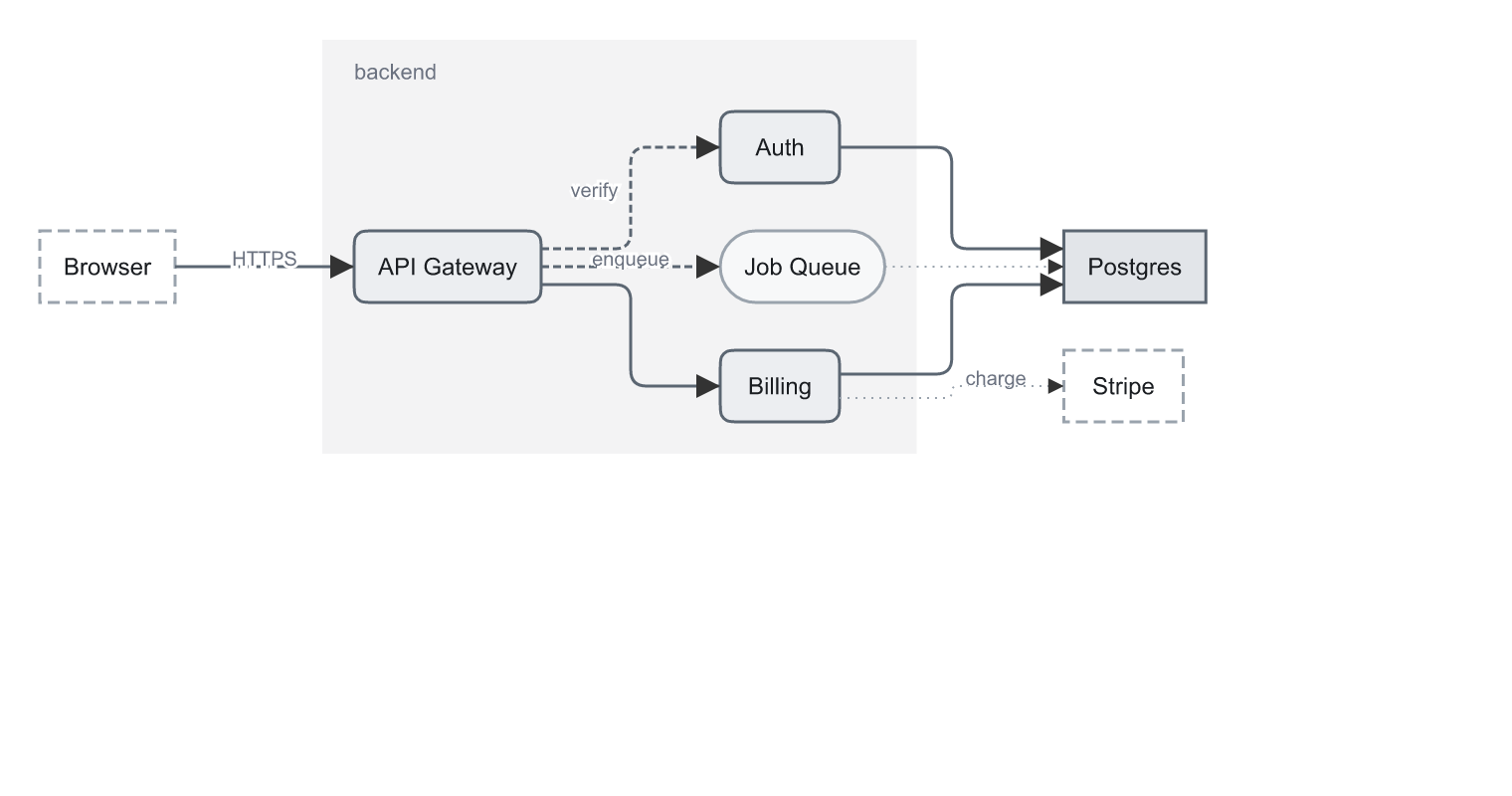
add_diagram_node(kind, label)(theme picks the shape, label sizes the box), id-parametric edges with side auto-selection, port fan-out and rounded orthogonal routing, containers drawn behind their members, explicitreflow()after moves, andlayout_diagram(layered/tree/grid) for zero-coordinate authoring. Seedocs/diagrams.md. - Graph ingest (
add_diagram_graph) — hand it a whole{nodes, edges}graph, in the shape code-graph/dependency exports already emit (from/to, extra keys ignored), and get boxes, arrows and a layout in one call: self-edges dropped and counted, parallel edges merged with their weights summed, unknown endpoints refused rather than invented. You say what the picture is about —collapsegroups,include/excludeglobs,size_fieldscaling a box by area — because no centrality score knows which nodes deserve one. - Edge router —
layout_diagramreserves a lane per rank-spanning edge (dummy nodes in the ranking) so long edges travel between the boxes instead of over them, routes sharing a corridor fan apart instead of drawing on top of each other, and a label is scored onto the cheapest segment long enough to hold it — charged for the boxes, routes and labels it would land on. When the router's choice isn't yours,waypointspins an edge's middle through every later reflow and layout, andpinnedkeeps a node where you put it while the layout packs the drawing around it. - Charts — seven data-parametric kinds (
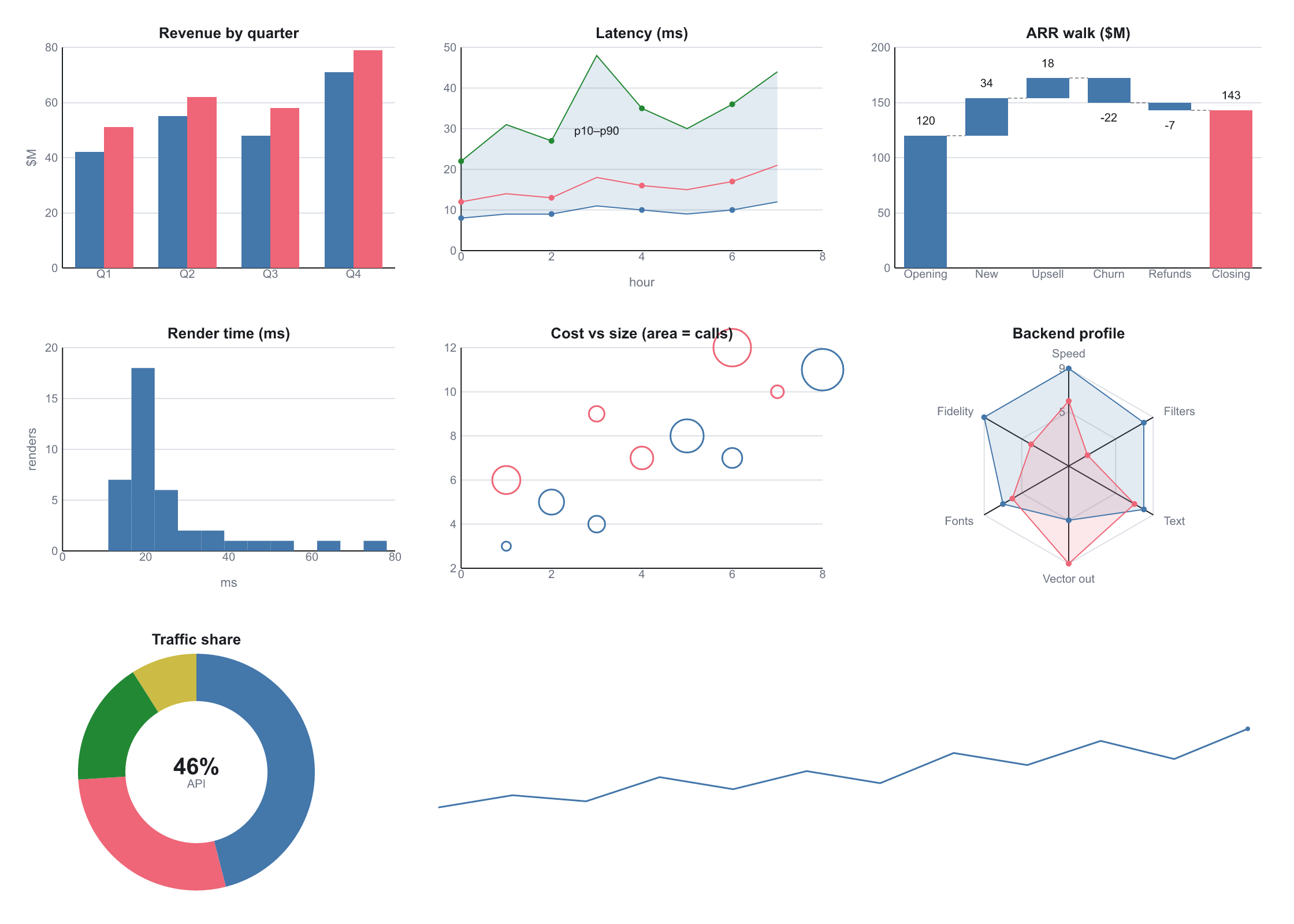
bar,line,donut,scatter,histogram,sparkline,radar) with nice-number ticks and margins measured from the actual tick labels; anaxes=spec for pinned (and clipped) limits, tick counts or explicit ticks, percent/currency/SI labels, gridlines, minor ticks, tick direction, rotated/inverted axes, a zero spine, reference lines and log scales; plus waterfalls with a total bar, normalized stacks, marker glyphs (open,markevery, bubbles by area), series bands, and step-mid lines.edit_chartre-derives the picture from new data. Deliberately not a plotting library (no density/KDE, secondary axes or colormaps —import_svgmatplotlib output for that). - Annotations —
add_legend()generated from what the document uses (swatches wear the real theme classes),add_calloutcards whose leader lines point at node ids and survivereflow,add_tablewith measured columns,add_callout_cardwith kind-colored accents. - Composable effect stack — Photoshop-style layer effects that stack on one node (each
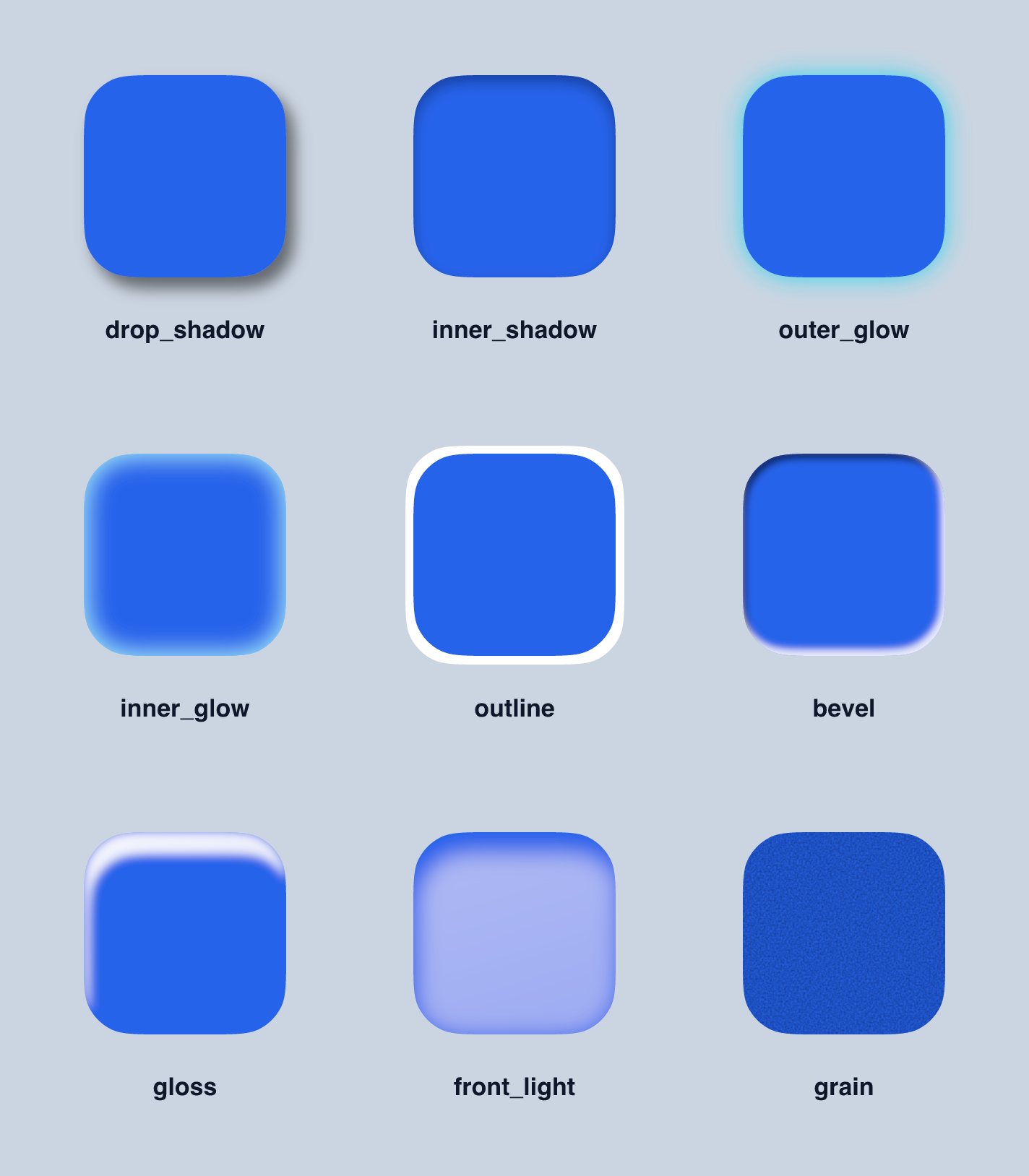
apply_*appends;replace=truestarts fresh), each bounded by asize/falloff so the interior fill stays intact:apply_drop_shadow,apply_inner_shadow,apply_outer_glow,apply_inner_glow,apply_outline,apply_bevel,apply_gloss(glassy sheen on the lit edge),apply_front_light(its inverse — lights the front body),apply_grain.get_filterdescribes the ordered stack andedit_filtertweaks one effect's params by index — round-tripping through the SVG (data-fx).
Architecture
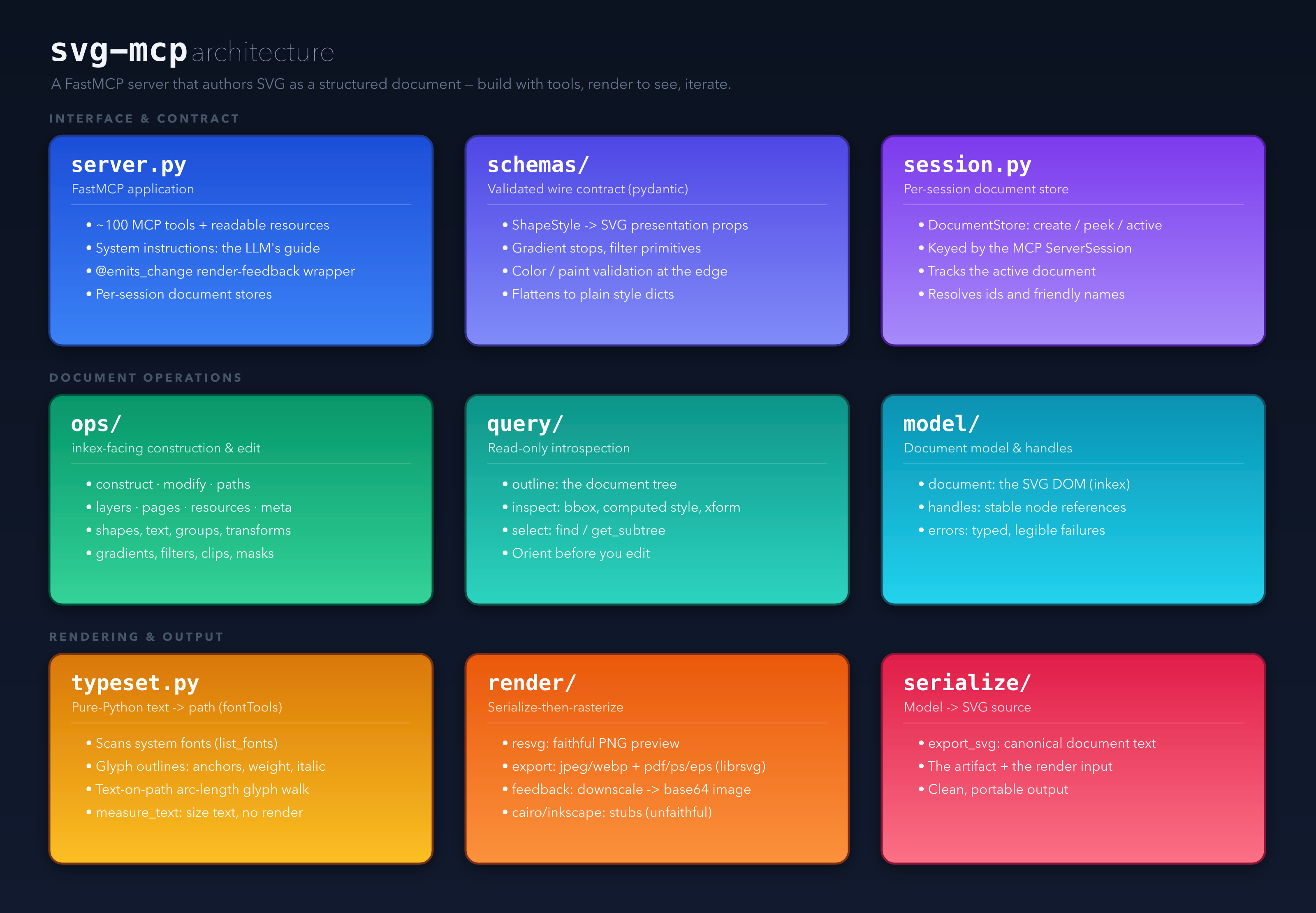
Authored entirely through the svg-mcp tools and rendered via the server's resvg backend (
docs/architecture.svgis the live serialized source).

Three layers: an interface & contract tier (the FastMCP server, pydantic input schemas, and
per-session document stores), a document-operations tier (inkex-facing construction/edit,
read-only introspection, and the document model), and a rendering & output tier (pure-Python
typesetting, the render/export backends, and SVG serialization). See DESIGN.md
for the full layering rationale.
Design language & declarative facades
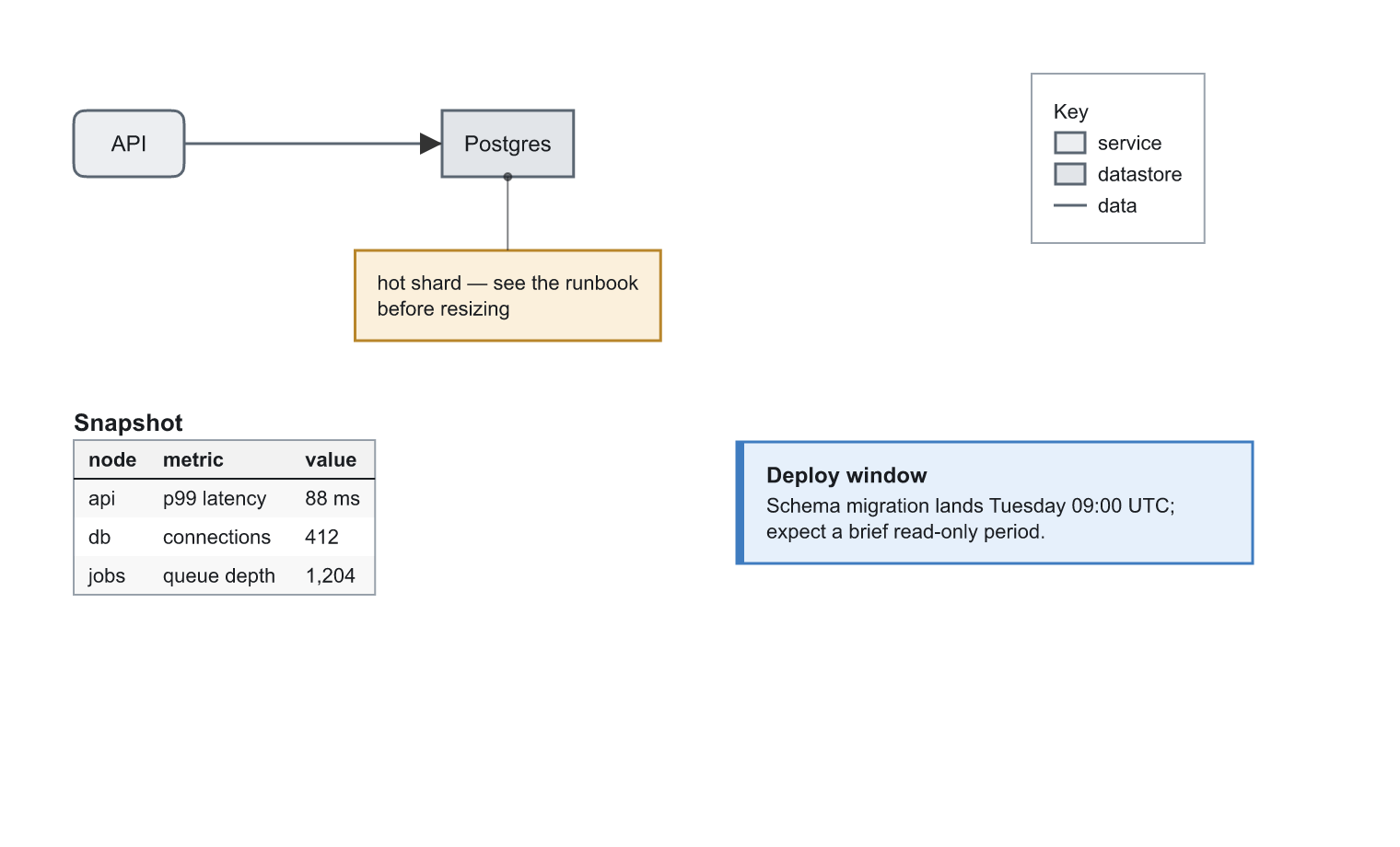
State what things are — kinds, roles, connections, data — and geometry and paint are
derived. Everything below was authored with zero coordinates inside the facades, styled by
the bundled default theme, and stays editable (edit_chart swaps the data and re-derives;
translate_node + reflow() re-routes; set_theme_variant("dark") reskins in one call).
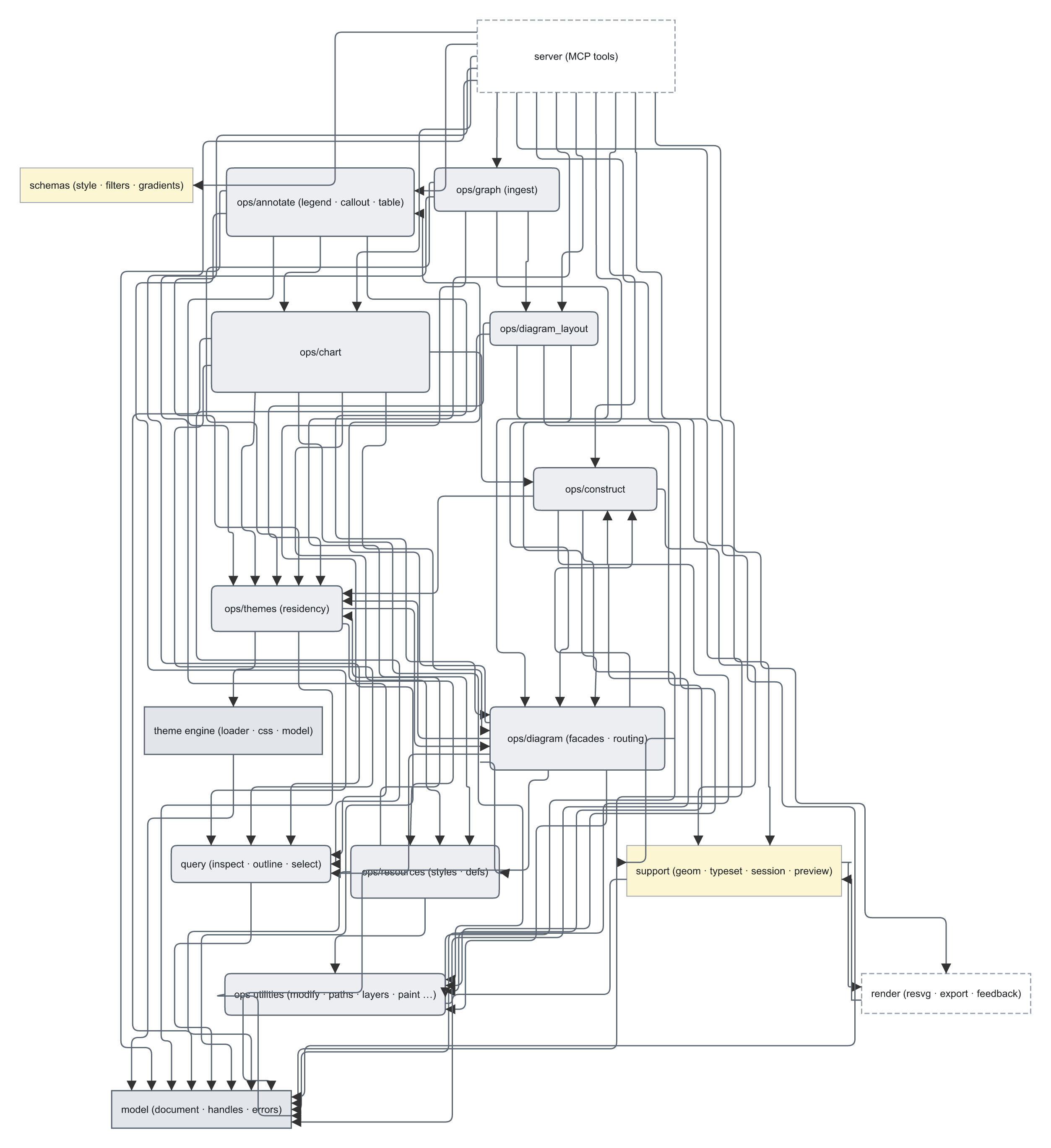
And the same idea applied to a graph you already have: the self-portrait below is svg-mcp's own
module graph handed to add_diagram_graph in one call — a code-index export, seven collapse
groups, boxes scaled by symbol count, laid out and routed with no coordinates anywhere.
Guides: docs/themes.md (authoring a design language as CSS — tokens,
variants, residency, precedence) and docs/diagrams.md (diagram,
chart, and annotation facades). Regenerate the images with
examples/generate.py.
Install as a Claude Code plugin
The repo doubles as a Claude Code plugin marketplace. The plugin
runs the published release with uvx, behind one warm server shared by every session
(via sharedserver) rather than a cold start per session. Your documents stay isolated
regardless: svg-mcp partitions state per MCP session, so each chat gets its own document
store exactly as separate processes did.
Prerequisites:
- uv (for
uvx) onPATH. If it's missing the plugin still loads, but the server won't start — aSessionStarthook reports this with an install link. - sharedserver — it owns the warm
server's lifecycle, refcounted so the process stops once the last session leaves.
You don't need to install it: the plugin fetches a prebuilt release on first use
when none is present, so no Rust toolchain is required. An
sharedserveralready onPATH, or$SHAREDSERVER_BIN, is used as-is and never silently replaced. - Linux only: install the system packages (Linux) before the
first launch, so
lxml/PyGObjectcan build. macOS installs entirely from wheels.
/plugin marketplace add georgeharker/svg-mcp
/plugin install svg-mcp@svg-mcp
The first session pays a one-time resolve/build cost; later sessions attach to the warm server and start immediately.
Install as an OpenCode plugin
The OpenCode counterpart lives in plugins/opencode
and behaves identically (same warm sharedserver-managed server, same
uvx svg-mcp@<version> pin, same combiner stand-down). Add it to your opencode.json:
{ "plugin": ["@geohar/opencode-svg-mcp@latest"] }
It registers svg-mcp as a type: "remote" MCP endpoint (:7731) and keeps one warm
server behind it. Full options (port, gracePeriod, dev, manage, …) are in the
plugin's README. The same MCP_COMBINER /
MCP_COMBINER_SERVES_SVG_MCP switch below applies — the OpenCode plugin honours it too.
Install as a Pi extension
Pi has no MCP of its own, so it needs pi-mcp-adapter
(pi install npm:pi-mcp-adapter) plus the @geohar/pi-svg-mcp extension in
plugins/pi. The extension runs the same warm
sharedserver-managed server (same uvx svg-mcp@<version> pin) and injects the
diagram-authoring directive on before_agent_start; point the adapter at svg-mcp with a
one-line mcp.json (plugins/pi/mcp.json.example).
Load the extension by symlink into ~/.pi/agent/extensions/, a local path under
settings.json extensions, or the published package under packages. Full options
(SVG_MCP_PORT / _VERSION / _DEV, PI_SVG_MCP_*) are in the plugin's
README. The same MCP_COMBINER /
MCP_COMBINER_SERVES_SVG_MCP stand-down applies — when combiner-served the extension
injects the directive only (no mcp.json needed; you register the combiner instead).
If a combiner already serves svg-mcp
The plugin writes to your user-scope MCP config (claude mcp add|remove) rather than
declaring a server in its manifest — that is what lets one plugin serve both deployments.
If an aggregator such as mcp-companion
already proxies svg-mcp, registering a second copy would mount every tool twice. Set the
global switch once (e.g. in ~/.zshenv) and the plugin will not register:
export MCP_COMBINER=1                  # a combiner serves my MCPs
export MCP_COMBINER_SERVES_SVG_MCP=0   # …except svg-mcp — override, wins over the global
It is a machine-wide toggle, not per-session: it must be set before Claude Code starts, and the registry it drives is global. Both directions converge — setting it removes our entry, unsetting it re-adds — but a change lands in the next session.
Running a local checkout (development)
By default the plugin serves uvx svg-mcp@<plugin version> — the published release, pinned so
the marketplace version and the served code agree. To serve your own working tree instead:
export SVG_MCP_DEV=~/Development/svg-mcp   # a checkout to run via `uv run --project`
export SVG_MCP_DEV=1                       # or: the plugin's own bundled copy
SVG_MCP_PORT (default 7731) moves both the registered URL and the server's bind port.
Install (manual / development)
pip install -e ".[dev]"
System packages (Linux)
macOS installs entirely from wheels — nothing extra. On Linux, pip falls back to building a couple of dependencies from source whenever no wheel matches your interpreter (common on Debian 13 “trixie” and other recent/edge distros), and those builds need C headers and build tooling. Which library needs what:
| Python dependency | Why | Debian/Ubuntu packages |
|---|---|---|
| (all C-extension builds) | compiler, headers, pkg-config |
build-essential · python3-dev · pkg-config |
| lxml | the XML/XSLT C libs it binds | libxml2-dev · libxslt1-dev |
PyGObject + pycairo (both pulled in by inkex on Linux) |
GObject-introspection (girepository) and the cairo C lib (PyGObject depends on pycairo) |
libgirepository-2.0-dev · gir1.2-girepository-2.0 · libcairo2-dev (drag in libglib2.0-dev) |
pangocffi / pangocairocffi (cairo extra only) |
the pango C lib (cairo is already covered above) | libpango1.0-dev · libffi-dev |
Core install (everything except the optional cairo extra) on Debian/Ubuntu — verified on
Debian 13 (trixie):
sudo apt-get install build-essential python3-dev pkg-config \
    libxml2-dev libxslt1-dev \
    libglib2.0-dev libgirepository-2.0-dev gir1.2-girepository-2.0 \
    libcairo2-dev
On trixie the GObject-introspection dev package is the new
libgirepository-2.0-dev(it pulls inlibglib2.0-dev); on older releases it islibgirepository1.0-dev. Likewise the XSLT headers arelibxslt1-dev(the barelibxslt-devname is only a virtual alias).
If you also install the cairo extra (pip install -e ".[cairo]"), add pango (cairo is
already in the core set above):
sudo apt-get install libpango1.0-dev libffi-dev
Equivalents on other distros (same libraries, distro-specific names):
# Fedora / RHEL
sudo dnf install gcc python3-devel pkgconf-pkg-config \
    libxml2-devel libxslt-devel \
    gobject-introspection-devel glib2-devel cairo-devel \
    pango-devel libffi-devel                    # last line = cairo extra
# Arch
sudo pacman -S base-devel libxml2 libxslt gobject-introspection cairo \
    pango libffi                                # pango/libffi = cairo extra
If pip instead finds wheels for every dependency on your platform/interpreter, none of the above is needed — the build-from-source fallback is the only thing that pulls these in.
inkex (the SVG DOM)
Depends on the released PyPI inkex>=1.4.1. Note its API shape (verified against the
install): inkex.colors is a flat module, and there is no Image.embed_image() — raster
embedding is done manually (base64 data URI). All element classes plus bounding_box,
composed_transform, specified_style, and Transform @ composition are present.
resvg (the default renderer)
resvg is a deterministic, cross-platform renderer with native text-on-path and broad filter
support and no system libs. It renders in-process via the bundled resvg-py binding
(same engine — verified pixel-identical to the CLI), so a bare install is self-contained with no
external binary.
If the resvg CLI is on PATH it's used automatically instead — marginally faster, entirely
optional:
brew install resvg # OPTIONAL (macOS; or: cargo install resvg)
Override the CLI path with SVG_MCP_RESVG_BINARY=/path/to/resvg, or force a backend with
SVG_MCP_RENDERER=resvg-py (in-process) / resvg-cli. Vector export (pdf/ps/eps) still needs
the librsvg rsvg-convert binary; raster output never does.
Optional backends
cairoextra — secondary vector/raster backend (PDF/PS/SVG out) via cairocffi + pango; needs the cairo + pango system libs (macOS: Homebrewcairo+pango; Linux: see System packages (Linux)). Stub today.- Headless Inkscape — reference renderer + heavy ops, driven via
--shell(no D-Bus on macOS). Stub today.
Configuration
All settings are env vars prefixed SVG_MCP_ (or a .env file):
| Var | Default | Meaning |
|---|---|---|
SVG_MCP_RENDERER |
resvg |
Render backend: resvg (CLI if present, else in-process) · resvg-py · resvg-cli · cairo · inkscape |
SVG_MCP_RESVG_BINARY |
auto | Path to the resvg CLI |
SVG_MCP_INKSCAPE_BINARY |
auto | Path to the Inkscape CLI |
SVG_MCP_FEEDBACK_MAX_EDGE |
unset | Optional long-edge cap (px); unset = raw image handed back directly as base64 |
SVG_MCP_DEFAULT_BACKGROUND |
transparent | Default render background (CSS color) |
SVG_MCP_RENDER_TIMEOUT_S |
30 |
Per-render subprocess timeout |
SVG_MCP_TRANSPORT |
stdio |
Server transport: stdio · http · streamable-http · sse |
SVG_MCP_HOST / SVG_MCP_PORT |
127.0.0.1 / 8000 |
Bind address for the http transports |
SVG_MCP_AUTH_TOKEN |
unset | Optional inbound bearer token for the http /mcp endpoint (see Authentication) |
SVG_MCP_PREVIEW |
unset | Auto-start the live preview web server on boot (1/true) |
SVG_MCP_PREVIEW_HOST / SVG_MCP_PREVIEW_PORT |
127.0.0.1 / 8808 |
Bind address for the live preview |
Transport, host, and port can also be set with CLI flags (which take precedence over the env
vars): svg-mcp --transport streamable-http --host 127.0.0.1 --port 7731.
Authentication
The http /mcp endpoint is unauthenticated by default — fine on loopback, but open the
moment you bind beyond 127.0.0.1. Set SVG_MCP_AUTH_TOKEN and every request to /mcp
must present Authorization: Bearer <token>; a missing/wrong token gets a plain 401 (no
WWW-Authenticate, so standards clients don't drift into OAuth). Unset ⇒ open (unchanged);
/health stays open. When svg-mcp runs behind the
mcp-combiner, give the combiner the token in
this server's servers.json entry: {"auth": {"bearer": "${SVG_MCP_AUTH_TOKEN}"}}. (The gate
is inbound_auth.py, vendored byte-identical from the combiner.)
Develop
pytest          # tests (resvg smoke test auto-skips if the binary is absent)
ruff check .    # lint
mypy src        # types (no Any / object — precise types only)
Run
svg-mcp                                          # FastMCP server over stdio (default)
svg-mcp --transport streamable-http --port 7731  # or streamable HTTP at 127.0.0.1:7731/mcp
# env vars work too: SVG_MCP_TRANSPORT=http SVG_MCP_PORT=7731 svg-mcp
A long-running HTTP server is handy for a shared/persistent endpoint a bridge can connect to (the server runs as a single process; each client connection gets its own isolated documents).
Live preview
Rendering each step back into the chat costs tokens and, in a terminal, the model sees the image but you don't. The live preview solves both: a tiny loopback web page that mirrors the active document and auto-refreshes on every edit over Server-Sent Events — so you watch the drawing build in a browser while the model keeps working, with no render bytes spent on the conversation.
- Start it: the model is instructed to open a preview and hand you the URL up front on any
non-trivial drawing, so you can watch (and redirect) as it builds. You can also ask for it
outright — "show me", "open a preview" — or set
SVG_MCP_PREVIEW=1to auto-start on boot. - Watch it: open the URL once and leave it — it repaints on each change. Toggle PNG (faithful resvg output) vs SVG (crisp vector), zoom, drag to pan, and Save the current frame as PNG/SVG/WebP/JPEG/PDF straight from the page.
- Per-chat: the URL carries a session token (
/<token>/), so each chat gets its own isolated preview even though they share one server and port — one chat's edits never appear in another's.
The page just mirrors the read-only svg:// resources: GET /<token>/active/render
is the same render as the svg://{id}/render resource, refreshed by the same change signal.
Inline widget (show_widget)
show_widget is the in-chat companion to the live preview: instead of a browser page, it renders
the active document inside the conversation as an interactive card — zoom, pan, backdrop,
refresh, and a jump to the full browser preview — on Claude surfaces that render MCP-Apps widgets
(Claude Desktop chat, claude.ai). The rendered PNG also rides in the tool result, so on surfaces
that don't render widgets (Claude Code, and the model's own render-and-see loop) you still get
the image inline — nothing is lost. To save a file, ask the model to export_render / export_svg
(a sandboxed widget can't trigger a browser download).
Reach for show_widget when you want a quick look in the chat with no browser, and for
start_preview when you want the always-on, auto-refreshing browser view (which
works on every surface). The widget is self-contained — the ext-apps
runtime is vendored inline (scripts/vendor_ext_apps.py regenerates it), so it needs no server and
no network.
Experiment with an LLM
Quickest sanity check (no LLM): render a sample poster to PNG.
.venv/bin/python scripts/demo.py # writes demo_output.png
Claude Code — install it as a plugin, or add the server explicitly:
claude mcp add svg-mcp -- /Users/geohar/Development/svg-mcp/.venv/bin/svg-mcp
Claude Desktop — add to claude_desktop_config.json:
{
  "mcpServers": {
    "svg-mcp": { "command": "/Users/geohar/Development/svg-mcp/.venv/bin/svg-mcp" }
  }
}
MCP Inspector — interactively call tools and view rendered images in a browser:
uv run fastmcp dev src/svg_mcp/server.py:mcp
The model's loop is: create_document → add nodes / resources → render_document to see the
result inline → iterate → export_svg. The server's instructions describe the full workflow
and conventions; each tool carries its own description.
Usage
The tools are called by an LLM over MCP. The core loop is create → build → render-and-see → iterate → export. A minimal session (arguments shown as the JSON each tool receives):
create_document(width=320, height=120)                 # → {document_id:"doc1", active:true}

# define a reusable gradient, then paint with it by name (@name) or url(#id)
define_linear_gradient(x1=0, y1=0, x2=1, y2=0,
    stops=[{offset:0, color:"#7dd3fc"}, {offset:1, color:"#1e3a8a"}], name="brand")
add_rect(x=0, y=0, width=320, height=120, rx=16, style={fill:"@brand"})

add_text(x=160, y=72, content="svg-mcp", name="title",
    style={font_family:"Helvetica", font_size:"40px", font_weight:"bold",
           text_anchor:"middle", fill:"#ffffff"})
apply_drop_shadow(target="title", dx=0, dy=2, blur=3, color="#000", opacity=0.4)

render_document(scale=2)        # returns the rendered PNG inline — look, then adjust
export_svg()                    # final SVG source string
Conventions
- Active document.
create_documentreturns adocument_idand makes it active; you may omitdocument_idon later calls to target it. Pass it explicitly to switch, or useset_active_document. Callcurrent_context()to re-anchor (active id, open docs, outline). - Targets by id or name. Every
target/parent/contentarg takes a node's returned id or the friendlynameyou gave it. Name things you'll revisit; reason viafind(name=…)andoutline. A bare handle is an id, else an exact name — never a hierarchy query, so a name containing/(graph imports name nodessrc/ops/x.py) just works. Be explicit when you must:id:x,name:x(verbatim, slashes and all), orpath:ancestor/namefor the ancestor-chain query (each segment an id or name, gaps allowed) that disambiguates a duplicated name; the prefix is stripped once, so any literal name is expressible (name:name:foo). Names should be unique — a name matching several nodes is rejected (no silent guess), and the error lists a handle per candidate. Each chat/connection has its own isolated set of documents (current_contextreports thesession_id). - Stacking. Later siblings paint on top. Restack relative to a sibling with
reparent(target, above=<node>)/below=<node>instead of counting child indices. - Coordinates. User units, origin top-left, y increases downward.
- Style. A structured object —
fill,stroke,stroke_width,opacity, plus typography (font_family,font_size,font_weight,font_style,text_anchor). Colors accept hex /rgb()/ CSS names /none, or a paint referenceurl(#id)/@nameto a defined gradient or pattern. - Resources follow create → define → reference/apply:
define_*returns an id you use as a fill (url(#id)/@name) or attach viaapply_*(clip/mask/marker/filter). Clip/mask/ symbol/pattern definitions move the listed content nodes into the resource, so build those shapes first.list_resources()shows what's defined. - Transforms compose:
translate_node,rotate_node(optional center),scale_node(optional anchor),skew_node, orapply_transform("rotate(45 100 100)"). - Text.
add_text+add_text_runfor multi-line/styled spans;add_text_on_pathto flow along a path. Judge text size withrender_document(geometry queries are empty for live text).text_to_pathoutlines text to glyph paths — font-independent, flattens tspans, and walks<textPath>along its curve;list_fontslists installable families.
Resources
Open documents are also exposed as readable MCP resources, so a host can surface live state:
svg://documents (index + which is active), svg://{id}/svg (source), svg://{id}/render
(PNG). Mutations emit resources/updated notifications.
Example: the logo
The header logo (logo.svg) was built with these tools — <mcp>svg</mcp> as a blue gradient
wordmark, an orange→white starfield clipped into the glyphs, the inner svg word under a
translucent white veil (so the <mcp> tags read as starry space and svg as frosted white), all
under one drop shadow — then text_to_path outlined the glyphs so the final file is
font-independent. scripts/demo.py shows a smaller end-to-end build you can run directly.
License
GPL-2.0-or-later. svg-mcp's document model is built on inkex
(the Inkscape extensions library), which is GPL-2.0-or-later — a strong copyleft license that
extends to works that import it. svg-mcp is therefore licensed under the GNU General Public License
v2 or later; see LICENSE.