
@geohar/opencode-mcp-combinerOpenCode plugin: run the mcp-combiner MCP aggregator via sharedserver and register its endpoint with OpenCode.
8
+1 in 30 days
1,226
530 in 7 days
48.7
Multi-signal model
15 hours ago
2026-08-19
Install and configure
opencode.jsonWrites to this project's opencode.json — applies to this repository only.
opencode.json
{
  "$schema": "https://opencode.ai/config.json",
  "plugin": ["@geohar/opencode-mcp-combiner@0.13.2"]
}
Writes to ~/.config/opencode/opencode.json — applies to every project.
~/.config/opencode/opencode.json
{
  "$schema": "https://opencode.ai/config.json",
  "plugin": ["@geohar/opencode-mcp-combiner@0.13.2"]
}
If you want to modify the plugin locally, install it into the project and reference the local path.
shell
pnpm add -D @geohar/opencode-mcp-combineropencode loads npm dependencies through its embedded runtime on startup and caches them locally — no manual global install needed.
mcp-companion
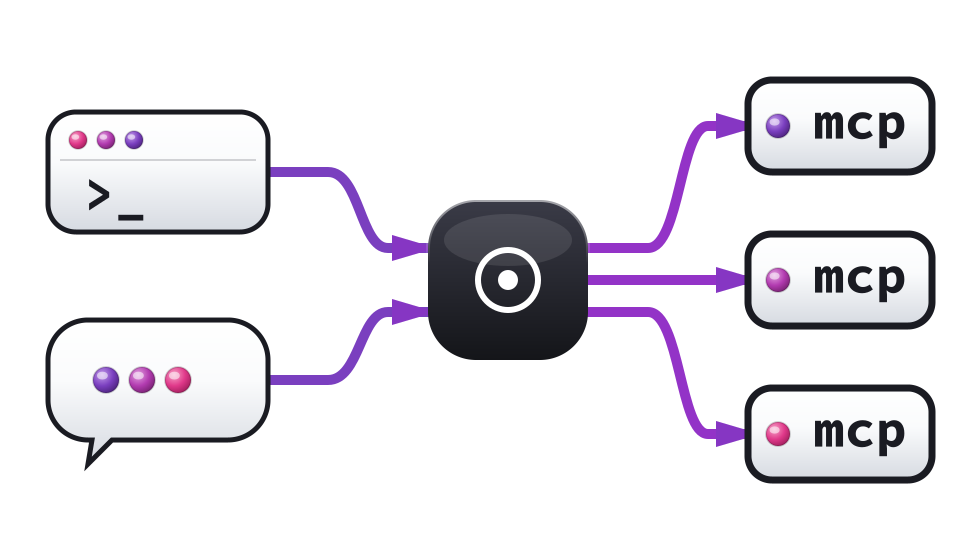
An MCP aggregator (combiner) and editor integration that aggregates multiple Model Context Protocol servers behind a single HTTP endpoint, with first-class CodeCompanion.nvim support.
The combiner runs standalone as a Python process — any MCP-aware client can connect to it over HTTP. The Lua plugin layer adds Neovim-specific features: tool registration, editor context, slash commands, ACP forwarding, and a status UI.
⚠️ The combiner was renamed
mcp-bridge→mcp-combiner. The Python package, command, and import are nowmcp-combiner/mcp-combiner/mcp_combiner; its admin tools arecombiner__*; config env vars areMCP_COMBINER_*(andMCP_COMPANION_COMBINER_URL→MCP_COMPANION_COMBINER_URL). If you ran an earlier build, seecombiner/README.mdto migrate (reinstall + a one-off OAuth re-auth). Themcp-companionrepo and Neovim plugin keep their name.
📖 Rendered documentation: docs.georgeharker.com/mcp-companion
Overview
MCP Combiner (standalone)
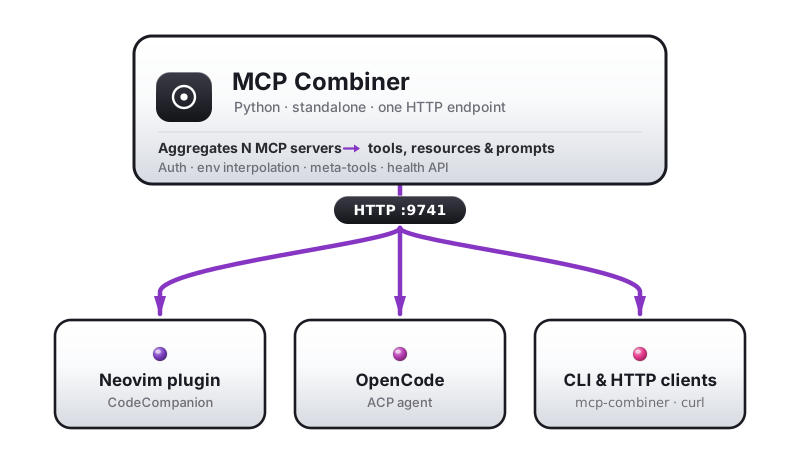
The combiner is a FastMCP server that proxies all configured MCP servers through a single HTTP endpoint. It works independently of Neovim — any MCP client that speaks HTTP can use it.
Quick start
# Install dependencies
cd combiner
uv sync --frozen

# Run the combiner
uv run python -m mcp_combiner --mcp --config ~/.config/mcp/servers.json --port 9741

# Health check
curl http://127.0.0.1:9741/health
What the combiner does
- Reads a standard
mcpServersJSON config (VS Code / Claude Desktop format) - Spawns and manages stdio servers, connects to HTTP/SSE servers
- Exposes all tools, resources, and prompts through one HTTP endpoint
- Handles environment variable interpolation, OAuth 2.1 auth, schema sanitization
- Provides meta-tools (
combiner__status,combiner__enable_server,combiner__disable_server) - Serves a
/healthendpoint with server status
Architecture
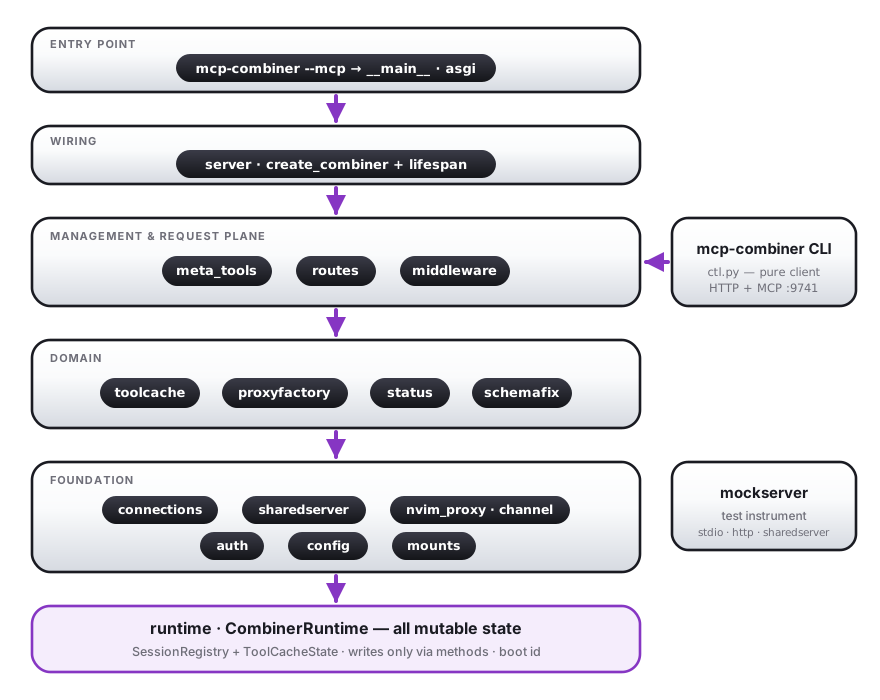
Internally the combiner is a one-way layered DAG: the serve entry point
(--mcp → __main__ · asgi) wires up server, which registers the
management & request plane (meta_tools, the /sessions* REST routes,
and the tools/list + tool-call middleware) over the domain modules
(tool cache/hysteresis, proxy construction, status, schema fixes) and the
foundation (persistent connections with self-healing, sharedserver
process management, auth, the Neovim back-channel). All mutable state is
owned by runtime.CombinerRuntime and mutated only through its methods.
The mcp-combiner CLI is a pure client of the management plane; the
mockserver module is the instrumentable test upstream. Full internal
design notes live in
docs/design.md.
Control CLI
mcp-combiner (without --mcp) is a control CLI for a running combiner —
the same operations surface the Neovim plugin exposes:
mcp-combiner start                     # launch the combiner via sharedserver, attached to this shell
mcp-combiner stop                      # drop this shell's reference (decref)
mcp-combiner restart                   # bounce the whole combiner process (like :MCPRestart)
mcp-combiner status                    # glyph table: server, state, transport
mcp-combiner health --json             # raw /health payload
mcp-combiner enable <server>           # mount + connect
mcp-combiner disable <server>          # unmount + disconnect
mcp-combiner restart-server <server>   # hard bounce one upstream (like :MCPRestartServer)
mcp-combiner reload                    # re-read config, apply the diff
mcp-combiner tools                     # list advertised tools
mcp-combiner call myserver_echo --args '{"message": "hi"}'
mcp-combiner session status                              # list sessions
mcp-combiner session disable <server> --token <uuid>     # per-chat filter (WIP)
mcp-combiner session allow --servers a,b --token <uuid>  # allow-list (WIP)
Process lifecycle: start / stop / restart
start, stop, and restart manage the combiner's own process through
sharedserver — the native-CLI
equivalent of the Claude plugin's SessionStart hook. They are distinct from
enable/disable/restart-server, which drive an already-running combiner
over its control API.
startrunssharedserver useto launch (or attach to) the combiner and ties the reference to the calling shell — not the short-lived CLI process — so the combiner outlives the command and lives as long as your shell (or untilstop). It is idempotent and refcounted: astartfrom a second shell (or a Neovim/Claude client) just adds a reference to the same process.--wait(default) polls/healthuntil ready.stoprunssharedserver unuseto drop this shell's reference. The combiner keeps running until the last client detaches, then stops after the grace period (--grace-period, default30m).restartbounces the whole process:sharedserver admin stop --force(graceful SIGTERM → SIGKILL, so the combiner decrefs its own downstreams first) then a freshuse. If other clients are attached it refuses unless you pass--force(they reconnect automatically) — mirroring:MCPRestart/:MCPRestart!.restart-server <name>, by contrast, only bounces that one upstream and never the combiner.restartis the sanctioned restart, and it carries session state across: before stopping, it arms a one-shot handover (POST /handover/prepare) — the dying combiner parks its per-chat isolated upstream sessions without terminating them (the backing servers keep running and keep their state) and writes token filters, nvim binds, and per-token upstream session ids to a mode-600 file that the successor consumes via--restore(deleted on consume; refused if stale). A reconnecting chat that presents its grouping token then resumes its exact upstream sessions — a stateful server likesvg-mcpstill has the chat's documents, mid-conversation. Only this path gets the handover: crashes andsharedserver admin killboot fresh (config- supervisor re-assertion), and a combiner too wedged to answer the prepare call restarts restore-less. Tokenless chats always come back fresh — their wire session id died with the old process (see Chat identity).
start/restart accept --config (default: $MCP_COMBINER_CONFIG,
$CLAUDE_MCP_COMBINER_CONFIG, then standard locations), --name (sharedserver
name, default mcp-combiner), --port/--host, --grace-period, --pid
(override the shell PID the reference attaches to), --log-file, and --dry-run
(print the sharedserver command instead of running it). start also forwards
extra serve flags after --, e.g.
mcp-combiner start --config … -- --no-output-validation.
The session filter verbs (enable/disable/allow/clear) address a chat
by its grouping token and apply live: the token-keyed filter store is
canonical, enforcement reads through to it on the chat's next request, and the
state survives reconnects and mcp-combiner restart (it rides the handover).
With the Claude plugin's tokens this means any Claude chat is controllable
from the CLI — or from another chat — by its cc-<session-id> token (see
/sessions/map for the live roster).
The read/drive verbs (status, health, enable, …) accept --host/--port
(default 127.0.0.1:9741) or --url, and --json for scripting.
Migration note: the server is now started with an explicit
--mcpflag (mcp-combiner --mcp --config … --port …). The historical baremcp-combiner --config …invocation still serves, with a deprecation warning — add--mcpto launcher configs when convenient.
Using with other MCP clients
When using ACP adapters (OpenCode, Claude Code) through CodeCompanion, no manual configuration is needed — the combiner is automatically injected into the agent's session.
Any MCP client that supports HTTP transport can also connect directly for standalone use outside CodeCompanion:
# Direct HTTP access (standalone / debugging)
curl -X POST http://127.0.0.1:9741/mcp \
  -H "Content-Type: application/json" \
  -d '{"jsonrpc":"2.0","method":"tools/list","id":1}'
Plugins (standalone Claude Code, OpenCode & Pi)
Outside CodeCompanion, install a plugin so your agent runs and registers the
combiner itself (one refcounted process shared across clients). All three plugins live
in this repo — plugins/.
Prerequisites (once, for any plugin): uv,
cargo install sharedserver, and a servers.json at
~/.config/mcp-combiner/servers.json (see MCP Server Config).
You do not need to install the combiner itself — with uv present the plugins fetch a
pinned release from PyPI on demand. Then:
- Claude Code:
/plugin marketplace add georgeharker/mcp-companion→/plugin install mcp-combiner@mcp-companion→ restart the session; verify with/mcp(anmcp-combinerserver with prefixed tools). - OpenCode: add
"@geohar/opencode-mcp-combiner@latest"to youropencode.jsonpluginlist. - Pi:
pi install npm:pi-mcp-adapter(Pi's MCP client), drop the combiner into itsmcp.json(plugins/pi/mcp.json.example), and load the@geohar/pi-mcp-combinerextension (symlink into~/.pi/agent/extensions/, or list it undersettings.jsonpackages).
See plugins/README.md for the full walkthrough (config discovery order, env
knobs, troubleshooting) and the host-owned (MCP_COMPANION_COMBINER_URL)
behaviour.
MCP Server Config
The combiner reads a standard MCP servers JSON file. VS Code and Claude Desktop format is supported:
{
  "mcpServers": {
    "github": {
      "command": "npx",
      "args": ["-y", "@modelcontextprotocol/server-github"],
      "env": {
        "GITHUB_TOKEN": "${env:GITHUB_TOKEN}"
      }
    },
    "filesystem": {
      "command": "npx",
      "args": ["-y", "@modelcontextprotocol/server-filesystem", "/home/user"]
    },
    "remote-api": {
      "url": "https://api.example.com/mcp",
      "transport": "http",
      "headers": {
        "Authorization": "Bearer ${env:API_TOKEN}"
      }
    }
  }
}
Supported transport types
| Transport | Config | Description |
|---|---|---|
stdio |
command + args |
Spawns a local process (default) |
http |
url |
Connects to a remote HTTP MCP endpoint |
sse |
url |
Connects via Server-Sent Events |
Per-server options
| Field | Type | Description |
|---|---|---|
command |
string |
Executable for stdio transport |
args |
string[] |
Arguments for the command |
env |
object |
Environment variables (supports interpolation) |
url |
string |
URL for http/sse transport |
headers |
object |
HTTP headers (supports interpolation) |
transport |
string |
"stdio", "http", or "sse" (auto-detected from presence of url) |
disabled |
boolean |
Skip this server |
autoApprove |
bool | string[] |
Auto-approve spec — see Auto-approve spec |
auth |
string|object |
Authentication config (see below) |
sharedServer |
string |
Name of a sharedServers entry to start before connecting (see below) |
toolFilter |
string[] |
Glob patterns; only matching tool names are exposed (empty = all) |
permissions |
object |
Opt-in per-call allow/deny/elicit policy for this server's tools — see Combiner-side tool-call permissions |
isolate |
boolean |
Give each chat its own upstream MCP session — see isolate |
isolate — per-chat sessions
By default every chat shares one persistent upstream connection to an HTTP/SSE
server, and therefore one upstream Mcp-Session-Id. A stateful server that
keys state on the session — e.g. a server that tracks a "current document" —
then sees all chats as the same session, so two concurrent chats clash.
Set "isolate": true on such a server and the combiner opens a separate
upstream session per chat (still one upstream server instance, shared
transport). The server is handed a distinct, stable Mcp-Session-Id per chat
and partitions its per-session state automatically — no clash.
stdio servers cannot be isolated.
isolateis HTTP/SSE-only: a stdio server is one subprocess with a single MCP session, so"isolate": trueon a stdio entry is ignored (with a startup warning) and all chats share its one session — a stateful stdio server therefore leaks state across chats (one global "current document" for everyone). True per-chat isolation would require spawning a subprocess per chat, which the combiner deliberately does not do (unbounded processes for a marginal case). If you need per-chat state, run the server over HTTP/SSE and setisolate: truethere — which is exactly why the stateful sibling servers (svg-mcp, cribsheet) are HTTP, not stdio.
Chat identity — grouping tokens
"Per chat" is keyed by the chat's grouping token (the
X-MCP-Combiner-Session header, or a /mcp/<token> URL path — the URL form
wins when both are present). Tokens are minted outside the combiner by
whoever owns the chat, which is what makes them stable across combiner
restarts:
- Neovim / CodeCompanion mints a token per chat and manages its bindings.
- The Claude Code plugin presents the Claude session id as the token (a
SessionStarthook +headersHelperbridge), so every Claude chat is individually addressable — including through the/sessions/token/<token>control routes (per-chat filters and, over a restart, continuity). - The OpenCode plugin registers a per-instance token on its URL (all of an OpenCode instance's sessions share one MCP connection, so per-instance is its natural granularity).
- The Pi extension carries a per-instance token on its
mcp.jsonURL path (/mcp/<token>), viapi-mcp-adapter— the same per-instance granularity as OpenCode. (Owning the connection directly, for per-chat identity keyed on Pi's durable session id, is a documented future option — seeplugins/pi.)
A connection with no token falls back to its wire Mcp-Session-Id as the
grouping key — fine within one combiner lifetime, but that id is minted by the
combiner and dies with it, so tokenless chats do not survive a restart.
Session lifecycle
A chat's isolated upstream session moves through three tiers, driven by pure
timers (configure via a top-level "isolation" section):
- live — a downstream session bearing the token is connected, or the last
one dropped less than
grace_seconds(default 300) ago; quick reconnects reattach instantly. An explicit session DELETE from the client skips the grace and parks immediately. - parked — disconnected without terminating the upstream session; only
token → (Mcp-Session-Id, protocolVersion)is kept. The token's next appearance resumes the same upstream session (state intact), falling back to a fresh one if the server expired it. - forgotten — parked past
park_ttl_seconds(default 3600): the entry is dropped and a best-effort DELETE releases the server's session state.
"isolation": { "grace_seconds": 300, "park_ttl_seconds": 3600 }
GET /sessions/map on the combiner shows every correlation live: tokens,
their downstream sessions, nvim binds, and the isolated live/parked tiers.
isolate is tri-state:
- absent (default) — off; all chats share one upstream session.
true— on; per-chat upstream sessions. If the server usesauth/OAuth, the token is shared across the per-chat sessions, so it still authenticates once (no extra browser windows).false— explicitly off (distinct from absent for layered overrides).
Only applies to HTTP/SSE servers. An explicit true on a stdio server is
ignored with a warning — stdio has one session per process, so per-chat
isolation would need a subprocess per chat, which the combiner does not do.
"svg-mcp": {
  "url": "http://127.0.0.1:9745/mcp",
  "isolate": true        // each chat gets its own document/session state
}
sharedServer — per-server process management
Many MCP servers that expose an HTTP endpoint (as opposed to stdio) need to run as standalone processes: started before the combiner connects, kept alive during the session, and shut down when no longer needed. Managing this manually is tedious — you have to remember to start them before your editor, keep them running, and clean them up afterward.
The sharedServer field solves this. It links a server entry to a process definition in
the top-level sharedServers dict. The combiner delegates lifecycle to
sharedserver, a reference-counted
process supervisor:
- On combiner startup, sharedserver starts the process (or increments a refcount if it is already running from another client)
- The process stays alive as long as any client holds a reference — multiple combiner instances, Neovim windows, or scripts share the same process transparently
- After the last client detaches, the process remains alive for
grace_periodbefore stopping — so a quick restart or a second Neovim window opening does not cause an unnecessary restart - On combiner shutdown, sharedserver decrements the refcount; the process stops only when the grace period expires with no remaining clients
The result is ephemeral-but-shared server processes: they start on demand, are shared across all clients that need them, and stop themselves when idle. You never need to manually start or stop them.
The combiner waits up to health_timeout seconds for the process to become reachable
after starting before mounting the proxy. If the process was already running, this
passes immediately.
A complete example — a Google Workspace MCP server that needs OAuth and is managed via sharedserver:
{
  "sharedServers": {
    "google-workspace-proc": {
      "command": "uvx",
      "args": ["workspace-mcp", "--transport", "streamable-http"],
      "env": {
        "WORKSPACE_MCP_PORT": "8002",
        "MCP_ENABLE_OAUTH21": "true",
        "GOOGLE_OAUTH_CLIENT_ID": "${env:GOOGLE_OAUTH_CLIENT_ID}",
        "GOOGLE_OAUTH_CLIENT_SECRET": "${env:GOOGLE_OAUTH_CLIENT_SECRET}"
      },
      "grace_period": "30m",
      "health_timeout": 30
    }
  },
  "mcpServers": {
    "google-workspace": {
      "url": "http://localhost:8002/mcp",
      "auth": "oauth",
      "sharedServer": "google-workspace-proc"
    }
  }
}
The sharedServers key is separate from mcpServers — it describes how to run the
process; the mcpServers entry describes how to connect to it. Multiple server
entries can reference the same sharedServers entry.
sharedServers entry fields:
| Field | Type | Default | Description |
|---|---|---|---|
command |
string |
required | Executable to run (e.g. "uvx") |
args |
string[] |
[] |
Arguments to the command (supports interpolation) |
env |
object |
{} |
Extra environment variables (supports interpolation) |
grace_period |
string |
— | How long to keep the process alive after the last client detaches (e.g. "30m") |
health_timeout |
integer |
30 |
Seconds to poll the server URL after start before giving up |
Environment variable interpolation
All config fields support ${VAR} interpolation with optional defaults:
| Syntax | Description |
|---|---|
${VAR} |
Expands to $VAR value, empty string if unset |
${env:VAR} |
Same as ${VAR} (VS Code / Claude Desktop compat) |
${VAR:-default} |
Expands to $VAR if set, otherwise default |
${env:VAR:-default} |
Same with env: prefix |
Expansion applies to: command, args, env, url, and headers fields.
Interpolation happens at runtime (when connecting to servers), not at config
load time.
Authentication
MCP servers that require authentication are supported via the auth field.
Three modes are available:
Bearer token
{
  "mcpServers": {
    "my-api": {
      "url": "https://api.example.com/mcp",
      "auth": { "bearer": "${env:MY_API_TOKEN}" }
    }
  }
}
OAuth 2.1 — auto-discovery
{
  "mcpServers": {
    "my-api": {
      "url": "https://api.example.com/mcp",
      "auth": "oauth"
    }
  }
}
This triggers the full MCP OAuth 2.1 flow: metadata discovery, dynamic client registration, PKCE authorization code grant via browser redirect, and token exchange.
OAuth 2.1 — explicit client
{
  "mcpServers": {
    "my-api": {
      "url": "https://api.example.com/mcp",
      "auth": {
        "oauth": {
          "client_id": "my-app",
          "client_secret": "${env:OAUTH_SECRET}",
          "scopes": "read write"
        }
      }
    }
  }
}
When client_id is provided, dynamic client registration is skipped.
OAuth options
| Field | Type | Default | Description |
|---|---|---|---|
client_id |
string |
— | Pre-registered OAuth client ID (skips dynamic registration) |
client_secret |
string |
— | Client secret (used with client_id) |
scopes |
string|string[] |
— | OAuth scopes to request |
client_metadata_url |
string |
— | CIMD URL (alternative to dynamic registration) |
cache_tokens |
boolean |
true |
Persist tokens to disk for this server (overrides global setting) |
callback_port |
integer |
— | Local port for the OAuth redirect callback (e.g. 9876). Required when the auth provider validates redirect URIs strictly (Google, GitHub, etc.) — must match the URI registered in your OAuth app. |
OAuth token caching
By default, tokens are persisted to ~/.cache/mcp-companion/oauth-tokens/<server>/
and reused across sessions. Refresh tokens are handled automatically.
Global caching settings live in the top-level oauth section of your config:
{
  "oauth": {
    "cache_tokens": true,
    "token_dir": "~/.cache/mcp-companion/oauth-tokens"
  },
  "mcpServers": { ... }
}
Per-server override — disable caching for one server while keeping it globally:
{
  "mcpServers": {
    "my-api": {
      "url": "https://api.example.com/mcp",
      "auth": {
        "oauth": {
          "cache_tokens": false
        }
      }
    }
  }
}
CLI flags — override everything at startup (highest priority):
# Disable disk caching entirely (tokens lost on restart)
python -m mcp_combiner --mcp --config servers.json --no-oauth-cache

# Use a custom token directory
python -m mcp_combiner --mcp --config servers.json --oauth-token-dir /secure/tokens

# Re-enable caching if config file says otherwise
python -m mcp_combiner --mcp --config servers.json --oauth-cache
Priority order (highest to lowest): CLI flag → config oauth section → built-in default.
External OAuth provider mode
Some MCP servers support an "external OAuth provider" mode where the server does not run its own OAuth flow — it simply validates bearer tokens issued by the upstream identity provider (e.g. Google). In this mode the combiner holds the real OAuth token and passes it on every request. The server is stateless: it can restart freely without invalidating any sessions.
How it works:
- The MCP server is configured to advertise the identity provider (e.g.
Google) via RFC 9728
/.well-known/oauth-protected-resourceand returns401on unauthenticated requests. - The combiner's OAuth client follows the discovery document, performs the PKCE authorization code flow directly against the identity provider, and caches the resulting access + refresh token in the combiner's encrypted token store.
- Every subsequent request to the MCP server carries
Authorization: Bearer <real-token>. The MCP server validates it against the provider's API — no local state required. - When the access token expires, the combiner silently refreshes it using the cached refresh token. No re-authentication required unless the refresh token itself expires.
When to use this vs. standard OAuth 2.1:
| Standard OAuth 2.1 | External provider mode | |
|---|---|---|
| Token issued by | MCP server (JWT) | Identity provider directly |
| MCP server restart | Loses client registrations → re-auth needed | Transparent (stateless) |
Requires client_id |
Only if provider doesn't support DCR | Yes (Google/GitHub don't support DCR) |
| Redirect URI to register | Automatically negotiated | Must match callback_port |
Configuration example — Google Workspace MCP:
Enable external provider mode on the GWS server:
{
  "sharedServers": {
    "goog_ws": {
      "command": "uvx",
      "args": ["workspace-mcp", "--transport", "streamable-http"],
      "env": {
        "WORKSPACE_MCP_PORT": "8002",
        "MCP_ENABLE_OAUTH21": "true",
        "EXTERNAL_OAUTH21_PROVIDER": "true",
        "WORKSPACE_MCP_STATELESS_MODE": "true",
        "GOOGLE_OAUTH_CLIENT_ID": "${env:GOOGLE_OAUTH_CLIENT_ID}",
        "GOOGLE_OAUTH_CLIENT_SECRET": "${env:GOOGLE_OAUTH_CLIENT_SECRET}"
      },
      "grace_period": "30m",
      "health_timeout": 30
    }
  },
  "mcpServers": {
    "gws": {
      "url": "http://localhost:8002/mcp",
      "sharedServer": "goog_ws",
      "auth": {
        "oauth": {
          "client_id": "${env:GOOGLE_OAUTH_CLIENT_ID}",
          "client_secret": "${env:GOOGLE_OAUTH_CLIENT_SECRET}",
          "callback_port": 9876
        }
      }
    }
  }
}
Google Console setup (one-time):
- Go to Google Cloud Console → Credentials
- Create an OAuth 2.0 Client ID of type Web application
- Under "Authorized redirect URIs" add:
http://localhost:9876/callback(uselocalhost, not127.0.0.1) - Add your Google account as a test user on the OAuth consent screen
On first connection the combiner opens a browser tab for the Google consent
screen. After you approve it, the access and refresh tokens are cached
in ~/.cache/mcp-companion/oauth-tokens/gws/. Subsequent restarts of
GWS (or even the combiner) will silently re-use the cached token without
prompting again.
Notes:
callback_portmust match the redirect URI registered in your OAuth app exactly. Google and most providers reject unregistered URIs.- The
GOOGLE_OAUTH_CLIENT_ID/GOOGLE_OAUTH_CLIENT_SECRETenv vars are needed by both GWS (for token validation) and the combiner (for the OAuth flow). Use your shell environment or a secrets manager such as 1Password CLI (op run --) to supply them. - The
OAUTHLIB_INSECURE_TRANSPORT=1env var is only needed when GWS itself runs over plain HTTP (the default in local development) — it is not needed by the combiner.
Token encryption
Cached OAuth tokens are encrypted at rest using Fernet symmetric encryption. By default, the encryption key is derived from machine-specific identifiers (hostname + username). This provides obfuscation but not strong security — anyone with access to your home directory can derive the same key.
For stronger security, set a custom encryption key:
# Via environment variable
export MCP_COMBINER_TOKEN_KEY="your-secret-key-here"
python -m mcp_combiner --mcp --config servers.json

# Or in Neovim config
require("mcp_companion").setup({
    combiner = {
        token_key = "your-secret-key-here",
    },
})
When you change the encryption key, existing cached tokens become unreadable and you'll need to re-authenticate with OAuth servers.
Inbound authentication (locking down /mcp)
The above is backend auth (combiner → upstream servers). Separately, the combiner's
own /mcp endpoint is unauthenticated by default — fine on loopback, but open
the moment you bind beyond 127.0.0.1. Set an inbound bearer token and every
client must present Authorization: Bearer <token>:
Combiner:
MCP_COMBINER_AUTH_TOKENenv, or--auth-token-file PATH(the file wins). Unset ⇒ open (default; nothing changes). Gates/mcpand the control routes that mutate the server (/sessions*,/handover*);/healthstays open. A missing/wrong token gets a plain401— no OAuth challenge advertised. (Themcp-combinerctl and the Neovim host present the token automatically.)Neovim: set
combiner.auth_token(or exportMCP_COMBINER_AUTH_TOKEN) — it is passed to the spawned combiner AND presented by the plugin's own HTTP client:require("mcp_companion").setup({ combiner = { auth_token = "…" }, -- or read from your own secret store })Claude Code / OpenCode / Pi: each reads the same
MCP_COMBINER_AUTH_TOKENfrom its environment and sends the bearer automatically (Pi via the/mcp-combiner install-configcommand). See the combiner and per-plugin READMEs.
Backends behind the combiner (cribsheet, svg-mcp, …) are their own loopback
HTTP servers, so the combiner's bearer does not cover a local process hitting
them directly. Each can gate its own /mcp by vendoring the combiner's
inbound_auth.py (self-contained) and naming its own env var — CRIBSHEET_AUTH_TOKEN,
SVG_MCP_AUTH_TOKEN (set them to the same value for one shared secret, or distinct
for isolation). The combiner then presents that token via the backend's servers.json
entry: {"auth": {"bearer": "${CRIBSHEET_AUTH_TOKEN}"}}. See the combiner README's
Reusing the gate.
Neovim Integration
The Lua plugin connects the combiner to CodeCompanion.nvim, exposing MCP capabilities as native editor features.
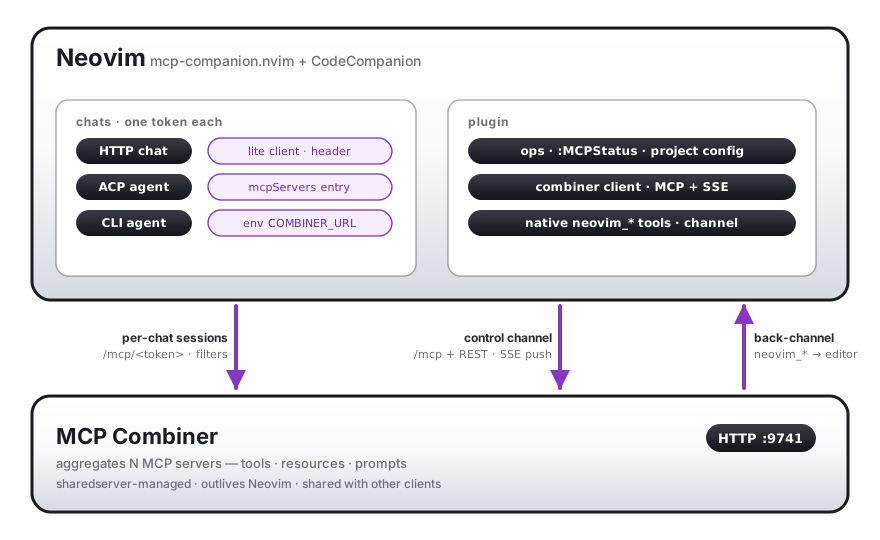
Three kinds of traffic connect editor and combiner: each chat gets its own
token-correlated MCP session (/mcp/<token> — carried by the HTTP adapter's
lite client, the ACP mcpServers entry, or the CLI agent's environment); the
plugin's tokenless control channel drives operations and receives SSE
push; and the back-channel runs in reverse — the combiner dispatches
neovim_* tool calls into the live editor over a private msgpack-RPC socket,
so any connected agent can drive buffers, files, and diagnostics.
Requirements
- Neovim 0.10+
- Python 3.12+ with
uv - CodeCompanion.nvim v19+
- sharedserver — manages the combiner process lifecycle across multiple Neovim instances
Installing sharedserver
The plugin uses sharedserver to share one combiner process across all Neovim instances, with automatic startup, health polling, idle timeout, and graceful shutdown.
Install via cargo:
cargo install sharedserver
Or let lazy.nvim build it — list georgeharker/sharedserver as a plugin entry with
a build step (see the lazy.nvim spec below). lazy.nvim will compile and install the
binary automatically on first sync.
Installation (lazy.nvim)
Install sharedserver and mcp-companion as separate top-level plugin entries so lazy.nvim runs the build steps independently, then declare sharedserver as a dependency of mcp-companion so load order is correct:
-- sharedserver: builds the Rust binary that manages combiner process lifecycle
{
    "georgeharker/sharedserver",
    build = "cargo install --path rust",
    lazy = false,
},

-- mcp-companion: the combiner + Neovim plugin
{
    "georgeharker/mcp-companion",
    lazy = false,
    dependencies = {
        "olimorris/codecompanion.nvim",
        "georgeharker/sharedserver",
    },
    config = function()
        require("mcp_companion").setup({
            combiner = {
                port = 9741,
                config = vim.fn.expand("~/.config/mcp/servers.json"),
            },
            log = { level = "info", notify = "error" },
        })
    end,
},
Then register the CC extension in your CodeCompanion config:
require("codecompanion").setup({
    extensions = {
        mcp_companion = {
            callback = "mcp_companion.cc",
            opts = {},
        },
    },
})
Combiner runtime (Python venv)
The Python combiner runs from a venv. On setup() the plugin ensures it's installed
via uv if it isn't already. This is async, idempotent, and a no-op once installed — so no
lazy.nvim build step is needed (the plugin now runs the equivalent uv sync itself).
Where it installs — and how, which differs by who owns the venv:
- Default (unset
combiner.venv) — the out-of-the-box mode. A plugin-local venv at<plugin>/combiner/.venv, populated withuv sync --frozen --no-dev --inexact. Self-contained, nothing leaks into your environment, and dependencies come from the committeduv.lock, so you get exactly the versions the release was tested with.uvcreates and manages this venv. - Set
combiner.venv = "~/.venv"(or any path) — the mode to use when developing. Install/run from that venv, so it can be shared with other clients (see below). A user-set venv must already exist: the plugin onlyuv pip install -es into it (additive) and will never point an environment-managing command (uv sync,uv venv) at a venv it doesn't own — that would prune packages it didn't put there. Note the tradeoff: this path re-resolves against the index rather than the lockfile, so deps are not lock-pinned.
Either way the install is editable, so edits to combiner/ take effect without reinstalling.
The plugin reinstalls only when pyproject.toml or uv.lock change (tracked by a hash stamp in
the venv), since those are what an editable install cannot pick up on its own.
combiner.python_cmd resolution order: an explicit custom path → the configured venv (once
the combiner is installed there) → the plugin-local combiner/.venv → python3.
require("mcp_companion").setup({
    combiner = {
        -- venv = "~/.venv",               -- opt in to a shared venv (default: plugin-local)
        -- python_cmd = "/path/to/python", -- pin a python and skip auto-install entirely
        -- command = "/path/to/mcp-combiner", -- run a prebuilt combiner binary directly (see Nix below)
    },
})
Commands: :MCPInstall installs/refreshes into the target venv (:MCPInstall! forces a
reinstall; :MCPInstall /path/to/venv targets a specific venv).
Sharing the combiner with standalone Claude Code. Only relevant if you opt into a shared
combiner.venv. Put its bin/ on PATH (or uv tool install <plugin>/combiner for a global
mcp-combiner), and the mcp-combiner
plugin will find mcp-combiner directly — Neovim and standalone Claude then share one combiner
process.
Nix
A flake.nix is provided for Nix users. Because the Nix store is read-only, the runtime
uv sync / uv pip install flow can't work — instead the flake builds the combiner ahead of
time and you point the plugin at the prebuilt executable, which skips the auto-install
entirely. The flake exposes three packages:
mcp-combiner— a Python venv with the combiner and its deps (bin/python,bin/mcp-combiner).mcp-combiner-bin— themcp-combinerconsole script as a standalone app (this isdefault, i.e. whatnix runexecutes). Since v0.8.0 the bare binary is the control CLI (nix run . -- status); serving takes the explicit flag:nix run . -- --mcp --config ….mcp-companion-nvim— the Lua/Neovim plugin. Lua only: it contains no combiner source and no Python, so the runtime auto-install cannot work from the read-only Nix store — you must setcombiner.command(orcombiner.python_cmd) to one of the combiner packages above.
Wire it up with combiner.command, pointing at the console script (the natural front door —
same main() and CLI flags as python -m mcp_combiner):
# e.g. with nixvim
extraConfigLua = ''
  require("mcp_companion").setup({
    combiner = {
      command = "${lib.getExe pkgs.mcp-combiner-bin}",  -- prebuilt binary, no uv install
      port = 9741,
      config = vim.fn.expand("~/.config/mcp/servers.json"),
    },
  })
'';
Alternatively, set combiner.python_cmd = "${lib.getExe' pkgs.mcp-combiner "python"}" — the venv
interpreter also runs -m mcp_combiner and likewise skips the auto-install. Both work;
command is the cleaner wiring because it consumes the package's advertised binary directly.
Features
MCP tools as CC tools
Every tool from every configured MCP server is registered as a CodeCompanion
tool. The LLM can call them directly during chat, and they appear in the tool
picker. Tools are grouped by server (@github, @todoist, etc.) and
individually addressable.
MCP resources as editor context
MCP resources are registered as CC editor context entries. Type
#mcp:resource_name in a chat buffer to inline a resource's content.
Optionally, resources can be auto-injected into every new chat's system prompt
(useful for guidance documents like basic-memory's "ai assistant guide").
MCP prompts as slash commands
MCP prompts become CC slash commands. Type /mcp:prompt_name in a chat buffer
to invoke a prompt. If the prompt defines arguments, you are prompted to fill
them in before the prompt messages are injected into the chat.
Controlling Neovim from an agent
A built-in neovim native server exposes your live editor to an agent as
neovim_* tools (open files, read/edit buffers, diagnostics, navigation), with
risk-tiered approval and multi-instance targeting. Works in CodeCompanion chats
and for external agents (Claude Code, OpenCode) connected through the combiner.
See Controlling Neovim from an agent.
ACP forwarding
When using an ACP adapter (OpenCode, Claude Code), the combiner is automatically
injected into the ACP session via session/new. The agent connects to the
combiner directly over HTTP (or via mcp-remote stdio fallback) and can call
all MCP tools autonomously without extra configuration.
The injection adapts to however the adapter's mcpServers is configured in
CodeCompanion:
defaults.mcpServers value |
How combiner is injected |
|---|---|
"inherit_from_config" |
CC calls transform_to_acp() to build the server list from config.mcp.servers. Our patch wraps that function to also include HTTP servers (upstream only handles stdio) and appends the combiner entry. |
{} (empty table) |
Combiner entry is inserted directly into the table during ACPSessionPre, before _establish_session reads it. |
{ ... } (table with entries) |
Same as empty table — combiner entry is appended if not already present. User-configured servers are preserved. |
Most ACP adapters ship with defaults.mcpServers = {}. Some (e.g. Copilot ACP)
use "inherit_from_config" to pick up servers from the global CC MCP config.
Both paths are handled automatically — no adapter-specific configuration is
needed.
Note: Upstream
transform_to_acp()only translates stdio-type servers. Our patch also translates HTTP servers fromconfig.mcp.serversthat are listed inconfig.mcp.opts.default_servers, so they are not silently dropped for ACP agents.
Individual servers can be hidden from the agent for the current chat session
using /mcp-session — see Per-session server gating.
Tool approval flow
Scope: this approval chain applies to in-process CodeCompanion chats only — i.e. when CodeCompanion is the host running the LLM inside Neovim. External ACP / CLI agents (Claude Code, OpenCode, Copilot, …) do NOT use it — they are their own MCP host and enforce tool permissions on their side. See Approval for external agents below.
In a CodeCompanion chat, tool calls go through a configurable approval chain before execution:
- Global auto-approve —
auto_approve = trueor a custom function (applies to every tool). - Per-server auto-approve spec — the same spec for proxied and native
servers (see Auto-approve spec). Resolution order is
per-project
.mcp-companion.jsonauto_approve.<server>→ plugin-level (autoApprovein servers.json for proxied;native_servers.<name>.auto_approvefor native). - User prompt —
vim.ui.select("Allow" / "Deny")
Approval for external agents
When an external agent reaches the combiner — over ACP (Claude Code, OpenCode via
CodeCompanion) or as a directly-configured MCP client — by default the combiner
does not approve anything. This is standard MCP: a server (the combiner is one)
executes the tools/call it receives; consent is the host/client's
responsibility. So tool permissions for these agents are normally configured
in the agent itself, not in mcp-companion. That governs every tool the agent
can reach through the combiner, including the neovim_* tools.
Opt-in exception: the combiner can enforce its own allow / deny / elicit policy on top of the agent's — useful when the agent's model is coarse, when one policy should follow a server across every agent, or when you want an interactive prompt for specific tools regardless of client. Off by default; see Combiner-side tool-call permissions.
| Agent | Where permissions live | Docs |
|---|---|---|
| Claude Code | permissions (allow / ask / deny rules) in settings.json; /permissions UI. MCP tools are named mcp__<server>__<tool> (e.g. mcp__mcp-companion__neovim_edit_buffer). |
Configure permissions |
| OpenCode | permission config (allow / ask / deny), global or per-agent. |
Permissions |
GitHub Copilot (e.g. copilot_acp) |
Per-tool confirmation in the chat UI; admins can set an MCP allow-list. | Build with agents in VS Code · Agent mode + MCP |
For example, to make Claude Code always prompt before any neovim write/exec
tool, add an ask rule like mcp__mcp-companion__neovim_edit_buffer (or a
broader pattern) in its settings.json per the linked docs.
Beyond that opt-in policy, the combiner's controls are exposure, not approval: per-session server gating (
/mcp-session,.mcp-companion.json) and theexectier being off by default (native_servers.neovim.expose_exec). Combine those with the agent's permission rules above.
Auto-approve spec
autoApprove (proxied, in servers.json) and native_servers.<name>.auto_approve
(native, in plugin setup) share one spec:
true— auto-approve all tools from the server.false/[]— auto-approve none (always prompt).string[]— a list of match tokens; a tool is approved if any matches:- tool-name glob — e.g.
"read_*","get_*","open_file","*". tier:<tier>alias — matches any tool of that internal risk tier (read/navigate/write/exec). Only native tools carry a tier, sotier:*tokens are no-ops for proxied servers.
- tool-name glob — e.g.
- a
function(tool_name, server_name, ctx) -> boolean(native config only).
The built-in neovim server defaults to { "tier:read", "tier:navigate" } — so
reads and navigation auto-approve while writes/exec prompt. Override it, e.g.
auto_approve = { "tier:read", "edit_buffer" } or auto_approve = true.
Combiner-side tool-call permissions
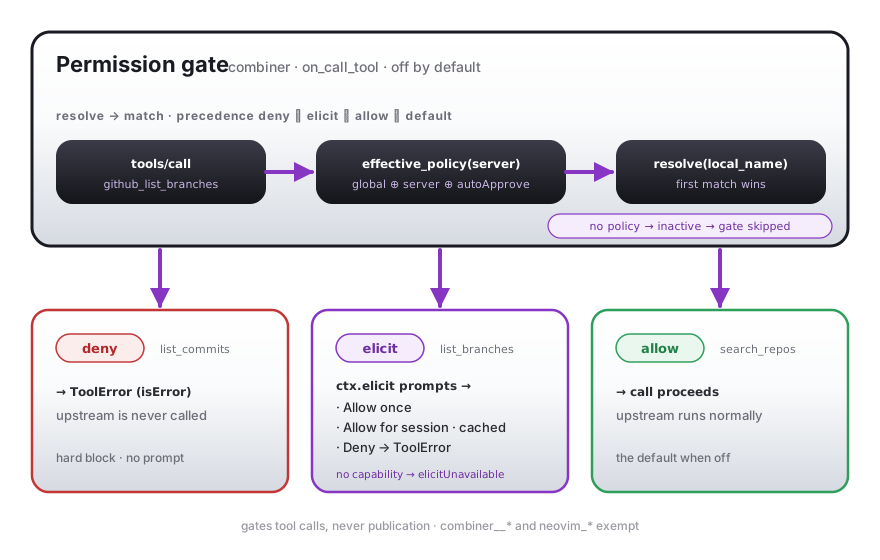
Unlike the agent-side approval above, this is the combiner gating calls itself —
opt-in, and off by default. With no permissions block anywhere the combiner
approves nothing of its own and behaves exactly as before this feature existed; add
one and it enforces an allow / deny / elicit policy on the tools you name,
independent of (and on top of) the agent's own rules.
Configure it globally at the top level of servers.json and/or per server (the
per-server block overrides and extends the global one):
{
  "permissions": {                  // global — applies to every server
    "default": "allow",             // action when no pattern matches (default: allow = off)
    "elicitUnavailable": "deny"     // fallback when a call resolves to elicit but the
  },                                //   client can't prompt (default: deny, secure)
  "mcpServers": {
    "github": {
      "url": "…",
      "permissions": {              // per-server — overrides/extends the global
        "deny":    ["*_delete", "delete_*"],           // rejected — never runs
        "elicit":  ["create_*", "merge_*"],            // prompt the user each call
        "allow":   ["get_*", "list_*", "search_*"]     // always runs
      }
    }
  }
}
- Patterns are globs over the local tool name (without the
<server>_prefix) — the same fnmatch semantics astoolFilter. - Precedence (first match wins):
deny>elicit>allow>default. - Actions:
allow— the call proceeds.deny— rejected with aToolError(isError: true); the upstream server is never invoked.elicit— the combiner prompts the user via MCP elicitation with Allow once / Allow for session / Deny. "Allow for session" is cached per session so the tool isn't re-prompted; a declined or cancelled prompt is aToolError.
elicitUnavailable— when a call resolves toelicitbut the client has no elicitation capability, apply this instead of hanging on a prompt nobody can answer:deny(default, secure) orallow. Global or per server.- Scalars inherit. In a per-server block,
default/elicitUnavailableleft unset inherit the global value; theallow/deny/elicitpattern sets are the union of global + server (plus the server'sautoApprovelist, which folds into the allow-set).
Off by default, provably. With no permissions and no per-server block the
resolved policy is default: allow with empty deny/elicit sets — which the
combiner detects as inactive and skips entirely, so the call path is byte-for-byte
identical to a build without the feature. Turning on a server's autoApprove adds
allow patterns but never activates the gate on its own.
Scope: gates tool calls only — never tool publication (tools still list
normally). The combiner meta-tools (combiner__*) and the built-in neovim_*
tools are exempt.
Combiner lifecycle
When sharedserver is available, the Neovim plugin calls:
sharedserver use mcp-combiner --grace-period <idle_timeout> --pid <nvim-pid> \
  -- python -m mcp_combiner --config <path> --port <port>
Multiple Neovim instances share the same combiner on 127.0.0.1:9741. When
the last Neovim instance exits (or calls get_combiner().stop()), the combiner stays
alive for idle_timeout in case another instance reconnects, then shuts down.
Without sharedserver, the combiner starts directly via vim.uv and lives for
the lifetime of the Neovim instance.
Hot reload
Capabilities are polled at a configurable interval. When MCP servers add, remove, or change tools/resources/prompts, the plugin re-registers everything in CodeCompanion automatically.
Status UI
:MCPStatus opens a floating window showing combiner state, connected servers,
and tool/resource/prompt counts. Servers can be expanded/collapsed, and a log
view is available. :MCPRestart restarts the combiner. :MCPLog opens the log
file.
Each server shows a lifecycle state reported by the combiner (also returned by
the combiner__status meta-tool, so the UI and the agent never disagree):
| State | Indicator | Meaning |
|---|---|---|
| connected | green | Tools are listable and callable (fully ready). |
| connecting | amber | Session established, tool set still warming up (common for OAuth servers just after connect). |
| disconnected | grey/red | Down, reconnecting, or a recent call hit a dead transport / crashed subprocess. |
| error | red | Authentication failed — re-enable with combiner__enable_server (or :MCPToggleServer). |
| disabled | dim | Turned off in config or for this session. |
The state is decoupled from the volatile "does this server return tools right now" heuristic: a server that is only transiently absent (mid-reconnect, a quick restart) keeps its last-known tools for a short grace window rather than flickering out of the list.
Meta-tools
The combiner exposes management tools that the LLM can call:
combiner__status— list all configured servers and their statecombiner__enable_server/combiner__disable_server— toggle servers globally (all sessions)combiner__session_disable_server/combiner__session_enable_server— toggle a server for the calling session only
Usage
In CodeCompanion chat
All MCP tools are available as CC tools. The LLM can call them automatically,
or you can reference them with @server_name to include all tools from a
server:
@github Create an issue titled "Bug report" in my repo
Individual tools are also accessible by their full key (server__tool_name).
Editor context (resources)
#mcp:basic-memory://ai-assistant-guide Tell me about the codebase
Slash commands (prompts)
/mcp:summarize-project
If the prompt requires arguments, you will be prompted to enter them.
With ACP agents (OpenCode, Claude Code)
When you use an ACP adapter in CodeCompanion, the combiner is automatically
forwarded to the agent via session/new. The agent connects to the combiner
directly and can call all MCP tools autonomously:
You: Use the todoist tool to list my tasks for today
Agent: [calls todoist_get_tasks autonomously via combiner]
Commands
| Command | Description |
|---|---|
:MCPStatus |
Toggle the status floating window |
:MCPRestart |
Restart the MCP combiner |
:MCPRestartServer <name> |
Restart a single server (stops + respawns its backing process; no full combiner restart) |
:MCPReload |
Re-read the config file and apply server changes without a restart |
:MCPLog |
Open the log file in a buffer |
:MCPToggleServer <name> |
Globally enable/disable a server |
:MCPSaveProjectConfig [shortest|allowed|disabled] |
Snapshot the current chat session's MCP server visibility to .mcp-companion.json (see Per-project defaults) |
vim.keymap.set("n", "<leader>ms", "<cmd>MCPStatus<cr>", { desc = "MCP status" })
The status window shows combiner state, connected servers, and tool/resource/prompt counts. Key bindings:
| Key | Action |
|---|---|
<CR> |
Expand/collapse the server under the cursor |
e |
Toggle global enable/disable (calls combiner__enable_server / combiner__disable_server) |
p |
Toggle the server's visibility in .mcp-companion.json (creates the file if absent; preserves the existing allowed_servers / disabled_servers shape) |
S |
Toggle the server for this chat session only — equivalent to /mcp-session on the chat the status window was opened from |
r |
Refresh from the combiner |
R |
Restart the combiner |
x |
Restart the server under the cursor (calls combiner__restart_server; respawns its backing process, no full combiner restart) |
c |
Reload the combiner config from disk and apply server changes (calls combiner__reload_config; no restart) |
l / s |
Switch to logs / status view |
q |
Close the window |
The three toggle keys (e, p, S) form a hierarchy from broadest to
narrowest scope:
e— global, persists in the combiner for every session.p— per-project, persists across Neovim restarts via.mcp-companion.json.S— per-chat, lives only as long as the chat session.
A server hidden by the project file shows [project off]; one hidden by a
session toggle shows [session off]. The same key that hid it (p or S)
restores it. S requires :MCPStatus to have been opened from a
CodeCompanion chat buffer (so it knows which chat to scope the toggle to).
Logging
MCP companion writes logs to two locations:
| Log | Default path | Purpose |
|---|---|---|
| Plugin log | ~/.local/state/nvim/mcp-companion.log |
Lua-side events (combiner lifecycle, server connections, errors) |
| Combiner file log | ~/.local/state/nvim/mcp-combiner-py.log |
Python file logger (formatted, level set by combiner.log_level) |
| Combiner stderr capture | ~/.local/state/nvim/mcp-combiner.log |
sharedserver-captured stderr from the Python combiner process |
| sharedserver logs | $XDG_RUNTIME_DIR/sharedserver or /tmp/sharedserver |
All processes managed by sharedserver |
Use :MCPLog to open the plugin log directly in a Neovim buffer.
The combiner file log is enabled by default. Configure it via combiner.log —
same shape as the top-level log table:
require("mcp_companion").setup({
  log = { level = "warn", file = true },        -- top-level (Lua side)
  combiner = {
    log = {
      level = "debug",                          -- trace | debug | info (default) | warn | error
      file = "/path/to/mcp-combiner.log",         -- true (default path), string (explicit), false (disabled)
    },
  },
})
Defaults are level = "info" and file = true (resolves to
stdpath("log")/mcp-combiner-py.log). At level = "debug" the upstream
httpx, httpcore, mcp.client.auth, and fastmcp.client.auth loggers
also flip to DEBUG so refresh requests, metadata-discovery URLs, and HTTP
request/response detail are captured. Restart the combiner after changing
either setting (:MCPRestart!).
When the combiner is managed by sharedserver,
sharedserver writes its own logs to $XDG_RUNTIME_DIR/sharedserver (or /tmp/sharedserver if
XDG_RUNTIME_DIR is not set).
OAuth tokens are cached at ~/.cache/mcp-companion/oauth-tokens/<server>/.
Manual combiner control
-- Start/stop combiner explicitly
require("mcp_companion").get_combiner().start()
require("mcp_companion").get_combiner().stop()

-- Check status
local status = require("mcp_companion").get_combiner().status()

-- Listen to events
require("mcp_companion").on("combiner_ready", function()
    print("Combiner connected!")
end)
Events
| Event | When |
|---|---|
combiner_ready |
Combiner connected and all capabilities loaded |
combiner_error |
Combiner encountered an error |
servers_updated |
Server list or capabilities changed |
tool_list_changed |
Tool list changed on a server |
resource_list_changed |
Resource list changed |
prompt_list_changed |
Prompt list changed |
Plugin Configuration
require("mcp_companion").setup({
    combiner = {
        port = 9741,                    -- combiner HTTP port
        host = "127.0.0.1",            -- combiner host
        config = nil,                   -- path to MCP servers JSON (auto-detected)
        python_cmd = nil,               -- path to Python (auto-resolved from .venv)
        idle_timeout = "30m",           -- sharedserver grace period
        startup_timeout = 30,           -- seconds to wait for combiner health
        request_timeout = 60,           -- default MCP request timeout in seconds
        token_key = nil,                -- encryption key for OAuth tokens (or use MCP_COMBINER_TOKEN_KEY env)
        log = {
          level = "info",               -- "trace" | "debug" | "info" | "warn" | "error"
          file = true,                  -- true = default path, string = explicit path, false = disabled
        },
        token_in_url = nil,             -- nil (default) = auto: ON for ACP agents, OFF for the HTTP-adapter
                                        --   client; true = always embed token in URL; false = header-only.
                                        --   See Troubleshooting below.
        -- Tri-state control of the combiner's JSON-schema (re)validation of proxied tool calls
        -- (the upstream server already validates). nil = leave combiner default; false = force off;
        -- true = force on. The meaningful win is output_validation = false, which removes the
        -- redundant per-call output validation that is measurably slow for large structured responses.
        output_validation = nil,        -- nil | false | true  (--[no-]output-validation)
        input_validation = nil,         -- nil | false | true  (--[no-]input-validation)
    },
    global_env = {},                    -- extra environment variables passed to the combiner process
    log = {
        level = "warn",                 -- file log level: "debug", "info", "warn", "error"
        notify = "error",               -- vim.notify level (default: errors only)
        file = true,                    -- write to ~/.local/state/nvim/mcp-companion.log
    },
    auto_approve = false,               -- true, false, or function(tool, server, ctx) -> bool
    system_prompt_resources = nil,       -- true (all), or {"pattern1", "pattern2"} to match
    cc = {
        -- Controls which MCP tool groups are added to new chats automatically.
        -- true (default): add the aggregate @mcp-combiner group (all servers, one context entry)
        -- false: do not auto-add; user manually @-mentions groups in each chat
        -- string[]: add only the named per-server groups, e.g. {"github", "filesystem"}
        auto_http_tools = true,
        -- true (default): inject combiner as MCP server into ACP agent sessions
        -- false or {}: inject combiner but disable all servers by default (use /mcp-session to enable)
        -- string[]: inject combiner but only expose the named servers, e.g. {"github"}
        auto_acp_tools = true,
        -- Per-session server filter for CodeCompanion CLI agents (codecompanion.interactions.cli).
        -- The CLI agent connects back to the combiner via its own MCP config; this controls which
        -- servers the combiner exposes on the per-session token.
        -- true (default): all servers visible to the CLI session
        -- false or {}: no servers visible (per-token filter set to empty)
        -- string[]: only the named servers, e.g. {"github"}
        auto_cli_tools = true,
        -- Whether to add per-tool natural-language system messages alongside the tools array.
        -- true (default): helps models that ignore JSON-Schema descriptions.
        -- false: saves tokens (descriptions duplicate the schema's `description` fields).
        -- Overridden per-project by .mcp-companion.json.
        tool_system_prompts = true,
        -- Normalize tool JSON schemas to fix providers (e.g. moonshot-ai/kimi) that reject
        -- schemas where `type` and `anyOf` coexist at the same level with a 400 error.
        -- The transformation is semantically equivalent and accepted by lenient validators.
        -- Passed to the combiner as --normalize-schema; applies at cache-fill time. Default false.
        normalize_schema = false,
        -- Per-adapter overrides for auto_http_tools / auto_acp_tools / auto_cli_tools.
        -- Keys are adapter names (chat.adapter.name, e.g. "moonshot-ai", "claude", "copilot_acp")
        -- or CLI agent names (e.g. "claude_code", "gemini_cli").
        -- Values override the corresponding top-level setting for sessions using that adapter/agent.
        -- Further overridden per-project by .mcp-companion.json#/adapters/<name>.
        adapters = {
            -- ["moonshot-ai"] = { auto_http_tools = { "github" }, auto_acp_tools = { "github" } },
            -- ["claude_code"] = { auto_cli_tools = { "github", "filesystem" } },
        },
    },
    ui = {
        enabled = true,
        width = 0.8,                    -- fraction of screen
        height = 0.7,
        border = "rounded",
    },
    on_ready = nil,                     -- fun(combiner) called when combiner connects
    on_error = nil,                     -- fun(err) called on combiner errors
})
Auto-approve examples
-- Approve everything
auto_approve = true

-- Approve specific tools
auto_approve = function(tool_name, server_name, ctx)
    -- Auto-approve all read-only tools
    if tool_name:match("^get_") or tool_name:match("^list_") then
        return true
    end
    return false  -- prompt for everything else
end
System prompt resource injection
-- Inject all MCP resources into every new chat's system prompt
system_prompt_resources = true

-- Inject only matching resources
system_prompt_resources = { "ai%-assistant%-guide", "project%-context" }
MCP tool group addressing (non-ACP chats)
When using a standard HTTP/LLM adapter (not ACP), MCP tools are available via
@-mention in CodeCompanion chats. Two levels of granularity are supported:
| Mention | Effect |
|---|---|
@mcp-combiner |
Enable all MCP tools from all connected servers (one context block entry) |
@mcp__github |
Enable tools from a single server only (replace github with any server name) |
With cc.auto_http_tools = true (the default), @mcp-combiner is added
automatically to every new chat and all servers are enabled on the combiner for
that session. With false, no tool groups are added and all servers are
disabled on the combiner — use /mcp-session or type @mcp__<server> manually
to enable tools on demand.
-- Default: all servers enabled automatically as a single group
cc = { auto_http_tools = true }

-- Opt-in only: type @mcp-combiner or @mcp__github manually in each chat
cc = { auto_http_tools = false }

-- Selective: auto-enable specific servers only
cc = { auto_http_tools = { "github", "filesystem" } }
You can also hide individual servers mid-conversation with /mcp-session —
see Per-session server gating below — or commit
per-project defaults to a .mcp-companion.json file (see
Per-project defaults below).
MCP tool availability in ACP chats
When using an ACP adapter (OpenCode, Claude Code, Cline), the combiner is
injected as a single MCP server entry into the agent's session/new call.
The agent discovers tools directly from the combiner — @-mention and tool
groups are not used.
cc.auto_acp_tools controls whether and which servers the combiner exposes to ACP
agents:
cc = {
  auto_acp_tools = true,                          -- (default) all servers visible
  auto_acp_tools = false,                         -- combiner injected, but no servers enabled by default
  auto_acp_tools = {},                            -- same as false
  auto_acp_tools = { "github", "filesystem" },    -- only these servers visible
}
When auto_acp_tools is false, {}, or a list, the combiner is still injected but unlisted
servers are automatically session-disabled for the ACP agent's combiner
connection once it is established. The filter is applied via the combiner's
REST session API and cleaned up when the chat closes.
Per-session server gating allows selectively hiding individual upstream
MCP servers from the ACP agent mid-conversation, without affecting other open
chats — see Per-session server gating below.
Per-project defaults can also be checked into a .mcp-companion.json file
(see Per-project defaults).
MCP tool availability in CLI sessions
codecompanion.interactions.cli opens a terminal-backed window that runs an
external CLI agent (e.g. claude_code, gemini_cli) and is a third category
distinct from both HTTP CC chats and ACP CC chats:
- HTTP CC chat: CodeCompanion is itself the MCP client; tools are dispatched
through CC's
tool_registryand the LLM sees them via thetoolsarray. - ACP CC chat: the combiner is injected into the ACP agent's
session/newcall (mcpServers), and the agent's own MCP client connects back to the combiner. - CLI session: the spawned CLI process is the MCP client. It connects to
the combiner using its own MCP config (whatever is in the CLI tool's config
file). The plugin does not inject a combiner entry into the CLI's process —
it only allocates a per-session token, applies the server filter to that
token on the combiner, and registers the session for
:MCPStatusand/mcp-sessiongating.
cc.auto_cli_tools controls the combiner-side filter for CLI sessions:
cc = {
  auto_cli_tools = true,                          -- (default) all servers visible
  auto_cli_tools = false,                         -- per-token filter set to empty
  auto_cli_tools = {},                            -- same as false
  auto_cli_tools = { "github", "filesystem" },    -- only these servers visible
}
Because the CLI tool only sees the combiner via its own config, you must:
- Configure the combiner as an MCP server in the CLI tool's own config (e.g.
~/.claude/mcp.jsonor equivalent), pointing athttp://127.0.0.1:9741/mcpwith your combiner port. - Optionally set
combiner.token_in_url = trueand arrange for the CLI tool's config to embed the token (advanced; most users don't need this).
Without step 1 the CLI tool will not see the combiner at all regardless of
auto_cli_tools. With step 1 but no token plumbing, the CLI tool connects
to the combiner's singleton endpoint (no per-token filter), so auto_cli_tools
becomes informational rather than enforced.
Per-session gating (/mcp-session), per-adapter overrides via cc.adapters,
and per-project overrides via .mcp-companion.json all work for CLI sessions
exactly as they do for HTTP chats — the adapters.<name> key in
.mcp-companion.json uses the CLI agent name (agent_name from
config.interactions.cli.agents).
Per-session server gating
/mcp-session lets you hide or restore individual MCP servers for the current
chat session only. It works identically with both ACP and non-ACP (HTTP/LLM)
adapters:
/mcp-session
A picker lists all connected servers with their current session status
([ON] / [OFF]). Selecting a server toggles it for the current chat only.
What happens on toggle:
- ACP chats — the agent receives a
notifications/tools/list_changedsignal and sees the updated tool list immediately. - Non-ACP chats — the server's tool group is removed from (or re-added
to) the CC tool registry and context block. Tools from a hidden server
disappear from
@-mention suggestions and the LLM's available tools. :MCPStatus— shows[session off]next to servers hidden in the currently focused chat.
When the chat session ends the state is automatically cleaned up.
Per-project defaults (.mcp-companion.json)
The global cc.auto_http_tools / cc.auto_acp_tools / cc.auto_cli_tools
settings can be overridden per-project by dropping a .mcp-companion.json
file at (or above) the project's working directory. When a new session
starts, the plugin walks upward from vim.fn.getcwd() looking for this
file; if found, it controls which servers the session sees, regardless of
the global default. The file is keyed by adapter/agent name, so a single
file applies to HTTP chats, ACP chats, and CLI sessions alike.
The intended workflow is "default off, opt in per project": set
auto_http_tools = false (and/or auto_acp_tools = false /
auto_cli_tools = false) globally, then list the servers each project
actually needs.
{
  "$schema": "https://raw.githubusercontent.com/georgeharker/mcp-companion/main/docs/schemas/project.schema.json",
  "allowed_servers": ["github", "gws"]
}
Or hide specific servers from an otherwise-default project:
{
  "$schema": "https://raw.githubusercontent.com/georgeharker/mcp-companion/main/docs/schemas/project.schema.json",
  "disabled_servers": ["clickup"]
}
| Field | Type | Effect |
|---|---|---|
allowed_servers |
string[] |
Whitelist — only these servers are visible. |
disabled_servers |
string[] |
Blacklist — every other configured server is visible. |
tool_system_prompts |
boolean |
Override the plugin-level cc.tool_system_prompts setting (default true). Set false here to suppress per-tool natural-language system messages just for this project. |
adapters |
object |
Per-adapter server filter overrides. Keys are adapter names for chats (e.g. "moonshot-ai", "claude", "copilot_acp") or CLI agent names (e.g. "claude_code"). Each value is an object with the same allowed_servers / disabled_servers shape as the top level, and overrides the top-level filter for sessions using that adapter/agent. Useful when different models need to see different server subsets within the same project. |
Example with per-adapter overrides:
{
  "$schema": "https://raw.githubusercontent.com/georgeharker/mcp-companion/main/docs/schemas/project.schema.json",
  "allowed_servers": ["github", "gws"],
  "adapters": {
    "moonshot-ai": {
      "allowed_servers": ["github"]
    }
  }
}
The two server-list fields are mutually exclusive. Server names must match entries in
your servers.json / mcpServers config; unknown names are dropped with a
warning, so a stale project file never breaks chat creation. Malformed JSON
or schema violations log a warning and fall back to the global
auto_*_tools setting — they don't lock you out of MCP tools.
The file is re-read every time a chat session starts; no Neovim reload is
needed when you edit it. The schema is published at
docs/schemas/project.schema.json for
editor autocomplete (e.g., VSCode json.schemas, Neovim jsonls).
Saving from current session state
If you've reached the right per-project setup with /mcp-session toggles,
two surfaces snapshot it back to disk:
:MCPSaveProjectConfig [shortest|allowed|disabled]— works from any buffer; resolves the active chat automatically./mcp-session-save— slash command in a CodeCompanion chat; prompts for the format.
The default shortest writes whichever list (allowed_servers or
disabled_servers) is smaller, with a tie going to allowed_servers to
match the documented "default off, opt in per project" workflow. allowed
or disabled force a specific shape.
The save target is the existing .mcp-companion.json walked up from cwd if
one exists (so a save updates the same file the chat is already reading);
otherwise the file is created at cwd/.mcp-companion.json. If the existing
file would be overwritten with different contents, the command prompts
before writing.
How it works
Filtering is enforced at two layers:
Combiner-side (source of truth) — each chat gets a unique session token. When you toggle a server, the plugin calls the combiner's REST filter API (
/sessions/token/<token>/filter) which controls which servers the session can execute tools on. This prevents tool calls from reaching a disabled server regardless of what the client sends.Neovim-side (mirrors combiner state) — for non-ACP chats, the plugin also adds or removes tool groups from the CC
tool_registryso the LLM's available tools stay in sync. For ACP chats, the combiner sends anotifications/tools/list_changednotification and the agent re-fetches tools directly.
The initial filter for a new chat is derived in this order of precedence:
.mcp-companion.jsonfound by walking up from the cwd (see Per-project defaults above)cc.auto_http_tools(orcc.auto_acp_toolsfor ACP chats,cc.auto_cli_toolsfor CLI sessions):false→ all servers disabled on the combiner for that session{"github"}→ onlygithubenabled; all others disabledtrue→ no filter; all servers enabled
Combiner meta-tools
The underlying combiner tools are callable by the agent directly (e.g., in an ACP session where the agent has autonomous tool access):
combiner__session_disable_server — hide a server from this session
| Parameter | Type | Description |
|---|---|---|
server_name |
string (required) |
Name of the server to disable |
chat_id |
string (optional) |
Chat identifier for per-chat filtering when multiple chats share one MCP connection |
Returns JSON: { "session_id": "...", "action": "disabled", "server": "...", "disabled_servers": [...] }
combiner__session_enable_server — restore a hidden server for this session
| Parameter | Type | Description |
|---|---|---|
server_name |
string (required) |
Name of the server to re-enable |
chat_id |
string (optional) |
Same as above |
Returns JSON: { "session_id": "...", "action": "enabled", "server": "...", "disabled_servers": [...] }
combiner__session_status — get the current session's disabled server list
| Parameter | Type | Description |
|---|---|---|
chat_id |
string (optional) |
Same as above |
Returns JSON: { "session_id": "...", "disabled_servers": [...] }
These complement the global combiner__enable_server / combiner__disable_server
tools, which affect all sessions simultaneously.
Example workflow
1. Open a chat with auto_http_tools = { "github" }
   → only github tools available; other servers disabled on the combiner

2. Mid-conversation, run /mcp-session
   → picker shows:  [ ON] github   [OFF] todoist   [OFF] filesystem

3. Select todoist to toggle it ON
   → combiner enables todoist for this session
   → todoist tools appear in tool suggestions
   → other chats are unaffected

4. Close the chat
   → session filter is automatically cleaned up on the combiner
┌─────────────────────────────────────────────┐
│ MCP Combiner (Python, FastMCP)                │
│                                             │
│  server.py      Proxy + middleware + health  │
│  config.py      Pydantic models, env interp  │
│  auth.py        OAuth 2.1, bearer tokens     │
│  sharedserver.py  sharedserver lifecycle     │
│  meta_tools.py  combiner__status, enable/disable│
└────────────────────┬────────────────────────┘
                     │ HTTP :9741
┌────────────────────┴────────────────────────┐
│ Neovim Plugin (Lua)                         │
│                                             │
│  combiner/       HTTP client -> combiner process │
│  cc/           CodeCompanion extension       │
│    tools       MCP tools -> CC tools         │
│    editor_context  MCP resources -> #context │
│    slash_commands   MCP prompts -> /commands  │
│    approval    Tool approval flow            │
│  native/       Pure-Lua MCP servers (stub)   │
│  ui/           Status floating window        │
└─────────────────────────────────────────────┘
The combiner aggregates N MCP servers through a single HTTP endpoint. A
SanitizeSchemaMiddleware handles servers with circular $ref schemas
(e.g. Todoist) that would otherwise crash Pydantic serialization.
Troubleshooting
ACP agent cannot call MCP tools (per-chat session not established)
Per-chat sessions map a token to an MCP session on the combiner via the
X-MCP-Combiner-Session header. The ACP spec requires HTTP MCP transports to
forward custom headers, but several agents (e.g. Copilot CLI) strip them — so
header-only correlation silently fails and the injected combiner tools never
surface in the chat.
Because of this, token_in_url defaults to auto: for ACP agents the token is
embedded in the URL path (/mcp/<token>) as well as the header, which works
regardless of header forwarding. You normally do not need to configure anything.
Symptom (should be rare now): Tools fail or the combiner logs show no
Token mapped entry, and every request logs acp-token-hdr=-.
Opt out (force header-only, cleaner URLs — only if your agent is known to forward the header):
combiner = {
    token_in_url = false,
}
Setting token_in_url = true forces the URL token everywhere (including the
HTTP-adapter client), i.e. belt-and-braces. If an ACP agent still fails to see
tools with the auto default, please open an issue at
https://github.com/georgeharker/mcp-companion/issues with the agent name and
version.
Development
Python combiner
scripts/test.sh fast    # unit tier
scripts/test.sh e2e     # process-level tier (spawns combiner + mock upstreams)
scripts/test.sh         # everything
nix flake check runs the unit tier only — the e2e tier spawns subprocesses
and uses loopback networking, which the Nix build sandbox does not allow.
or directly:
cd combiner
uv sync --frozen
uv run pytest -q
uv run mypy mcp_combiner
The e2e tier drives real combiner subprocesses against
mcp_combiner.mockserver — an instrumentable mock MCP server (stdio or
HTTP) with configurable tools, verbatim (including deliberately malformed)
schemas, scripted responses, fault injection, per-session call tracking and
a persistent boot counter. It is also useful standalone when debugging
combiner behavior:
python -m mcp_combiner.mockserver --name mock --transport http --port 9760
curl http://127.0.0.1:9760/stats
sharedserver-backed e2e tests run when the sharedserver binary is on PATH
and skip otherwise; Neovim-backed tests likewise require nvim.
Lua plugin
scripts/test-lua.sh     # all self-contained tests, headless
lua-language-server --check=. --checklevel=Warning
Integration tests (requires a running combiner):
:luafile tests/test_cc_tools.lua
:luafile tests/test_real_servers.lua
Type safety
- Lua: Full LuaLS type annotations. Zero warnings under
lua-language-server --check --checklevel=Warning. - Python: Pydantic models throughout. Zero errors under
mypy --strict.
License
MIT